When you use match logic ANY and activate attributes and behaviors, for qualifying profiles with no records meeting the rules of the activated behavior table, behavior data value would be marked as NULL.
If needed, you may exclude profiles containing NULL values using Activation Actions.
The following example demonstrates how the activated behavior data may contain NULL values when using match logic ANY.
- Attributes Table
| User ID | First Name | Country |
|---|---|---|
| id_1 | Rob | Canada |
| id_2 | Elle | France |
| id_3 | Yusuf | Canada |
- Behavior Table: Email subscription
| User ID | Email Consent | |
|---|---|---|
| id_1 | rob@abc.com | 1 |
| id_1 | rob@xyz.com | 1 |
| id_2 | elle@home.com | 1 |
| id_2 | elle@work.com | 0 |
| id_3 | yusuf@home.com | 0 |
| id_3 | yusuf@work.com | 0 |
- Behavior Table: Web Engagement
| User ID | Action | Campaign Name | Device Type |
|---|---|---|---|
| id_1 | Click | Pre-Sale Concert | Mobile |
| id_1 | Open | Pre-Sale Concert | Tablet |
| id_1 | Click | Summer Merch Sale | Mobile |
| id_1 | Click | New Album Release | Mobile |
| id_1 | Click | New Album Release | Desktop |
| id_2 | Open | Summer Merch Sale | Mobile |
| id_2 | Click | New Album Release | Mobile |
| id_3 | Click | Summer Merch Sale | Laptop |
| id_3 | Click | Pre-Sale Concert | Laptop |
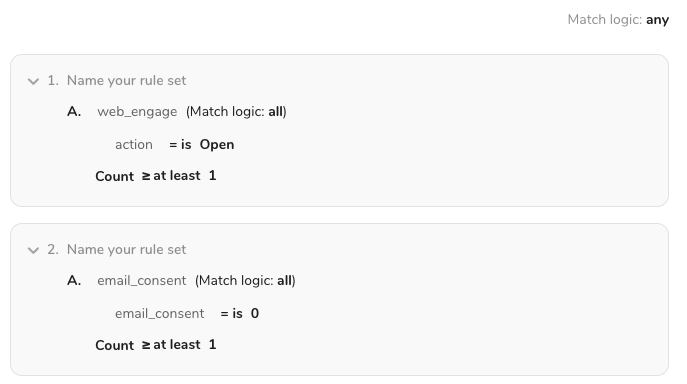
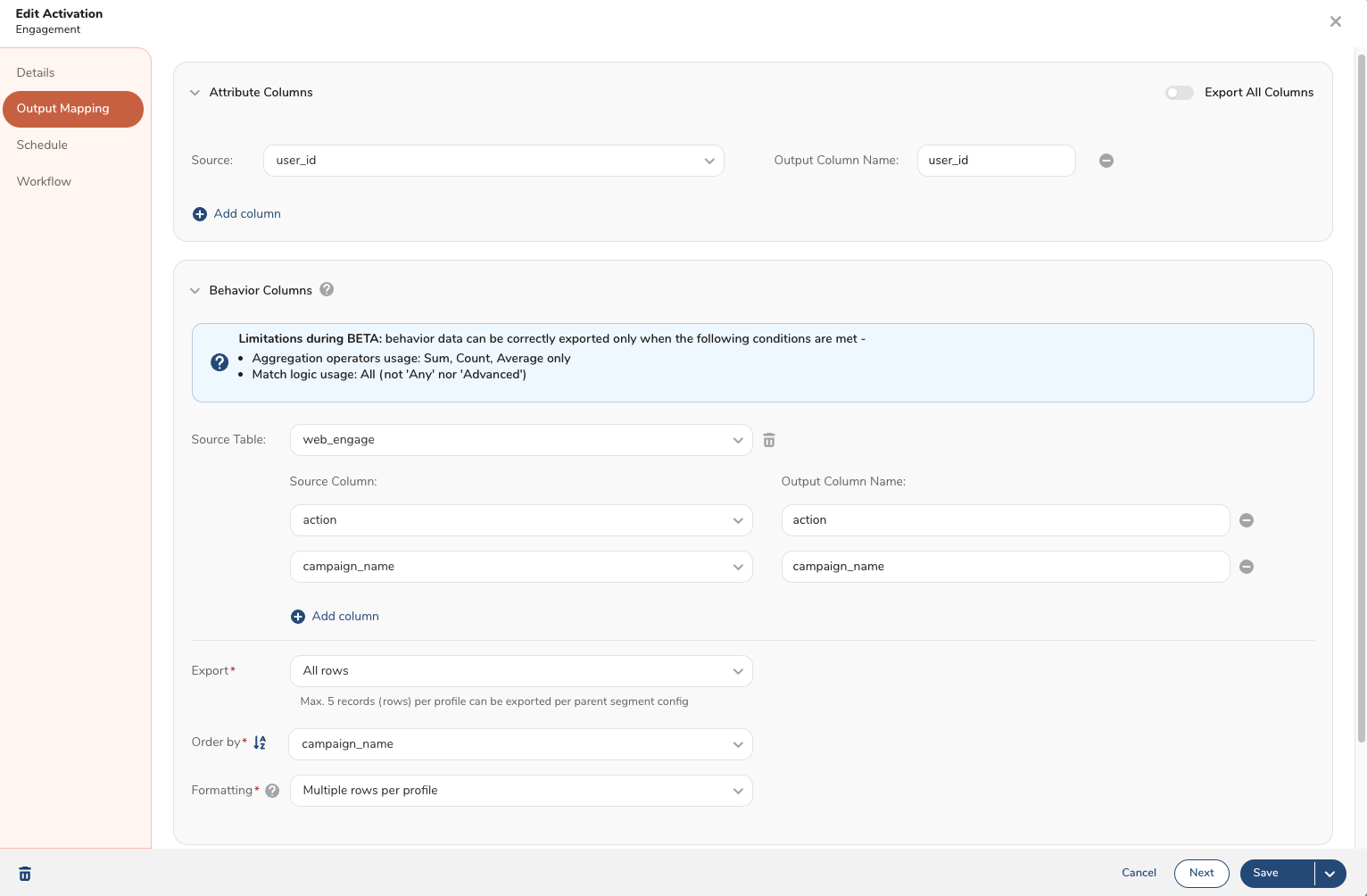
The user _id_3_ fulfills the email_consent criteria but none of the rules in the activated web_engage behavior table so the behavior columns will output NULL values.
| user_id | action | campaign_name |
|---|---|---|
| id_1 | Open | Pre-Sale Concert |
| id_2 | Open | Summer Merch Sale |
| id_3 | NULL | NULL |
The following example demonstrates how the activated behavior data will work when using match logic ADVANCED.
Attributes
| User ID | First Name | City | Country |
|---|---|---|---|
| id_1 | Rob | yvr | Canada |
| id_2 | Matt | paris | France |
| id_3 | Amit | clgy | Canada |
| id_4 | Chloe | mtrl | Canada |
| id_5 | Elle | lyon | Canada |
Behavior Table: email_subscription
| User ID | Email Consent | |
|---|---|---|
| id_1 | rob@td.com | Yes |
| id_1 | rob@gmail.com | Yes |
| id_1 | rob@aol.com | Yes |
| id_2 | matt@hotmail.com | Yes |
| id_2 | matt@gmail.com | No |
| id_3 | am@td.com | No |
| id_3 | am@gmail.com | No |
| id_4 | chloe@td.com | No |
| id_4 | chloe@gmail.com | No |
| id_5 | elle23@gmail.com | Yes |
| id_5 | elle@aol.com | Yes |
| id_5 | elle@work.com | No |
Behavior Table: sms_subscription
| User ID | Phone number | Phone Consent |
|---|---|---|
| id_1 | 213-555-1234 | Yes |
| id_1 | 510-555-1234 | Yes |
| id_2 | 310-555-1234 | No |
| id_2 | 818-555-1234 | Yes |
| id_3 | 626-555-1234 | No |
| id_4 | 408-555-1234 | Yes |
| id_4 | 656-555-1234 | No |
| id_5 | 223-555-1234 | No |
| id_5 | 650-555-1234 | No |
The segment builder and behavior activations approach these rules the same.
Match Logic with a combination ANY/ALL
Match Logic ADVANCED
Output settings: Attributes + Behavior Table = email_activity
What behavior data gets exported? Behavior filters from the segment rules will be applied to all qualifying profiles.
Segment Rules determined all 5 profiles qualify Behavior Activations applies the filters from the email_activity behavior table (email_consent =is 1) to the behavior data of those qualifying profiles
Id_3 (Amit), id_4 (Chloe) do not have any behavior records where email_consent =is 1 so their behavior columns will output NULL values.
- Attributes
- Behavior Table (email_subscription)
| id | first_name | country | email_1 | email_consent |
|---|---|---|---|---|
| id_1 | Rob | Canada | rob@td.com | 1 |
| id_1 | Rob | Canada | rob@gmail.com | 1 |
| id_1 | Rob | Canada | rob@aol.com | 1 |
| id_2 | Matt | France | matt@hotmail.com | 1 |
| id_3 | Amit | Canada | NULL | NULL |
| id_4 | Chloe | Canada | NULL | NULL |
| id_5 | Elle | Canada | elle@aol.com | 1 |
| id_5 | Elle | Canada | elle23@gmail.com | 1 |