Marketers might need to modify a live journey based on the performance of specific campaigns within the journey or if they need to end particular campaigns. To alter a live journey, marketers can create a version of the journey.
This topic includes:
- You can only create versions of batch journeys.
- You can only create one draft version of a journey at a time; no more than one draft version can exist within a journey simultaneously.
- Customer journeys support up to 30 versions. If 30 versions exist, you must delete an existing version to create a new version.
- A journey must be live to make a new version.
- Marketers must have edit permissions to create a new version.
When your administrator enables Journey Versioning, all existing journeys are automatically renamed version 1 journeys (for example, journeyname v1).
- Open TD Console.
- Navigate to the Audience Studio.
- Select a parent segment and then open an existing live journey.
Live journeys have a solid, complete journey icon 
- Choose one of the following:
- Select the ellipses (...) in the upper-right menu and then select Create new version.
- Right-mouse-click the journey and then select Create new version.
Journey Versioning automatically applies a version number to the current journey name.
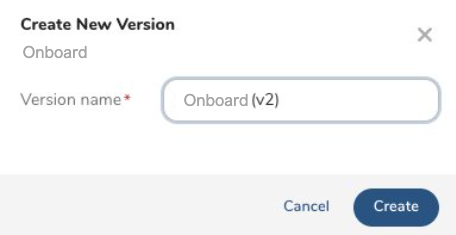
- (Optional) Rename the journey version name.
- Select Create. The new version is in draft state.
The versioning of a journey is similar to copying a batch journey. Review the following table to determine what you can and cannot change in the journey and its events.
| Object | Editable | Non-Editable |
|---|---|---|
| Journey version name | X | |
| Stage names | X | |
| Stage configuration | X (No stage additions, deletions, or reordering) | |
| All other events in the journey version (Activations, Wait steps, Decision points, Merge, Jump, A/B testing, End) | X |
- When you are finished making changes to your version, select Launch.
You can only create one draft journey version at a time. Therefore, you must launch the latest journey version before creating another version.
- Journey Versions : After launching a version, it becomes the latest version.
- Profile Workflows :
- New Profiles to a Journey : Profiles new to the journey will enter the latest version.
- Existing Profiles in a Journey : Existing profiles that have already entered a previous version will stay in the version until they exit the journey.
- Profile Journey Re-entry : Profiles that exit and later re-enter the same journey will re-enter the latest journey version.
- Journey Re-entry Timing : Journey re-entry does not happen on the same day. For example, if profiles exit a journey (v1) and a new version (v2) has been created, the profiles that meet the entry criteria again enter the latest version (v2).
- Profile Jumps : If profiles jump to a different journey with versions, the profiles enter the latest journey version.