Marketers might need to modify a live journey based on the performance of specific campaigns within the journey or if they need to end particular campaigns. To alter a live journey, marketers can create a version of the journey.
This topic includes:
- You can create a version of launched journeys, a live or a paused journey.
- You can only create one draft version of a journey at a time; no more than one draft version can exist within a journey simultaneously.
- Customer journeys support up to 30 versions. If 30 versions exist, you must delete an existing version to create a new version.
- When a source journey (for example, Journey A) references a version of a destination journey (for example, Journey B v2), and then Journey B v2 is deleted, profiles from Journey A are redirected to Journey B v1 (which is now the latest version). However, this process does not work if the following conditions are met:
- The source journey is in a draft state.
- After the Versioning feature is enabled in your account, an existing journey is identified as the source journey. To enable the source journey to jump to the correct version of a destination journey, you must recreate the source journey.
- Marketers must have edit permissions to create a new version.
When your administrator enables Journey Versioning, all existing journeys are automatically renamed version 1 journeys (for example, journeyname v1).
- Open TD Console.
- Navigate to the Audience Studio.
- Select a parent segment and then open an existing live journey.
Live journeys have a solid, complete journey icon 
- Choose one of the following:
- Select the ellipses (...) in the upper-right menu and then select Create new version.
- Right-mouse-click the journey and then select Create new version.
Journey Versioning automatically applies a version number to the current journey name.
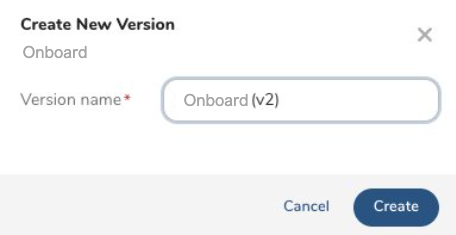
- (Optional) Rename the journey version name.
- Select Create. The new version is in draft state.
The versioning of a journey is similar to copying a batch journey.
Review the following table to determine what you can and cannot change in the journey and its events. These changes apply to versions created after version 1 of existing journeys.
| Object | Editable | Non-Editable |
|---|---|---|
| Journey version name | X | |
| Stage names | X | |
| Stage configuration (No stage additions, deletions, or reordering.) | X | |
| All other events in the journey version: Activations Wait steps Decision points Merge Jump A/B testing End | X | |
| Re-entry of stale profiles | X |
- When you are finished making changes to your version, select Launch.
You can launch a journey only if you have edit access to journeys set up as jump destinations in the current journey's Exit criteria, Goal, and Jump events.
You can only create one draft journey version at a time. Therefore, you must launch the current draft journey version before creating another version.
- Journey Versions : After launching a version, it becomes the latest version.
- Profile Workflows :
- New Profiles to a Journey : Profiles new to the journey will enter the latest version.
- Existing Profiles in a Journey : Existing profiles that have already entered a previous version will stay in the version until they exit the journey.
- Profile Journey Re-entry : Profiles that exit and later re-enter the same journey will re-enter the latest journey version.
- Journey Re-entry Timing : Journey re-entry does not happen on the same day. For example, if profiles exit a journey (v1) and a new version (v2) has been created, the profiles that meet the entry criteria again enter the latest version (v2).
- Profile Jumps : If profiles jump to a different journey with versions, the profiles enter the latest journey version.