Marketers who want to activate segments to external platforms without having to understand all of the technical aspects of the parent segments can use the Copy activation from feature to use existing activations to activate any segments for which they have permissions. This feature prevents the need to configure new activations for every segment, providing a higher level of efficiency and allowing users to complete activation tasks more easily.
When creating a new activation that can be used as a template, it is recommended that a naming convention be used that enables users to easily locate the correct template. One example of a naming convention might be TEMPLATE_<integrationname>_<activity/team/country>. So, if you are creating an activation template and it is for Facebook Insights for the Japan market or team, it might look like TEMPLATE_facebookinsights_japan.
After an activation has been created, it can be copied by any other user that has permissions to View Authentications as well has permissions in the segment folder.
If the user does not have View Authentications permissions, the activations copy option isn’t available in the Create New Activations dialog.
If there is an existing activation that a user wants to copy for a new activation, this can be done in the Audience Studio.
Open TD Console.
Navigate to Audience Studio
Select the segment you want to activate.
Select Create activation.

In the Details tab, select an existing activation from the drop-down menu.
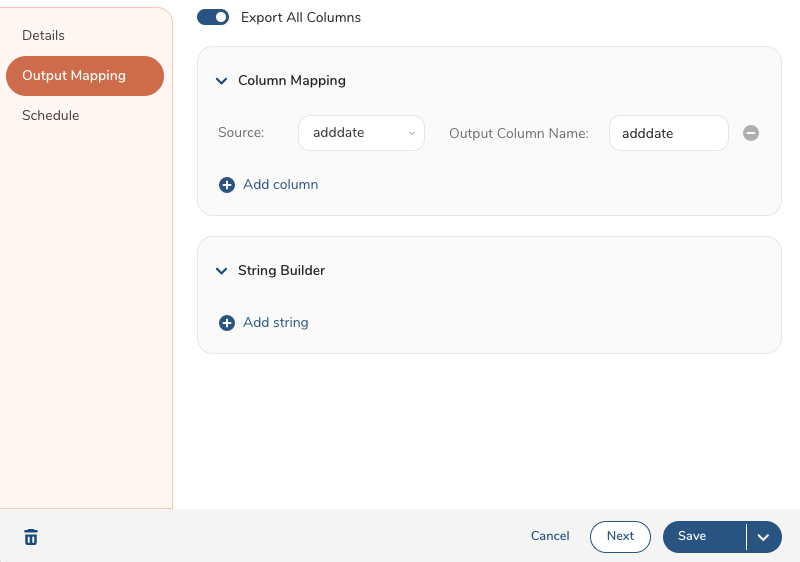
 6. Change the activation name. 7. Select Next. 8. Keep the default of Export All Columns, or add columns to column mapping and/or add strings to the String Builder.
- Select Run (immediate), Save and Run (save the authentication and run), or Save (don't run it now.)