このインテグレーションにより、Treasure Dataのジョブ結果をGoogle Ads Serverに直接書き込み、コンバージョン測定の精度を向上させることができます。Google Adsにおいて、コンバージョンとは、ユーザーが広告をクリックした後、またはディスプレイネットワーク広告を表示した後に、製品の購入、モバイルアプリのインストール、メーリングリストへの登録など、特定のアクションを実行することを指します。
コンバージョントラッキングは、広告の表示またはクリック後のユーザーのアクションに関する重要なインサイトを提供します。このインテグレーションでは、以下のコンバージョンデータがサポートされています:
- オフラインクリックコンバージョン
- Enhanced conversion for Lead
- Enhanced conversion for Web
- オフラインコールコンバージョン
- Store salesコンバージョン(対象となる広告主のみ)
TD Toolbeltを含むTreasure Dataの基礎知識
ドキュメント: Google Ads API
セットアップガイド:
GoogleによるEnhanced Conversions機能を使用するための管理者権限を持つGoogle Adsアカウント
Google AdsアカウントにアクセスするためのTreasure Data Google OAuthアプリの認証
選択したConversion Action Typeに対応する正確な小文字の名前とデータ型を持つカラムを指定する必要があります。
Store salesコンバージョンの場合、
Insufficient transactionsエラーでジョブが失敗しないようにするため、少なくとも数百件のトランザクションをアップロードしてください。アップロードジョブは、Googleによって完全に処理されるまで最大24時間かかる場合があります。
Store salesコンバージョンでCustom Variableを使用するには:
- Google Ads UIでStore salesコンバージョンに対して1つのCustom Variableを有効にします。
- Store salesに対してcustom variableが有効になっている場合、このインテグレーションのConfiguration画面で変数名を入力する必要があります。
クエリを実行する前に、TD Consoleでデータ接続を作成および設定する必要があります。データ接続の一部として、次の手順を使用してインテグレーションにアクセスするための認証を提供します。
- TD Consoleを開きます。
- Integrations Hub > Catalogに移動します。
- Google Enhanced Conversion via Google Adsを検索して選択します。
- Create Authenticationを選択し、ターゲットのGoogle AdsアカウントにアクセスできるGoogleアカウントのOAuthを提供します。
- Continueを選択し、Authenticationの名前を入力してから、Doneを選択します。
TD Consoleは、データをエクスポートする複数の方法をサポートしています。Data Workbenchからデータをエクスポートするには、次の手順を完了します。
- Data Workbench > Queriesに移動します。
- New Queryを選択し、クエリを定義します。
- Export Resultsを選択し、データのエクスポートを設定します。
- 既存のGoogle Enhanced Conversion認証を選択するか、新しい認証を作成します。
- エクスポートパラメータを設定し、Doneを選択します。
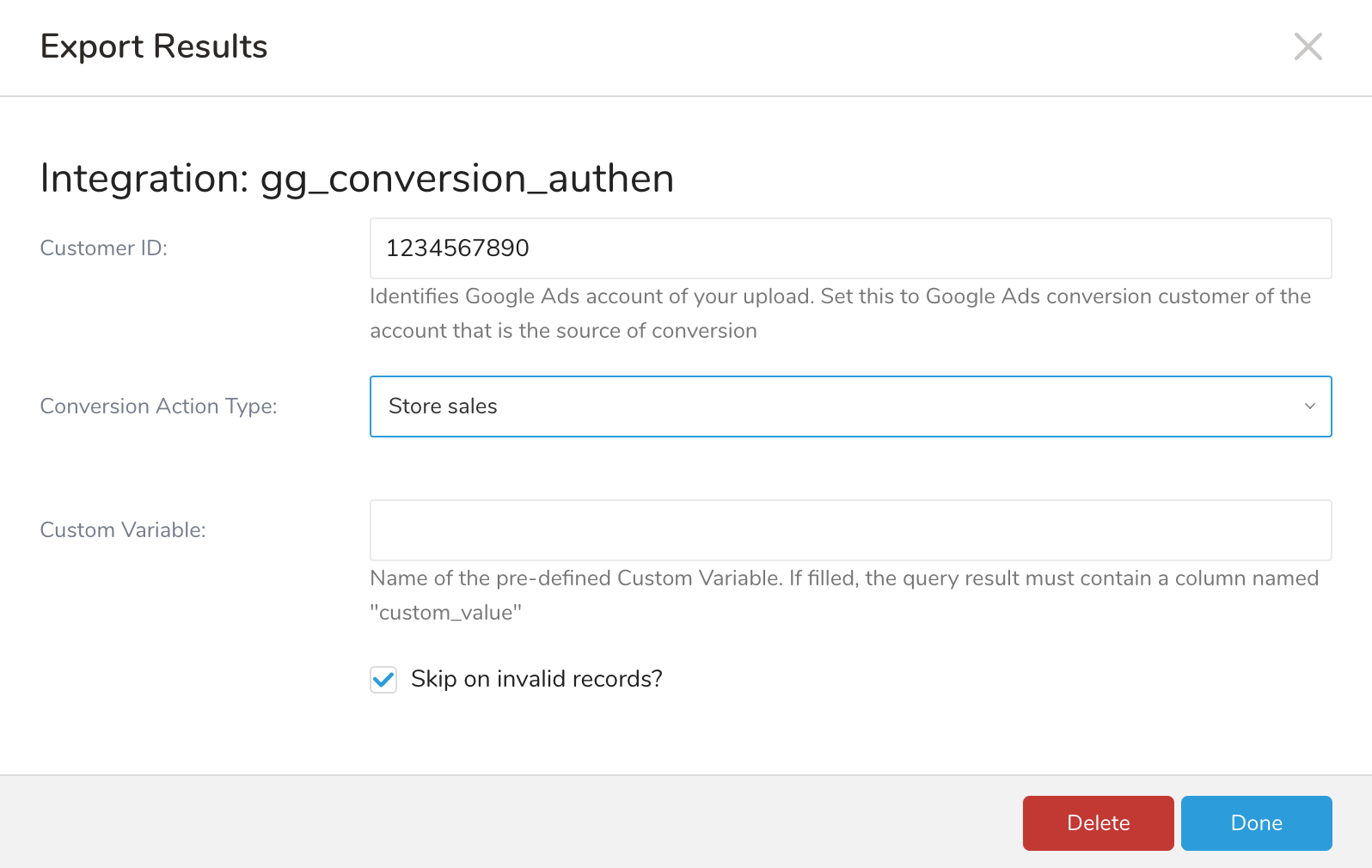
| パラメータ | タイプ | 説明 | 必須 |
|---|---|---|---|
| Customer ID | number | ハイフンなしのGoogle Adsアカウント番号を表示します。 | はい |
| Conversion Action Type | dropdown | サポートされているコンバージョンタイプの1つを選択します。 | はい |
| Custom Variable | string | 使用する場合、Store SalesのCustom Variable名を宣言する必要があります。 | |
| Skip on invalid records | checkbox | 選択すると、データエクスポート処理中に発生した有効なレコードがスキップされます。 |
- Doneを選択します。
Googleより: 2024年3月6日以降、Google Adsは、有効な同意がないEUユーザーのCustomer Match、コンバージョン、store salesデータのアップロードを受け付けなくなります。EUユーザーに対して"UNSPECIFIED"または"UNKNOWN"の同意を持つオーディエンスは処理されません。同意値を指定してください(また、同意アップロードのためにアカウントをホワイトリストに登録する必要がある場合は、Googleの担当者にお問い合わせください)。このインテグレーションは、指定された場合にad_user_data同意を送信します(https://developers.google.com/google-ads/api/reference/rpc/v15/Consentを参照してください)。
エクスポートされたデータが受け入れられるためには、特定のフォーマットガイドラインに従う必要があります。フォーマットが正しくないと、アップロードエラーや一致するレコード数の減少につながる可能性があります。
- ハッシュ要件: ユーザーを識別可能な情報は、正規化(小文字、前後の空白なし)後、SHA-256を使用してハッシュ化する必要があります。データがプレーンテキストの場合、インテグレーションは以下のフィールドに自動的に適用されます:
- phone_number, phone_number_1, phone_number_2, phone_number_3, phone_number_4
- first_name
- last_name
- street_address
- データフォーマット要件:
- 電話番号: E.164フォーマットを使用します。例: +1234567890
- 国コード: ISO-3166-1 alpha-2の2文字の国コード
- 日時(conversion_date_time, adjustment_date_time, ...): フォーマットは
**YYYY-MM-DD HH:MM:SS[+/-HH:MM]**で、[+/-HH:MM]はUTCからのオプションのタイムゾーンオフセットです。オフセットがない場合、APIはデフォルトでアカウントのタイムゾーンを使用します。例: "2018-03-05 09:15:00"または"2018-02-01 14:34:30+03:00" - 通貨コード: ISO 4217
- カラム名: すべての名前は小文字で、重複できません。
| フィールド名(出力スキーマ) | 説明 | データ型 | 必須? |
|---|---|---|---|
| gbraid | iOS14以降のiOSデバイスから発信されるアプリコンバージョンに関連するクリックのクリック識別子。 | String | はい - これらのフィールドのいずれかに値が必要です。 |
| iOS14以降のiOSデバイスから発信されるウェブコンバージョンに関連するクリックのクリック識別子。 | String | ||
| gclid | このコンバージョンに関連付けられたGoogle クリック ID(gclid)。 | String | |
| external_attribution_data | 外部アトリビュートコンバージョンに関する追加データ。このフィールドは外部アトリビュートコンバージョンアクションを持つコンバージョンに必須ですが、それ以外の場合は設定しないでください。 | シリアライズされたJSON オブジェクトの文字列 { "external_attribution_credit": 1.2, "external_attribution_model": "sample model"} | いいえ |
| custom_variables | このコンバージョンに関連付けられたカスタム変数。 | シリアライズされた配列JSON オブジェクトの文字列 [{ "conversion_custom_variable": 1, "value": "1"}] | いいえ |
| cart_data | このコンバージョンに関連付けられたカートデータ | シリアライズされたJSON オブジェクトの文字列 { "merchant_id": 111, "feed_country_code": "US", "feed_language_code": "en", "local_transaction_cost": 1.2, "items": [{ "product_id": "123", "quantity": 2, "unit_price": 1.2 }]} | いいえ |
| conversion_environment | このコンバージョンが記録された環境がアプリまたはウェブであるか。 | String 使用可能な値: UNSPECIFIED、UNKNOWN、APP、WEB | いいえ |
| conversion_action_id | このコンバージョンに関連付けられたコンバージョンアクションのリソース名。 | ||
| conversion_date_time | コンバージョンが発生した日時。クリック時刻より後である必要があります。タイムゾーンを指定する必要があります。形式は「yyyy-mm-dd hh:mm:ss+ | -hh:mm」です。例:「2019-01-01 12:32:45-08:00」 | String |
| conversion_value | 広告主にとってのコンバージョンの値。 | Double | はい |
| currency_code | コンバージョン値に関連付けられた通貨。これはISO 4217の3文字通貨コードです。例: USD、EUR。 | String | はい |
| order_id | コンバージョンに関連付けられた注文ID。注文IDは、コンバージョンアクションごとに1つのコンバージョンにのみ使用できます。 | String | いいえ |
| consent | 欧州経済領域のユーザーに対する明示的な広告同意宣言。 | String 使用可能な値: UNSPECIFIED、GRANTED、DENIED | いいえ |
ユーザー識別子フィールド: email、phone_number、phone_number_1、phone_number_2、phone_number_3、phone_number_4。
最小入力は少なくとも1つのユーザー識別子(emailまたはphone)です。最大は5つのユーザー識別子です。
| フィールド名(出力スキーマ) | 説明 | データ型 | 必須? |
|---|---|---|---|
| custom_variables | このコンバージョンに関連付けられたカスタム変数。 | シリアライズされた配列JSON オブジェクトの文字列 [ { "conversion_custom_variable": 1, "value": "1" }] | いいえ |
| cart_data | このコンバージョンに関連付けられたカートデータ。 | シリアライズされた配列JSON オブジェクトの文字列 { "merchant_id": 111, "feed_country_code": "US", "feed_language_code": "en", "local_transaction_cost": 1.2, "items": [{ "product_id": "123", "quantity": 2, "unit_price": 1.2 }]} | いいえ |
| 最大5つのユーザー識別子(emailとphone_number)をサポート | String(ハッシュ要件) | はい - 2つのフィールド名のうち少なくとも1つに値が必要です | |
| phone_number | プレフィックスとして複数の電話番号をサポート可能: phone_number、 phone_number_1、phone_number_2、phone_number_3、phone_number_4 | String(ハッシュ要件) | |
| conversion_environment | このコンバージョンが記録された環境がアプリかWebか。 | String 受け入れ可能な値: UNSPECIFIED, UNKNOWN, APP, WEB | No |
| gclid | このコンバージョンに関連付けられているGoogle Click ID (gclid)。 | String | No |
| conversion_action_id | このコンバージョンに関連付けられているコンバージョンアクションのリソース名。 | ||
| conversion_date_time | コンバージョンが発生した日時。クリック時刻より後である必要があります。タイムゾーンを指定する必要があります。形式は「yyyy-mm-dd hh:mm:ss+ | -hh:mm」です。例:「2019-01-01 12:32:45-08:00」 | String |
| conversion_value | 広告主にとってのコンバージョンの値。 | Double | Yes |
| currency_code | コンバージョン値に関連付けられている通貨。ISO 4217 3文字の通貨コードです。例: USD, EUR | String | Yes |
| order_id | コンバージョンに関連付けられている注文ID。注文IDは、コンバージョンアクションごとに1つのコンバージョンにのみ使用できます。 | String | No |
| consent | 欧州経済領域のユーザーに対する明示的な広告同意宣言。 | String 受け入れ可能な値: UNSPECIFIED, GRANTED, DENIED | No |
ユーザー識別子フィールド: email, phone (phone_number, phone_number_1, phone_number_2, phone_number_3, phone_number_4), address (first_name, last_name, country_code, postal_code, street_address)。
最小入力は、少なくとも1つのユーザー識別子(email、phone、address)で、最大5つのユーザー識別子です。
| フィールド名 (Output Schema) | 説明 | データ型 | 必須? |
|---|---|---|---|
| gclid_date_time_pair | String of serialized JSON object { "gclid": "gclid", "conversion_date_time": "2023-10-10 10:10:10+07:00"} | No | |
| 最大5つのユーザー識別子(email、phone_number、address)をサポート | String (ハッシュ要件) | Yes | |
| phone_number | プレフィックスとして複数の電話番号をサポート可能: phone_number_1, phone_number_2, phone_number_3, phone_number_4 | String (ハッシュ要件) | Yes |
| first_name | 住所情報 | String (ハッシュ要件) | Yes |
| last_name | String (ハッシュ要件) | Yes - first_nameが含まれている場合のみ必須 | |
| country_code | String | Yes - first_nameが含まれている場合のみ必須 | |
| postal_code | String | Yes - first_nameが含まれている場合のみ必須 | |
| street_address | String (ハッシュ要件) | No | |
| order_id | コンバージョンに関連付けられている注文ID。注文IDは、コンバージョンアクションごとに1つのコンバージョンにのみ使用できます。 | String | Yes |
| conversion_action_id | このコンバージョンに関連付けられているコンバージョンアクションのリソース名。 | ||
| adjustment_date_time | 調整が発生した日時。conversion_date_timeより後である必要があります。タイムゾーンを指定する必要があります。形式は「yyyy-mm-dd hh:mm:ss+ | -hh:mm」です。例:「2019-01-01 12:32:45-08:00」 | String |
| user_agent | 元のコンバージョンを強化するためのユーザーエージェント。これは、ユーザーがWebページでコンバージョンしたときのHTTPリクエストヘッダーで見つけることができます。 例 "Mozilla/5.0 (iPhone; CPU iPhone OS 12_2 like Mac OS X)" エンハンスメントは、ユーザー識別子を持つユーザーエージェントのみを指定できます。これは、元のコンバージョンを送信したリクエストのユーザーエージェントと一致する必要があります。そうすることで、コンバージョンとそのエンハンスメントの両方が同一デバイスとして帰属するか、両方がクロスデバイスとして帰属するかのいずれかになります。 | String | No |
| フィールド名(出力スキーマ) | 説明 | データ型 | 必須? |
|---|---|---|---|
| custom_variables | このコンバージョンに関連付けられたカスタム変数。 | シリアル化された配列のJSON オブジェクトの文字列 [ { "conversion_custom_variable": 1, "value": "1" }] | いいえ |
| caller_id | この通話が発信された発信者ID。発信者IDは、先頭に「+」記号を付けたE.164形式である必要があります(例:「+16502531234」)。 | String | はい |
| call_start_date_time | 通話が発生した日時。タイムゾーンを指定する必要があります。形式は「yyyy-mm-dd hh:mm:ss+|-hh:mm」です(例:「2019-01-01 12:32:45-08:00」)。 | String | はい |
| conversion_action_id | このコンバージョンに関連付けられたコンバージョンアクションのリソース名。 | ||
| conversion_date_time | コンバージョンが発生した日時は、クリック時刻より後である必要があります。タイムゾーンを指定する必要があります。形式は「yyyy-mm-dd hh:mm:ss+|-hh:mm」です(例:「2019-01-01 12:32:45-08:00」)。 | String | はい |
| conversion_value | 広告主のコンバージョンの価値。 | Double | いいえ |
| currency_code | コンバージョン値に関連付けられた通貨は、USDやEURなどのISO 4217 3文字通貨コードです。 | String | いいえ |
| consent | 欧州経済領域(EEA)ユーザーに対する明示的な広告同意の宣言。 | String 受け入れられる値:UNSPECIFIED、GRANTED、DENIED | いいえ |
| フィールド名(出力スキーマ) | 説明 | データ型 | 必須? |
|---|---|---|---|
| String(ハッシュ化要件) | はい - emailまたはphone numberのいずれかに値が必要です。それ以外の場合は、住所情報に値が必要です。 | ||
| phone_number | プレフィックスとして複数の電話番号をサポート可能:phone_number、phone_number_1、phone_number_2、phone_number_3、phone_number_4 | String(ハッシュ化要件) | |
| first_name | 住所情報 emailまたはphone numberのいずれにも値がない場合、これらのフィールドはすべて必須です。 | String(ハッシュ化要件) | |
| last_name | String(ハッシュ化要件) | ||
| city | String | ||
| state | String | ||
| country_code | String | ||
| postal_code | String | ||
| tran_datetime | トランザクションが発生したタイムスタンプ。形式は「YYYY-MM-DD HH:MM:SS[+/-HH:MM]」です | String | はい |
| tran_amount | マイクロ単位のトランザクション金額。マイクロ単位のトランザクション金額は1000より大きい必要があります | Double | はい |
| tran_currency | トランザクション通貨コード。ISO 4217 3文字コードが使用されます | String | はい |
| conversion_action_id | Store Sales コンバージョンアクションのID | String | はい |
| order_id | トランザクション注文ID | String | いいえ |
| custom_value | 設定画面でカスタム変数名が入力されている場合、このフィールドは必須です 値は、Google Ads UIのStore Sales用カスタム変数で事前に定義されている必要があります | String | いいえ |
| consent_user_data | 欧州経済地域ユーザーに対する明示的な広告同意宣言 | String 許可される値: UNSPECIFIED, GRANTED, DENIED | No |
| consent_personalize | パーソナライズド広告に対する明示的な広告同意 | No |
カスタムオブジェクトクエリ
SELECT gclid, external_attribution_data, custom_variables, cart_data, conversion_action_id, conversion_date_time, conversion_value, currency_code, order_id, consent, email, phone_number, phone_number_1, first_name, last_name, city, state, country_code, postal_code, street_address, gclid_date_time_pair, adjustment_date_time, user_agent, caller_id, call_start_date_timeFROM tableAudience Studioでアクティベーションを作成することで、セグメントデータをターゲットプラットフォームに送信することもできます。
- Audience Studioに移動します。
- 親セグメントを選択します。
- ターゲットセグメントを開き、右クリックして、Create Activationを選択します。
- Detailsパネルで、アクティベーション名を入力し、前のセクションの設定パラメータに従ってアクティベーションを設定します。
- Output Mappingパネルでアクティベーション出力をカスタマイズします。
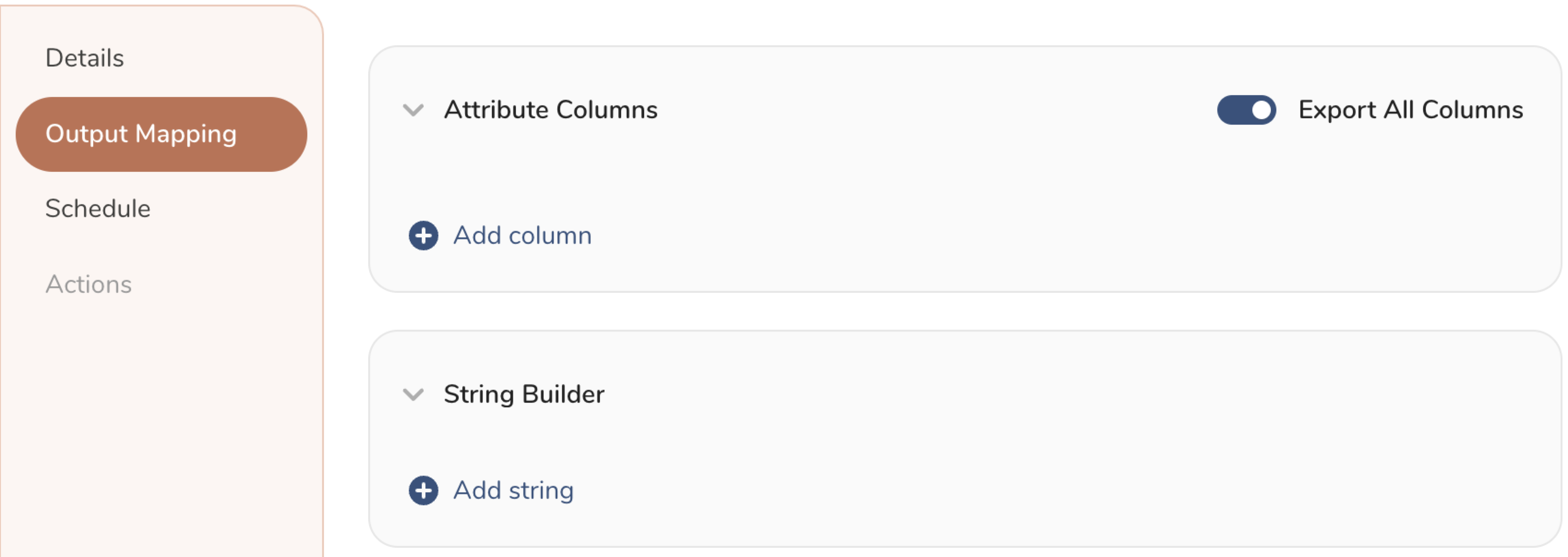
- Attribute Columns
- Export All Columnsを選択すると、変更を加えずにすべての列をエクスポートします。
- + Add Columnsを選択して、エクスポート用の特定の列を追加します。Output Column Nameは、同じSourceカラム名で事前入力されます。Output Column Nameを更新できます。+ Add Columnsを選択し続けて、アクティベーション出力に新しい列を追加します。
- String Builder
- + Add stringでエクスポート用の文字列を作成します。以下の値から選択します:
- String: 任意の値を選択。テキストを使用してカスタム値を作成します。
- Timestamp: エクスポートの日時。
- Segment Id: セグメントID番号。
- Segment Name: セグメント名。
- Audience Id: 親セグメント番号。
- + Add stringでエクスポート用の文字列を作成します。以下の値から選択します:
- Scheduleを設定します。
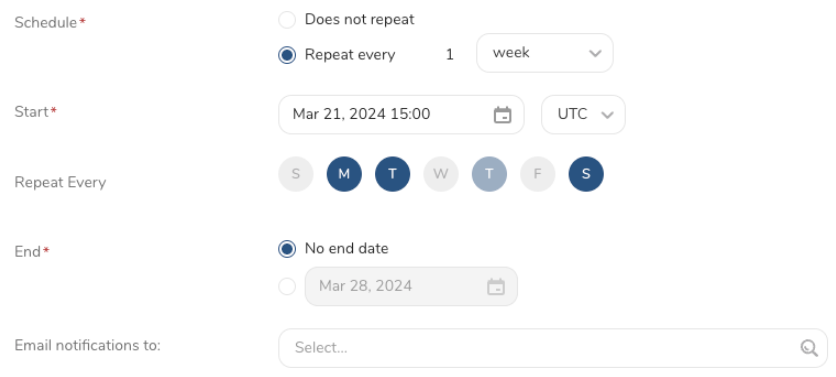
- スケジュールを定義する値を選択し、オプションでメール通知を含めます。
- Createを選択します。
TD Toolbeltを使用して、CLIからクエリ結果のエクスポートをトリガーできます。td queryコマンドの--resultオプションを使用して、エクスポートジョブのパラメータを指定する必要があります。詳細については、こちらの記事を参照してください。
オプションの形式はJSONで、一般的な構造は次のとおりです。
Case UPLOAD_OFFLINE_CLICK_CONVERSION{ "type": "google_enhanced_conversion_via_google_ads", "td_authentication_id": "td_authentication_id", "customer_id": 9491028710, "conversion_type": "upload_offline_click_conversion", "skipInvalid_records": true}Case UPLOAD_ENHANCED_FOR_LEAD{ "type": "google_enhanced_conversion_via_google_ads", "td_authentication_id": "td_authentication_id", "customer_id": 9491028710, "conversion_type": "upload_enhanced_for_lead", "skipInvalid_records": true}Case UPLOAD_ENHANCED_FOR_WEB{ "type": "google_enhanced_conversion_via_google_ads", "td_authentication_id": "td_authentication_id", "customer_id": 9491028710, "conversion_type": "upload_enhanced_for_web", "skipInvalid_records": true}Case UPLOAD_CALL_CONVERSION{ "type": "google_enhanced_conversion_via_google_ads", "td_authentication_id": "td_authentication_id", "customer_id": 9491028710, "conversion_type": "upload_enhanced_conversion_via_google_ads", "skipInvalid_records": true}Case UPLOAD_STORE_SALES{ "type": "google_enhanced_conversion_via_google_ads", "td_authentication_id": "td_authentication_id", "customer_id": 9491028710, "conversion_type": "upload_store_sales", "custom_variable": "custom_variable_name", "skipInvalid_records": true}| Name | Description | Value | Default Value | Required |
|---|---|---|---|---|
| type | ||||
| td_authentication_id | TDコンソールの既存のGoogle Enhanced via Google Ads認証のID。 | Number | Null | No |
| customer_id | 顧客のアカウントID。 | String | Yes | |
| conversion_type | コンバージョンアクションのタイプ。統合は現在、このリストの5つのタイプをサポートしています: - upload_offline_click_conversion - upload_enhanced_for_lead - upload_enhanced_for_web - upload_call_conversion - upload_store_sales | String | Yes | |
| skipInvalid_records | 無効なレコードを無視するかどうかを決定します。 | Boolean | True | No |
| custom_variable | Google Adsの既存のカスタム変数の名前。コンバージョンタイプがupload_store_salesの場合にのみ適用されます。 | String | Null | No |
| No | Step | Example |
|---|---|---|
| 1 | Prepare the config | { "type": "google_enhanced_conversion_via_google_ads", "td_authentication_id": "td_authentication_id", "customer_id": 1111111111, "conversion_type": "upload_store_sales", "skipInvalid_records": true, "oauth_warning_flag": null, "custom_variable": "custom_variable"} |
| Stringified JSON | {"type":"google_enhanced_conversion_via_google_ads","td_authentication_id":"td_authentication_id","customer_id":1111111111,"conversion_type":"upload_store_sales","skipInvalid_records":true,"oauth_warning_flag":null,"custom_variable":"custom_variable"} | |
| Prepare the query data | select 'test1@test.com' as email, '+1345876231' as phone_number, '+1345876231' as phone_number_1, '+1345876231' as phone_number_2, '+1345876231' as phone_number_3, '+1345876231' as phone_number_4, 'Test1' as first_name, 'Ng1' as last_name, 'HCM1' as city, 'HCM1' as state, 'VN' as country_code, '700000' as postal_code, '2024-07-04 14:34:30+03:00' as tran_datetime, amount_double as tran_amount, 'USD' as tran_currency, '' as custom_value, '486149275' as conversion_action_idfrom db.google_enhanced; Convert them to single line as below:select 'test1@test.com' as email, '+1345876231' as phone_number, '+1345876231' as phone_number_1, '+1345876231' as phone_number_2, '+1345876231' as phone_number_3, '+1345876231' as phone_number_4, 'Test1' as first_name, 'Ng1' as last_name, 'HCM1' as city, 'HCM1' as state, 'VN' as country_code, '700000' as postal_code, '2024-07-04 14:34:30+03:00' as tran_datetime, amount_double as tran_amount, 'USD' as tran_currency, '' as custom_value, '486149275' as conversion_action_id from luan_db.google_enhanced; | |
| Combine them and run them in terminal | td -c ./account.conf query \--database your_db --wait "select 'test1@test.com' as email, '+1345876231' as phone_number, '+1345876231' as phone_number_1, '+1345876231' as phone_number_2, '+1345876231' as phone_number_3, '+1345876231' as phone_number_4, 'Test1' as first_name, 'Ng1' as last_name, 'HCM1' as city, 'HCM1' as state, 'VN' as country_code, '700000' as postal_code, '2024-07-04 14:34:30+03:00' as tran_datetime, amount_double as tran_amount, 'USD' as tran_currency, '' as custom_value, '486149275' as conversion_action_id from db.google_enhanced;" \--type presto \--result '{"type":"google_enhanced_conversion_via_google_ads","td_authentication_id":"td_authentication_id","customer_id":1111111111,"conversion_type":"upload_store_sales","skipInvalid_records":true,"oauth_warning_flag":null,"custom_variable":"custom_variable"}' |
- Result Exportは、ターゲットの宛先に定期的にデータをアップロードするためにスケジュールできます。
- すべてのインポートおよびエクスポート統合は、TD Workflowに追加できます。tdデータオペレーターを使用して、指定されたコネクタにクエリ結果をエクスポートできます。詳細については、Treasure Dataオペレーターのリファレンスを参照してください。