この連携は、Google AdWords API が廃止されたため、サポートされなくなりました。この連携を使用すると、次のエラーメッセージが表示されます。Caused by: com.fasterxml.jackson.databind.JsonMappingException: Can not construct instance of com.fasterxml.jackson.databind.JsonNode, problem: abstract types either need to be mapped to concrete types, have custom deserializer, or be instantiated with additional type information at [Source: N/A; line: -1, column: -1] Google Ads Import Integration - V2への移行を推奨します。詳細はMigrating Google Adwords Integrationsを参照してください。
このデータコネクタを使用して、Google Ads レポートを Treasure Data にインポートします。
利用可能な Google Ads 連携はいくつかあります。この記事では、Google Ads Remarketing について説明します。

Google は Google AdWords を Google Ads にリブランドしました。この記事では、Audience Partner API 経由の Google Ads(旧 DDP 経由の AdWords として知られていたもの)については説明していません。名称は、Google が Google AdWords を Google Ads にリブランドした後に変更されました。この同じコネクタを使用して、Google Ads Remarketing データをエクスポートします。詳細は、Google AdWords Remarketing Lists Export Integrationを参照してください。
- Treasure Data の基本知識
- Google Ads の基本知識
Integration Hub の Catalog に移動し、Google AdWords input を検索して選択します。次のダイアログが開きます。

新しいアカウントを接続するために選択します。新しいウィンドウから Google AdWords アカウントにログインし、Treasure Data に Ads campaigns へのアクセスを許可します。

Integration Hub の Catalog にリダイレクトされます。新しい OAuth 接続を選択するため、新しいアカウントに接続する手順を繰り返します。
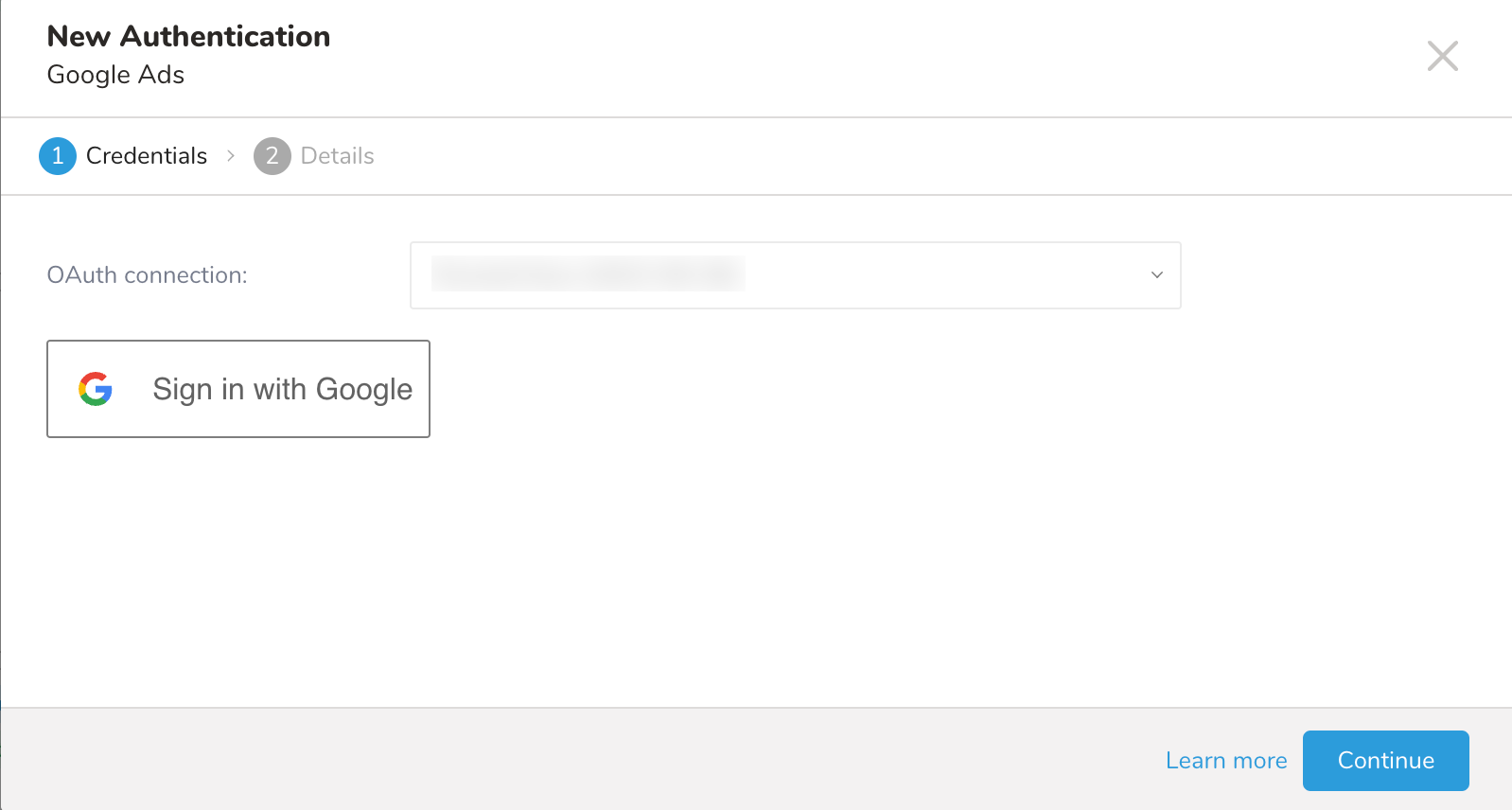
Continue を選択し、接続に名前を付けます。
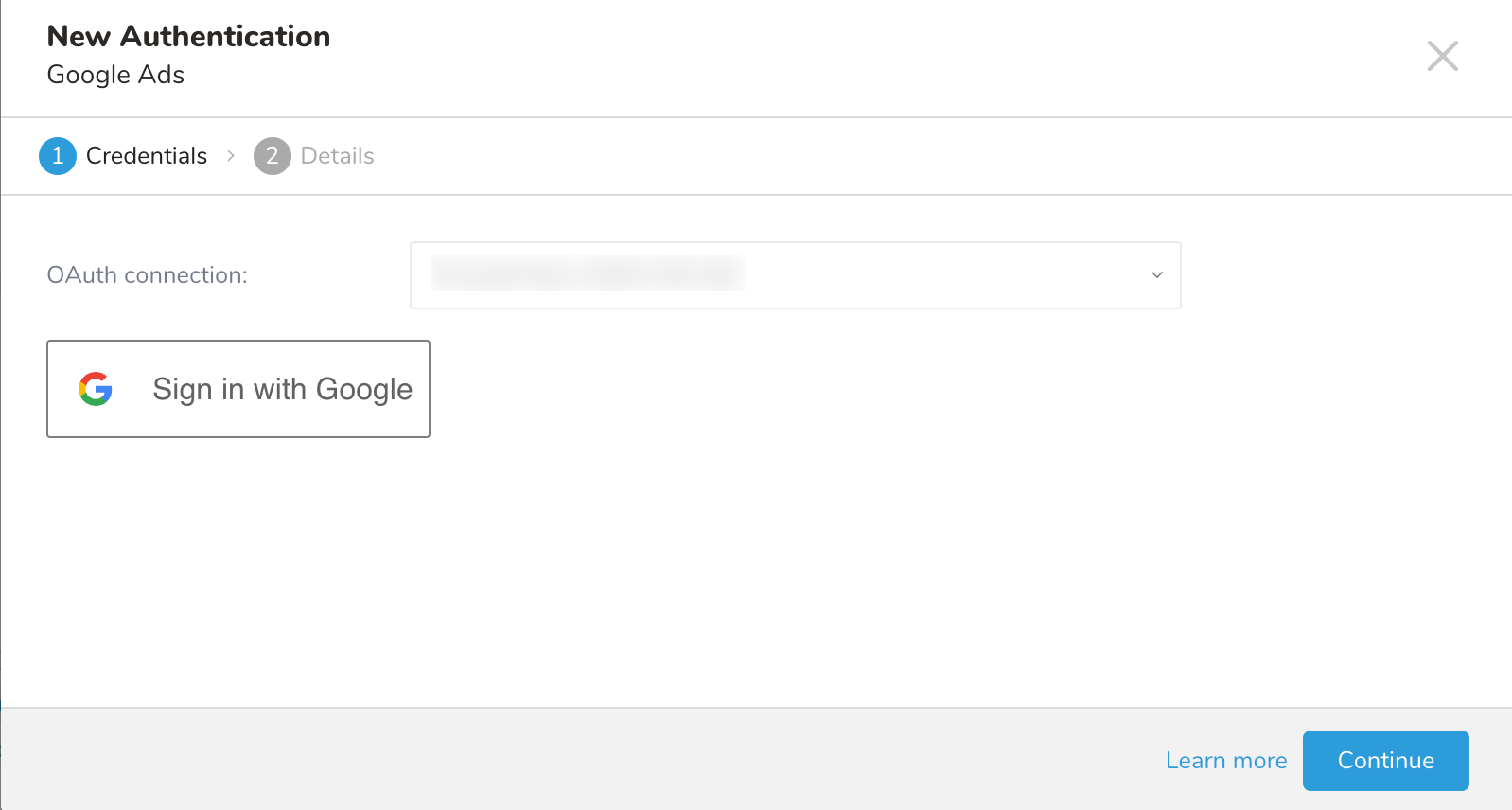
次に Done を選択します。
接続を作成すると、自動的に Sources タブに移動します。作成した接続を探し、New Source を選択します。

次のダイアログが開きます。詳細を編集し、Next を選択します。
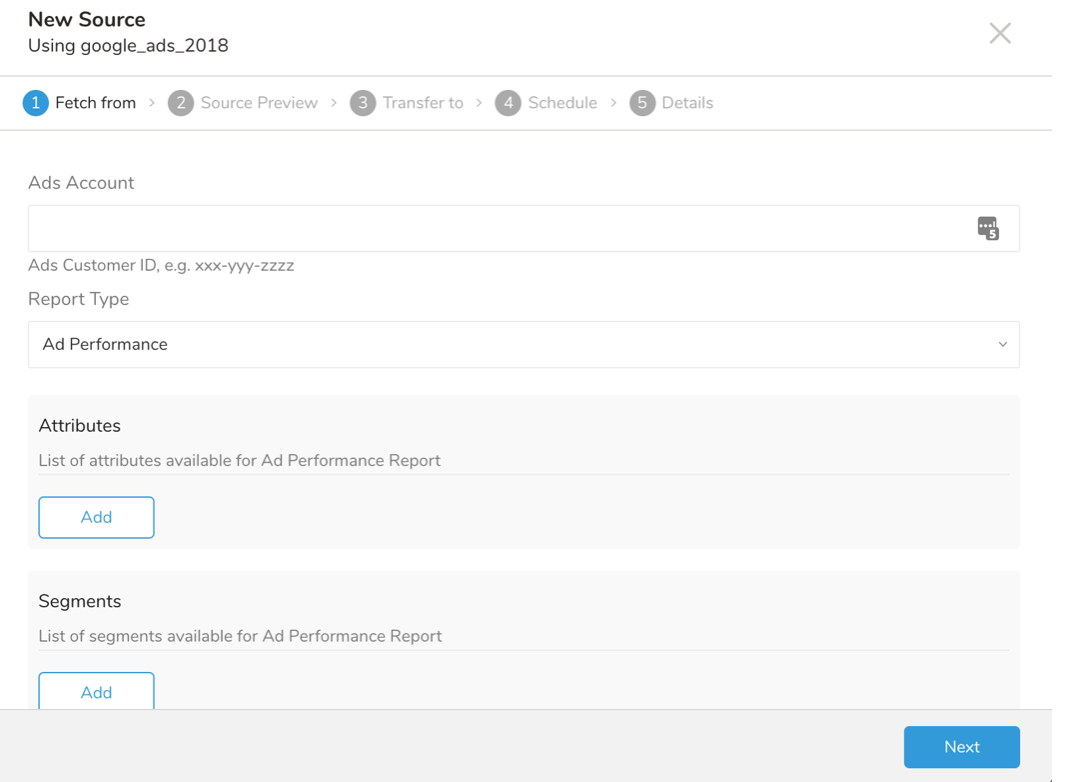
Ad Account フィールドに、Google Ads コンソール UIの Customer ID を入力します。
次に指定するパラメータは、Google Ad レポートタイプに基づいています。
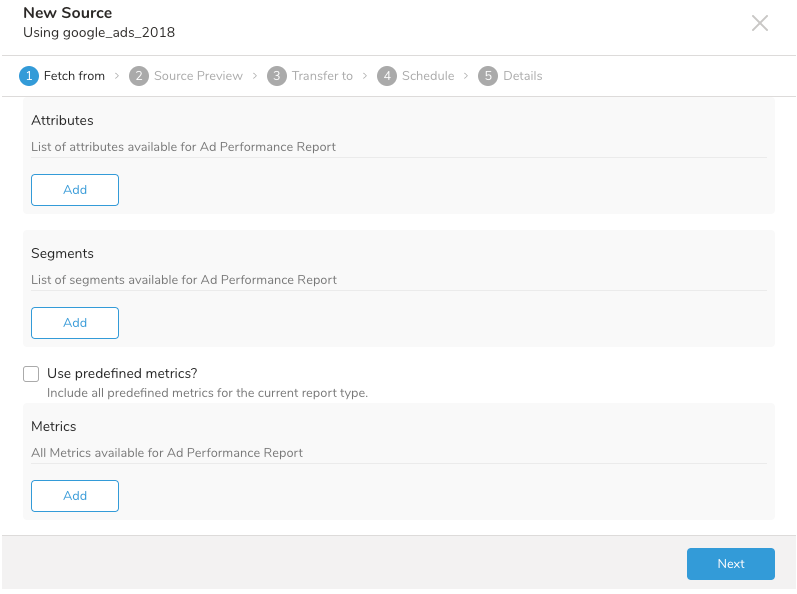
次のレポートから選択できます: Ad Performance、AdGroup Performance、Campaign Performance、Audience Performance。詳細については、付録を参照してください。
選択したレポートタイプに応じて、Add を選択すると、利用可能な attributes、segments、metrics のみが表示されます。
レポートタイプに対応して、事前定義された attributes が自動的に追加されます。詳細については、付録を参照してください。
Use predefined metrics をチェックすると、事前定義された metrics のリストが自動的に追加されます。詳細については、付録を参照してください。Metrics ドロップダウンから追加の metrics を選択できます。
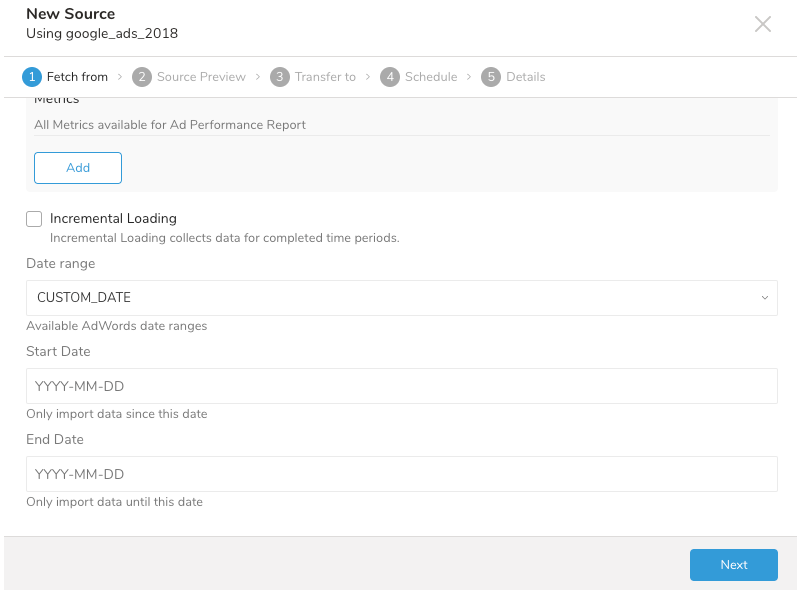
インクリメンタルローディングを有効にすると、指定した期間中にデータロードをスケジュールできます。データは、完全な期間(Date Range 値に基づいて自動的に計算される)が完了したときにのみ取得されることに注意してください。
生成されるレポートの日付範囲を指定します。CUSTOM_DATE を選択した場合、開始日と終了日を入力する必要があります。Incremental Loading で言及されているスケジューリングの期間は、開始日と終了日の間の日数です。詳細については、付録を参照してください。
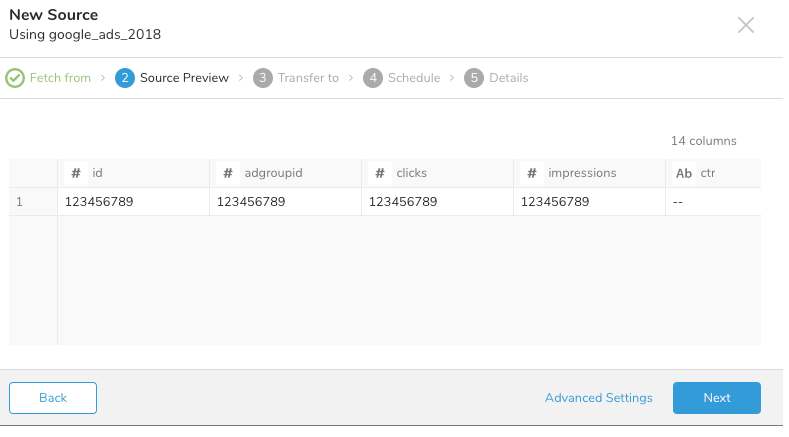
次に、データのプレビューが表示されます。プレビューデータは、Google Ads アカウントからの実際のデータを反映していません。選択したすべてのフィールドと、それらのフィールドのデータ型を表示するためのダミーデータです。
何かを変更したい場合は、Back を選択するか、または Next を選択します。
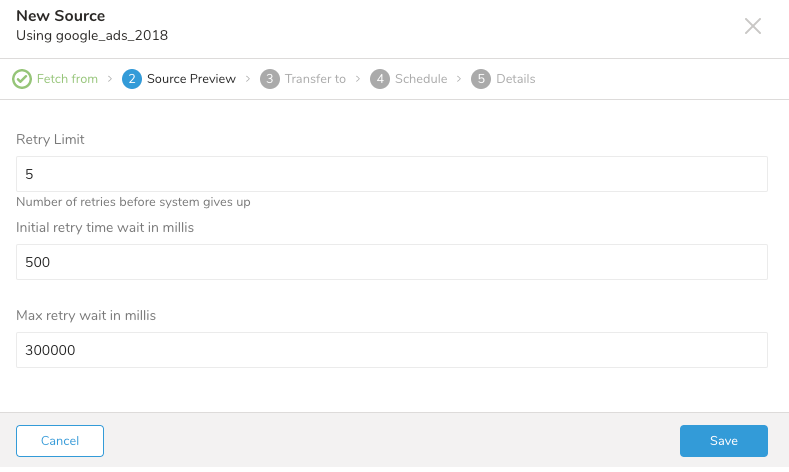
Advanced Settings では、推測されたプロパティをカスタマイズできます。必要に応じて、次のセクションを編集します。
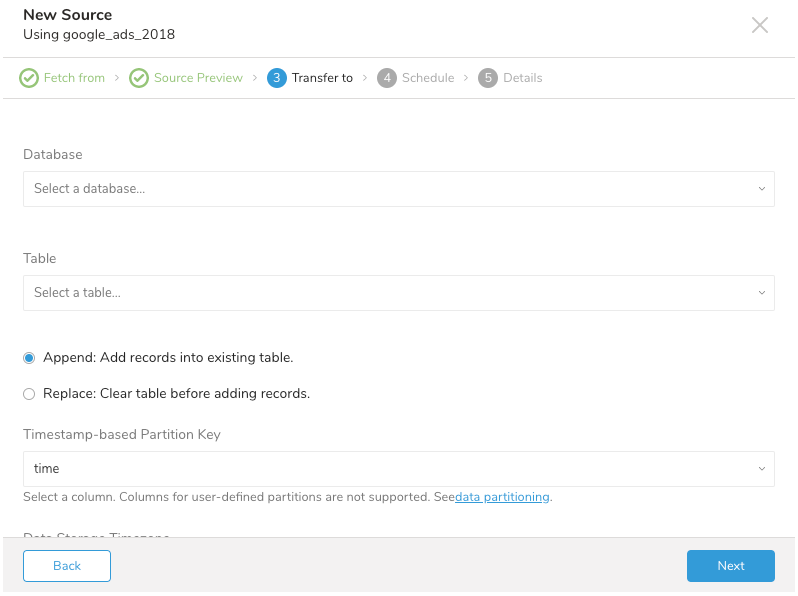
既存のデータベースとテーブルを選択するか、新しいものを作成します。
新しいデータベースを作成し、データベースに名前を付けます。Create new table についても同様の手順を完了します。
既存のテーブルにレコードを append するか、既存のテーブルを replace するかを選択します。
デフォルトキーではなく別の partition key seed を設定したい場合は、ポップアップメニューを使用して指定できます。
Schedule タブでは、1回限りの転送を指定するか、自動化された定期的な転送をスケジュールできます。Once now を選択した場合は、Next を選択します。Repeat… を選択した場合は、スケジュールオプションを指定してから Next を選択します。
転送が実行された後、Databases タブで転送の結果を確認できます。
最新の TD Toolbelt をインストールできます。
$ td --version
0.15.0次の例のように、Google Ads アカウントのアクセス情報を含む設定ファイル(例: load.yml)を準備します。
in:
    type: google_adwords
    client_id: "app client id" (required, string)
    client_secret: "app client secret" (required, string)
    refresh_token: "your oauth2 refresh token" (required, string)
    developer_token: "AdWords developer token" (required, string)
    target: audience_performance_report (required, string)
    client_customer_id: "your AdWords account number" (required, string)
    date_range: custom_date (required, enum)
    start_date: 2018-04-01 (required if `custom_date` date range, date)
    end_date: 2018-04-07 (required if `custome_date` date range, date)
    include_zero_impressions: true (optional, boolean, default is `true`)
    incremental: true (optional, boolean, default is `false`)
    columns:
    - AdGroupName
    - CampaignStatus
    - Date
    - Clicks
    - ...
out:
    mode: replace
この例は、Google Ads から Audience Performance レポートをダンプします。
client_id: OAuth アプリケーション client idclient_secret: OAuth アプリケーション client secretrefresh_token: OAuth 認証フローの結果である Refresh tokentarget: インポートする Google Ads レポートタイプ- 利用可能な
targetのリストについては、付録を参照してください。
- 利用可能な
client_customer_id: Google AdWords アカウント番号- Ads アカウント番号は、Google Ads コンソール UI の
Customer IDです
- Ads アカウント番号は、Google Ads コンソール UI の
date_range: Ads から利用可能な日付範囲- 利用可能な
date_rangeのリストについては、付録を参照してください。
- 利用可能な
start_date: レポートデータを生成する開始日(yyyy-MM-dd)。date_rangeにcustom_dateが選択されている場合、このフィールドは必須です。end_date: プロダクトデータをインポートする終了日(yyyy-MM-dd)。date_rangeがcustom_dateの場合、このフィールドは必須です。include_zero_impressions:trueはインプレッションがないすべての行を受け入れることを意味しますincremental: インクリメンタルローディングをサポートcolumns: 収集する attributes、segments、metrics のリスト- 利用可能な
attributes、segments、metricsのリストについては、付録を参照してください。
- 利用可能な
利用可能な out モードの詳細については、付録を参照してください。
td connector:preview コマンドを使用して、インポートするデータをプレビューできます。
$ td connector:preview load.yml
+-----------------+---------------------+-----------------+----
| id:long         | displayurl:string   | headline:string | ...
+-----------------+---------------------+-----------------+----
| 42023           | "Hello"             | "Ads"           |
| 42045           | "World"             | "Ads"           |
+-----------------+---------------------+-----------------+----ジョブを実行するには、td connector:issue を使用します。次の項目が必要です。
- スケジュールの名前
- cron 形式のスケジュール
- データが保存されるデータベースとテーブル
- Data Connector 設定ファイル
$ td connector:issue load.yml --database td_sample_db --table td_sample_table --time-column updated_dateデータベースまたはテーブルが TD に存在しない場合、td connector:issue は失敗します
次のオプションを指定することも推奨されます
- -time-column
オプション。Treasure Data のストレージは時間によってパーティション化されているためです(data partitioning を参照)。--time-column オプションが利用できない場合、データコネクタは最初の long または timestamp カラムをパーティショニング時間として選択します。--time-column で指定されたカラムのタイプは、long または timestamp タイプのいずれかである必要があります(利用可能なカラム名とタイプを確認するには、プレビュー結果を使用してください)。time カラムは出力の最後に利用可能です。
$ td connector:issue load.yml --database td_sample_db --table td_sample_table --time-column updated_date --auto-create-table
in:
  type: googlead
  ...
filters:
- type: add_time
  from_value:
    mode: upload_time
  to_column:
    name: time
out:
type: td詳細については、add_time filter plugin を参照してください。
time というフィールドがある場合は、-time-column オプションを指定する必要はありません。
Google Ads インポートのための定期的なデータコネクタ実行をスケジュールできます。高可用性を確保するために、スケジューラを慎重に設定しています。この機能を使用することで、ローカルデータセンターで cron デーモンを使用する必要がなくなります。
td connector:create コマンドを使用して、新しいスケジュールを作成できます。スケジュールの名前、cron 形式のスケジュール、データが保存されるデータベースとテーブル、およびデータコネクタ設定ファイルが必要です。
$ td connector:create \
    daily_google_adwords_import \
    "10 0 * * *" \
    td_sample_db \
    td_sample_table \
    load.yml
cron パラメータは、次の3つのオプションも受け入れます: @hourly、@daily、@monthly。 |
| --- |
td connector:list で現在スケジュールされているエントリのリストを確認できます。
$ td connector:list
+-----------------------+--------------+----------+-------+--------------+-----------------+-----------------------------+
| Name                  | Cron         | Timezone | Delay | Database     | Table           | Config                      |
+-----------------------+--------------+----------+-------+--------------+-----------------+-----------------------------+
| daily_google_adwords_import | 10 0 * * *   | UTC      | 0     | td_sample_db | td_sample_table | {"type"=>"google_adwords", ... } |
+-----------------------+--------------+----------+-------+--------------+-----------------+-----------------------------+td connector:show は、スケジュールエントリの実行設定を表示します。
% td connector:show daily_google_adwords_import
Name     : daily_google_adwords_import
Cron     : 10 0 * * *
Timezone : UTC
Delay    : 0
Database : td_sample_db
Table    : td_sample_table
td connector:history は、スケジュールエントリの実行履歴を表示します。各個別実行の結果を調査するには、td job jobid を使用します。
% td connector:history daily_google_adwords_import
+--------+---------+---------+--------------+-----------------+----------+---------------------------+----------+
| JobID  | Status  | Records | Database     | Table           | Priority | Started                   | Duration |
+--------+---------+---------+--------------+-----------------+----------+---------------------------+----------+
| 578066 | success | 10000   | td_sample_db | td_sample_table | 0        | 2015-04-18 00:10:05 +0000 | 160      |
| 577968 | success | 10000   | td_sample_db | td_sample_table | 0        | 2015-04-17 00:10:07 +0000 | 161      |
| 577914 | success | 10000   | td_sample_db | td_sample_table | 0        | 2015-04-16 00:10:03 +0000 | 152      |
| 577872 | success | 10000   | td_sample_db | td_sample_table | 0        | 2015-04-15 00:10:04 +0000 | 163      |
| 577810 | success | 10000   | td_sample_db | td_sample_table | 0        | 2015-04-14 00:10:04 +0000 | 164      |
| 577766 | success | 10000   | td_sample_db | td_sample_table | 0        | 2015-04-13 00:10:04 +0000 | 155      |
| 577710 | success | 10000   | td_sample_db | td_sample_table | 0        | 2015-04-12 00:10:05 +0000 | 156      |
| 577610 | success | 10000   | td_sample_db | td_sample_table | 0        | 2015-04-11 00:10:04 +0000 | 157      |
+--------+---------+---------+--------------+-----------------+----------+---------------------------+----------+
8 rows in settd connector:delete はスケジュールを削除します。
$ td connector:delete daily_google_adwords_importload.yml の out セクションでファイルインポートモードを指定できます。
これはデフォルトモードで、レコードはターゲットテーブルに追加されます。
in:
  ...
out:
mode: appendこのモードは、ターゲットテーブルのデータを置き換えます。ターゲットテーブルに加えられた手動のスキーマ変更は、このモードでは保持されます。
in:
  ...
out:
mode: replace| Report Type | Description |
|---|---|
| ad_performance_report | Ad Performance Report |
| adgroup_performance_report | AdGroup Performance Report |
| campaign_performance_report | Campaign Performance Report |
| audience_performance_report | Audience Performance Report |
| keywords_performance_report | Keywords Performance Report |
| Report Type | Predefined Attributes |
|---|---|
| Ad Performance | – Id – DisplayUrl – Headline – HeadlinePart1 – HeadlinePart2 |
| AdGroup Performance | – AdGroupId – AdGroupName |
| Campaign Performance | – CampaignId – CampaignName |
| Audience Performance | – Id – UserListName |
| Keywords Performance Report | – Id – AdGroupId |
| Report Type | Predefined Metrics |
|---|---|
| Ad Performance AdGroup Performance Campaign Performance | – Clicks – Impressions – Ctr – AverageCpc – Cost – Conversions – ViewThroughConversions – CostPerConversion – ConversionRate |
| Audience Performance | – Clicks – Impressions – Ctr – AverageCpc – Cost – AverageCPM – AbsoluteTopImpressionPercentage – TopImpressionPercentage |
| Keywords Performance | – Clicks – Impressions – Ctr – AverageCpc – Cost – Conversions – ViewThroughConversions – CostPerConversion – ConversionRate – AbsoluteTopImpressionPercentage – TopImpressionPercentage |
| Date Range | Description |
|---|---|
| TODAY | 今日のみ。 |
| YESTERDAY | 昨日のみ。 |
| LAST_7_DAYS | 今日を含まない過去7日間。 |
| LAST_WEEK | 前の月曜日から始まる7日間。 |
| LAST_BUSINESS_WEEK | 前の営業週の5日間の営業週(月曜日から金曜日まで)。 |
| THIS_MONTH | 今月のすべての日。 |
| LAST_MONTH | 前月のすべての日。 |
| ALL_TIME | 利用可能な全期間。 |
| CUSTOM_DATE | カスタム日付範囲。yyyy-MM-dd 形式で start_date と end_date が必要です。 |
| LAST_14_DAYS | 今日を含まない過去14日間。 |
| LAST_30_DAYS | 今日を含まない過去30日間。 |
| THIS_WEEK_SUN_TODAY | 前の日曜日から現在の日までの期間。 |
| THIS_WEEK_MON_TODAY | 前の月曜日から現在の日までの期間。 |
| LAST_WEEK_SUN_SAT | 前の日曜日から始まる7日間。 |
| Report Type | Reference |
|---|---|
| Ad Performance | Ad Performance Report |
| AdGroup Performance | AdGroup Performance Report |
| Campaign Performance | Campaign Performance Report |
| Audience Performance | Audience Performance Report |
| Keywords Performance | Keywords Performance |