This is a summary of new Treasure Data features and improvements introduced in the December 1st, 2019 release. If you have any product feature requests, submit them to feedback.treasuredata.com.
Option: you can view a video summary of our December releases:
Treasure Data offers pytd v1.0.0, a Python interface that makes it easier to consume Treasure Data’s REST API’s, Presto query engine, and Plazma primary storage.
For ingestion, pytd supports Bulk Import APIs to convert data into a CSV/msgpack file and enable upload in batch. For small volumes of data, pytd supports the Presto INSERT INTO query enabling you to insert single rows into your table.
You can also use pytd with td-spark, which uses a local customized Spark instance to directly write DataFrames to TD’s primary storage system. The seamless connections of pytd enables your Python code to efficiently read and write large volumes of data from and to Treasure Data.
pytd is the new recommended SDK, although we will continue to support the existing td-client-python. The td-client-python package is a basic minimal SDK, whereas pytd provides more user-friendly interfaces and gives access to Plazma API.
Plazma Public API limits its free tier at 100GB Read and 100TB Write. Contact your Customer Success representative at support@treasuredata.com for information about additional tiers.
Use pytd with custom scripts in TD Workflows to make day-to-day data analytic work more productive. The pytd package offers compatible functions in a more efficient manner than does the Python package pandas-td. We recommend that you switch to pytd if you are currently using pandas-td.
To learn more about pytd, refer to the following documents.
OSS documentation: https://pytd-doc.readthedocs.io/en/latest/#
pandas-td compatible guide: https://api-docs.treasuredata.com/en/tools/pytd/quickstart/#further-reading
The Treasure Data Identity Federation feature works with your Identity Provider (IdP) and enables your TD account users to use one ID to log into your Treasure Data accounts, even if the user is assigned multiple TD accounts.
You configure your IdP to authenticate your Treasure Data users and thereby control the login policy for your users through the IdP.
Identity Federation key benefit is providing heightened security and tighter authentication for both on-premise and cloud applications. You can centrally manage all users and their respective permissions through your corporate directory service.
The initial implementation of Identity Federation supports Azure Active Directory using SAML 2.0 protocol.
If you are interested in participating in the Identity Federation beta, contact your Customer Success Representative.
Treasure Data continues to improve the ease of use in TD Console.
Segmentation Timestamp Operators contribute to the rules that define a segment. These timestamps operators are now easier to understand and configure.
As part of this upgrade, some operators were kept and changed, and other operators were removed. See Segment Timestamp Operators for a summary of the segment timestamp operators. The article includes a table that reflects the changes.
Treasure Data offers some new features that improve your experience when creating and editing data transfers for sources.
You can choose to configure your data connector, save it and run the import immediately, or just save the configured data connector to run at a later time.
For every new data transfer, you can manually select a database and table, instead of a default database and table being selected for you. This is particularly useful when you already have a similar, existing data transfer and want the specified location for the imported data to be different.
As you define a database and table you can refer to help text
Also, a new user interface is coming soon:
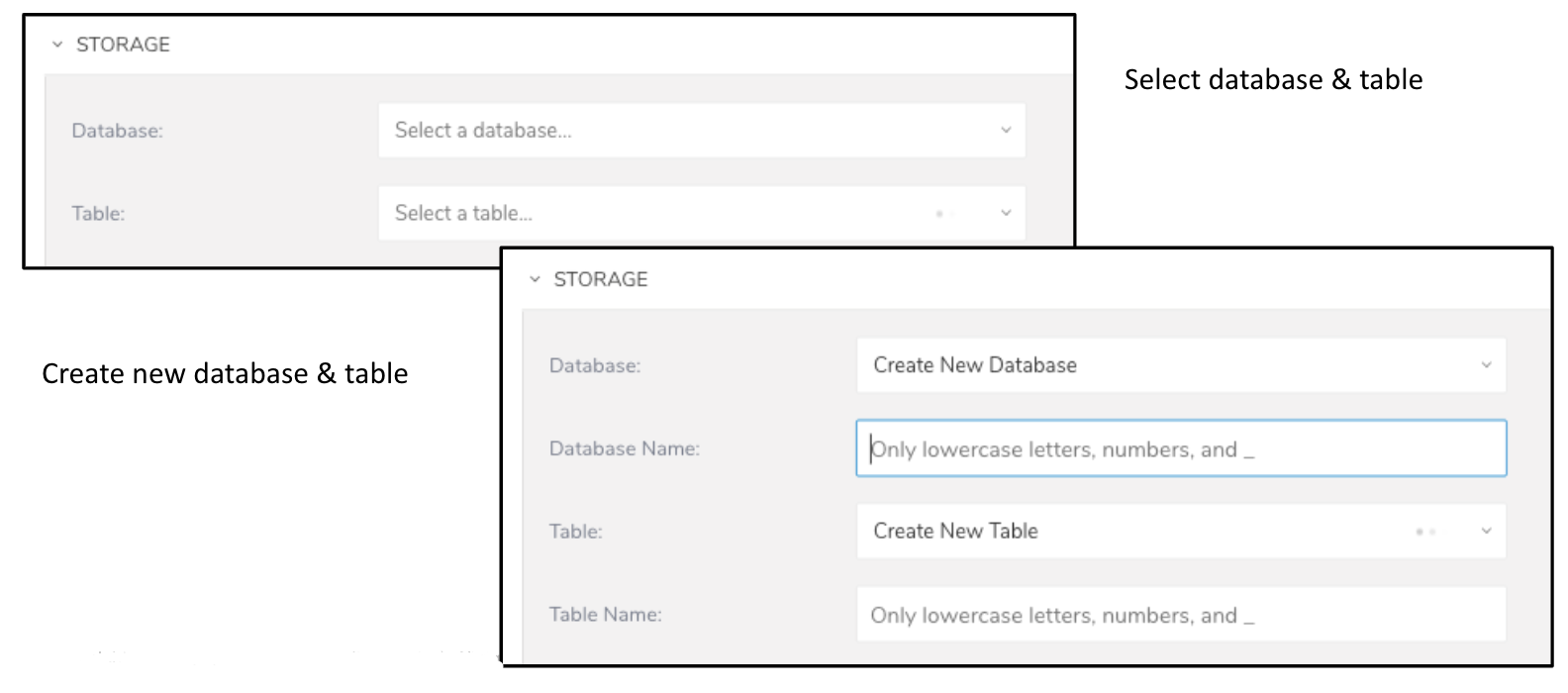
You can now use the Google Sheet data connector to import Google Sheet content into your database. You can bring in data from Google Spreadsheet file without manually converting the data to CSV before import, and you can retain the format in the original spreadsheet.
Contact your Treasure Data Customer Success representative for more information and enablement.
To aid in building Customer Journeys from your Magento eCommerce sites, the Magento data connector imports data directly from Magento. The data connector also helps to ingest from the APIs of Magento Commerce modules, third-party modules, and extension attributes that are installed on your system.
If you are interested in participating in the beta, contact your Treasure Data Customer Success representative.
A new parameter is added to the Google Sheet Export data connector. You can now specify a destination folder key when using a spreadsheet name to export data. You must re-authenticate to access Google Drive metadata in order to use this new parameter. Refer to Google Sheets Export Integration.
If multiple spreadsheets with the same name exist in the destination folder, your jobs fail. You can use the spreadsheet key to specify the correct destination spreadsheet to avoid job failure.
The current version of the Google sheets V3 connector is scheduled to be deprecated in early March 2020. You must re-authenticate all your existing Google Sheet Authentications before mid-February 2020 when the TD V3 connector is deprecated. Failure to do so results in a disruption of your Google sheets jobs. For more information, refer to the Appendix in Google Sheets - Export.