これはWebページのタイトルです!
ペアレントセグメントがリアルタイムジャーニーとリアルタイムトリガーアクティベーションに対して有効になっている場合、Treasure Dataは次のオブジェクトを自動的に作成します:
- Database :
cdp_audience_<_parent_segment_id_>_rt - Table :
activations
これらのオブジェクトは、アクティベーションログを作成するための情報を収集します。アクティベーションログを使用して、次のようなアクティベーションに関する情報を追跡できます:
- 失敗
- 成功
- ジャーニーとそれに関連するアクティベーション
- アクティブ化されるプロファイル
- アクティブ化されたプロファイルの数
このトピックには以下が含まれます:
Treasure Dataでは、クエリにPrestoエンジンを使用することをお勧めします。さらに、Prestoには、クエリ結果のフィルタリングに役立つ時間範囲機能があります。
- TD Consoleを開きます。
- Data Workbenchに移動します。
- Queriesを選択します。
- New Queryを選択します。
- クエリを入力します。
- Runを選択します。
- Query Resultを選択します。
タイムスタンプを使用したTD_TIME_RANGEを使用したクエリ
SELECT response, status, delivered, event_id, profile_id, activation_type, activation_id, activation_name, journey_name, timestamp from activations where TD_TIME_RANGE(time, 1716256019, 1716278847 )SELECT response, status, delivered, event_id, profile_id, activation_type, activation_id, activation_name, journey_name, timestamp from activations where TD_INTERVAL(time, '-3d/now')SELECT * from activations where TD_TIME_RANGE(time, '-12h')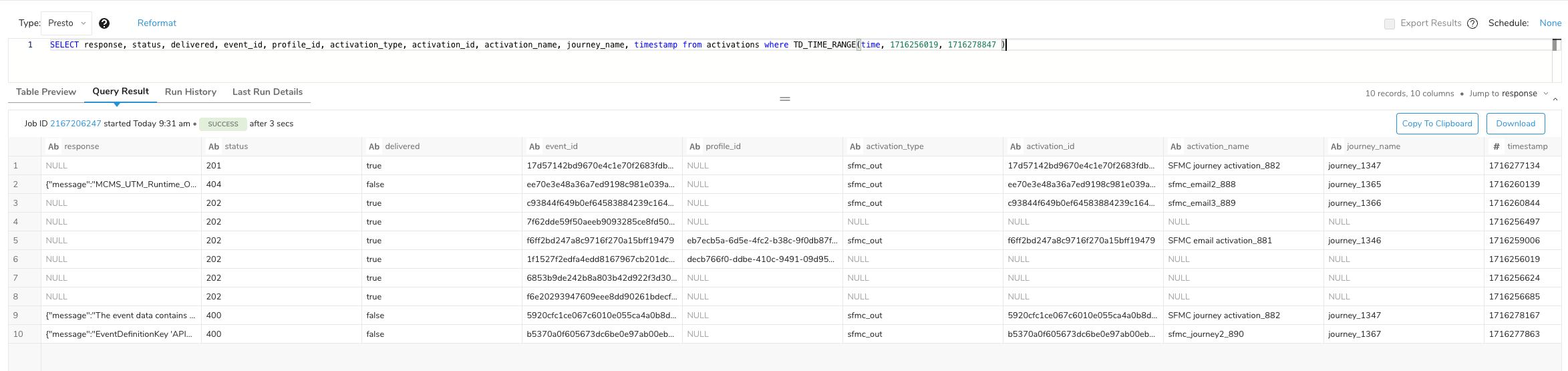
次のカラムは、クエリリクエストと利用可能な値に基づいて入力される場合があります:
- error
- response
- status
- delivered
- event_id
- profile_id
- activation_type
- activation_id
- activation_name
- journey_name
- timestamp
フィールドは、返されたイベントに基づいて入力されます。たとえば、イベントに_td_client_id_が含まれている場合は_profile_id_が入力され、そうでない場合はnullになります。さらに、次のプロファイル値のいずれかに対してアクティベーショントリガーがない場合:
- activation_type
- activation_id
- activation_name
- journey_name
- timestamp
値はnullになります。