このガイドでは、「Reuse Connector Authentication」と呼ばれる新機能について説明します。この機能により、既存のConnector Authenticationを再利用できます。
新しい統合ごとに新しいAuthenticationを作成する代わりに、既存のAuthenticationsを再利用できます。これにより、セキュリティが向上し、統合のセットアップ時の時間を節約できます。また、OAuth2認証方法のみをサポートする統合を、WorkflowおよびTD Toolbelt CLIで利用できるようになります。
必要に応じて、新しいAuthenticationを作成します:
- TD Consoleを開きます。
- Integrations Hub > Catalogに移動します。

- Catalogで統合を検索し、アイコンの上にマウスをホバーしてCreate Authenticationを選択します。

- Credentialsタブが選択されていることを確認し、統合の資格情報を入力します。
Authenticationの詳細は、タイプによって異なります(About Treasure Data Integrationsを参照)。以下はAuthenticationページの例です:
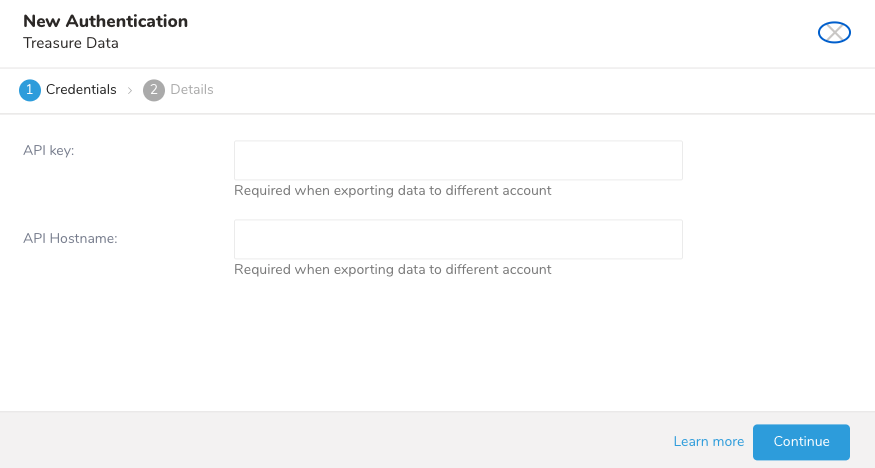
- Continueを選択します。
- Authenticationの名前を入力し、Doneを選択します。
既存のAuthenticationを再利用するには、まずAuthentication IDを特定する必要があります。このIDは通常、AuthenticationsのブラウザURLに表示されます。保存されているAuthenticationのAuthentication IDを取得するには、次の手順に従います。
- TD Console UIで操作します。
- Integrations Hub > Authenticationsに移動します。
- 保存されているAuthenticationをクリックします。
- ブラウザURLのAuthentication IDをコピーして保存します。
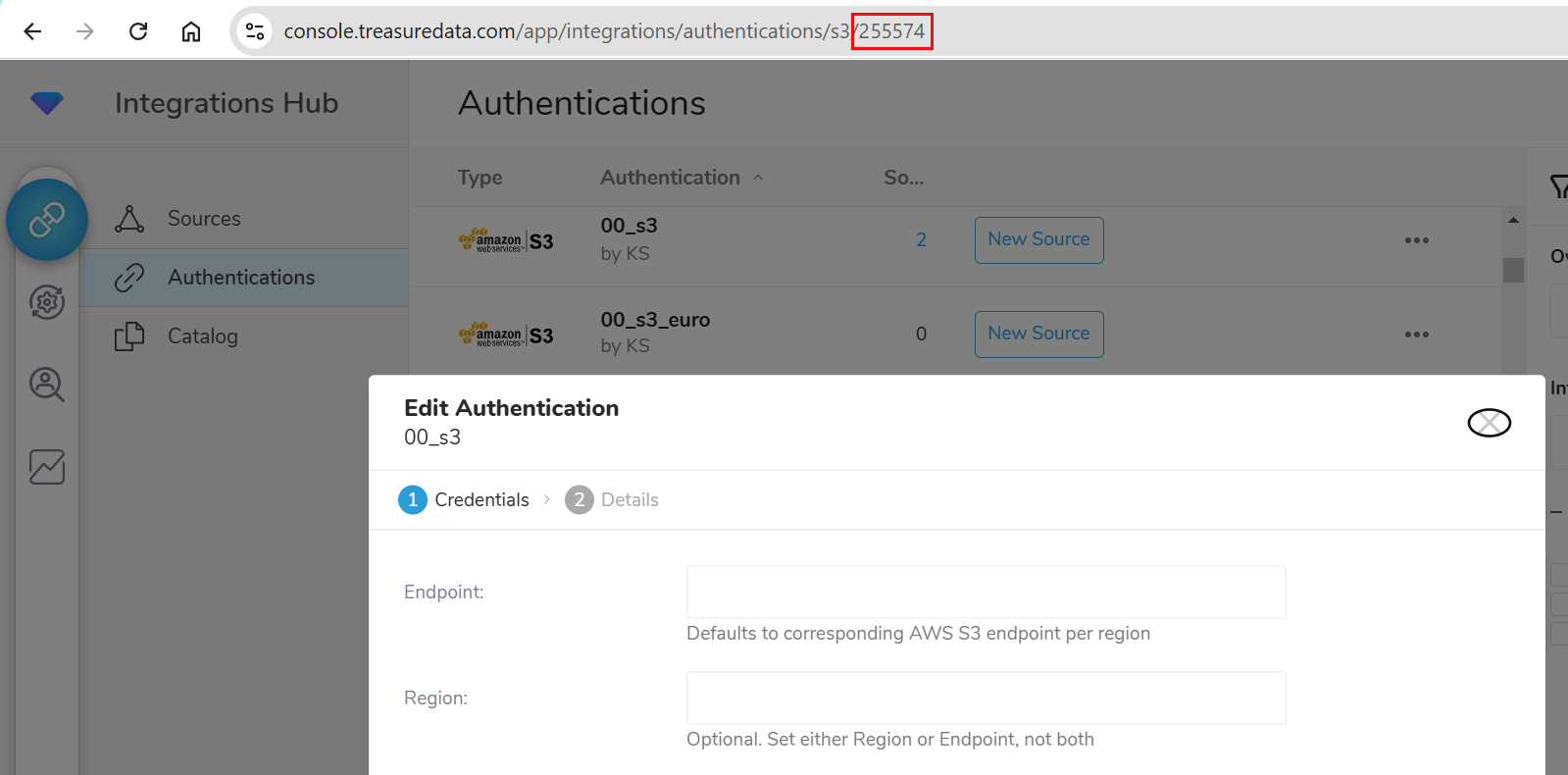
既存のAuthenticationを再利用するには、設定キー td_authentication_id に Authentication IDの値を指定します。上記の例では、値は255574になります。
この設定キーは、以下のCLIコマンドで使用できます:
- connector:guess
- connector:preview
- connector:issue
- connector:create
- connector:update
- sched:create
- sched:update
- query
- export:result
また、以下のWorkflow Operatorでも使用できます:
- td
- td_run
- td_load
新しいJobまたはWorkflow設定の場合、td_authentication_id を Authentication IDに設定するだけです。場合によっては、特定のtd_authentication_idで設定されたconfig.ymlファイルを最初に作成する必要があります。
例えば、assume_role認証方法を使用するS3_v2統合の場合は次のようになります。
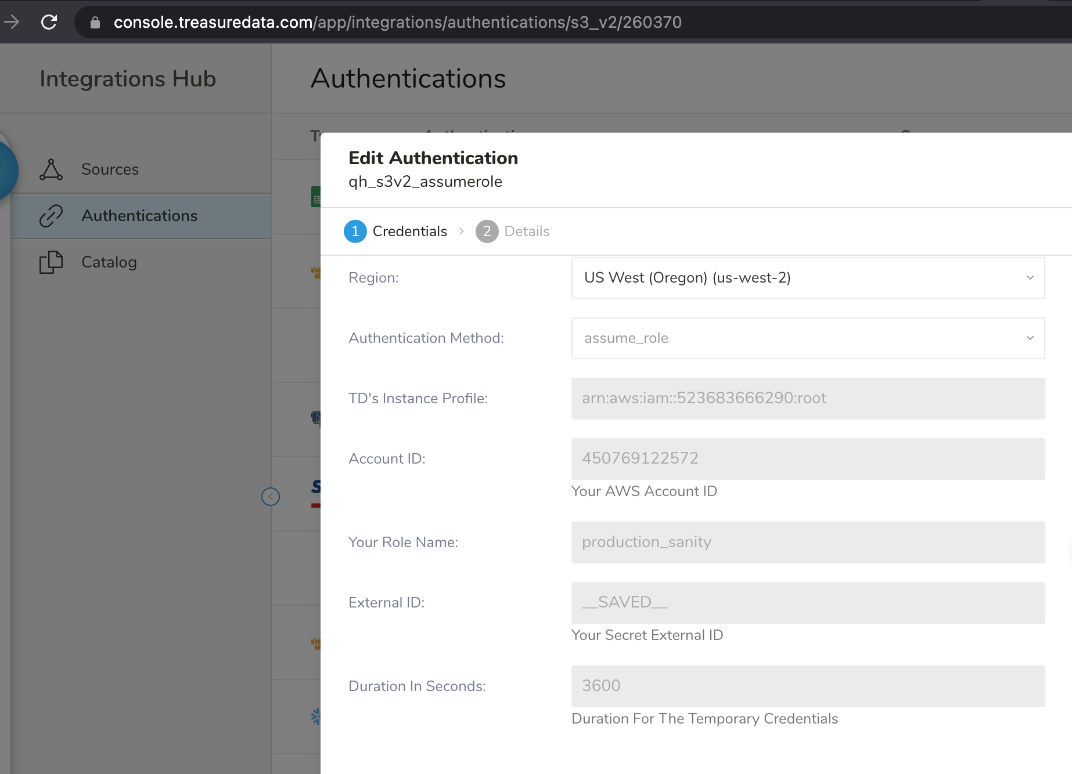
- connector:guessの設定ファイル
このファイル(s3_v2_seed.yml)では、td_authentication_idがAuthentication ID 260370に設定されています。このファイルは、config.ymlファイルの作成に使用されます。
---
in:
  type: s3_v2
  td_authentication_id: 260370
  bucket: qa-auto-test-3
path_prefix: 'qh_s3connector_test/Compress/assume_role_staging.csv'- connector:guessの結果
connector:guessは、s3_v2_seed.ymlを使用してconfig.ymlファイルを作成します。このファイルはTD Toolbelt CLIコマンドで使用されます。
td -k 1/xxx -e https://api.treasuredata.com connector:guess s3_v2_seed.yml推測された設定:
---
in:
  type: s3_v2
  bucket: qa-auto-test-3
  path_prefix: qh_s3connector_test/Compress/assume_role_staging.csv
  parser:
    charset: UTF-8
    newline: CRLF
    type: csv
    delimiter: ","
    quote: "\""
    escape: "\""
    trim_if_not_quoted: false
    skip_header_lines: 1
    allow_extra_columns: false
    allow_optional_columns: false
    columns:
    - {name: path, type: string}
    - {name: cnt, type: string}
    - {name: user, type: string}
    - {name: host, type: string}
    - {name: referer, type: string}
    - {name: code, type: long}
    - {name: agent, type: string}
    - {name: size, type: long}
    - {name: method, type: string}
    - {name: time, type: long}
  td_authentication_id: 260370
out: {}
exec: {}
filters: []
config.ymlファイルを作成しました。 'td -k 1/xxx -e https://console.treasuredata.com connector:preview config.yml'を使用して、バルクロードのプレビューを確認してください。
- connector:previewの結果
td -k 1/xxx -e https://console.treasuredata.com connector:preview config.yml- connector:issue
td -k 1/xxx -e https://api.treasuredata.com connector:issue config.yml --database tuan_db --table test_tbl- connector:create
td -k 1/xxxx -e https://api.treasuredata.com connector:create bulkload_data_from_s3 "0 * * * *" tuan_db test_tbl config.yml- connector:update
td -k 1/xxx -e https://api.treasuredata.com connector:update bulkload_data_from_s3 -c config.yml -s '0 0 * * *'- sched:create
td -k 1/xxx -e https://api.treasuredata.com sched:create result_to_s3_v2 '0 0 * * *' --database tuan_db 'SELECT * from aaks' --result '{"type":"s3_v2","td_authentication_id":260370,"duration_in_seconds":3600,"bucket":"qa-auto-test-3","path":"qh_s3connector_test/Compress/assume_role_staging1.csv","format":"csv","compression":"none","header":true}'- sched:update
td - k 1/xxx -e https://api.treasuredata.com sched:update result_to_s3_v2 -s '0 0 * * *' --database tuan_db --result '{"type":"s3_v2","td_authentication_id":260370,"duration_in_seconds":3600,"bucket":"qa-auto-test-3","path":"qh_s3connector_test/Compress/assume_role_staging2.csv","format":"csv","compression":"none","header":true}'- query
td -k "1/xxxx" -e https://api.treasuredata.com query --database tuan_db --wait "SELECT * from aaks" --type presto --result '{"type":"s3_v2","td_authentication_id":260370,"duration_in_seconds":3600,"bucket":"qa-auto-test-3","path":"qh_s3connector_test/Compress/assume_role_staging.csv","format":"csv","compression":"none","header":true}'- export:result
td -k "1/xxxx" -e https://api.treasuredata.com export:result 1696822041 '{"type":"s3_v2", "td_authentication_id":260370, "bucket": "qa-auto-test-us-east-1", "path":"quang/test_export_result_02.csv"}'- td_load
この例では、td_loadコマンドがs3_v2_guessed.ymlを使用します。このファイルでは、td_authentication_idが260370に設定されています。
---
in:
  type: s3_v2
  td_authentication_id: 260370
  bucket: qa-auto-test-3
  path_prefix: 111time.csv
  parser:
    charset: UTF-8
    newline: CRLF
    type: csv
    delimiter: ","
    quote: "\""
    escape: "\""
    trim_if_not_quoted: false
    skip_header_lines: 1
    allow_extra_columns: false
    allow_optional_columns: false
    columns:
    - name: col_1
      type: string
    - name: col_2
      type: string
- name: col_3+import_from_s3_assume_role_with_existing_connection:
td_load>: s3_v2_guessed.yml
database: tuan_data
table: wf_test- query
+query_data_and_write_result_with_existing_connection_by_url:
  td>:
  query: 'select * from wf_test'
  database: tuan_data
result_url: '{"td_authentication_id": 260370, "bucket": "qa-auto-test-3", "path": "viet/assume_role_from_eu01.csv"}'- td_run
この例では、presto_select_all_s3v2は保存されたクエリです。
+query_sql:
  td_run>: presto_select_all_s3v2
  database: quang
result_url: '{"type":"s3_v2", "td_authentication_id":260370, "bucket": "qa-auto-test-us-east-1", "path":"quang/wf_jan16_1444.csv"}'- td_result_export
このOperatorは、result_connectionでTD Console UIのAuthentication名を返すことにより、レガシー方式で既存の統合Authenticationの再利用をサポートします。
_export:
  td:
    database: quang

+export_query_result:
  td_result_export>:
  job_id: 14660140
  result_connection: quang_s3v2_happy_case_1195
  result_settings:
    bucket: qa-auto-test-us-east-1
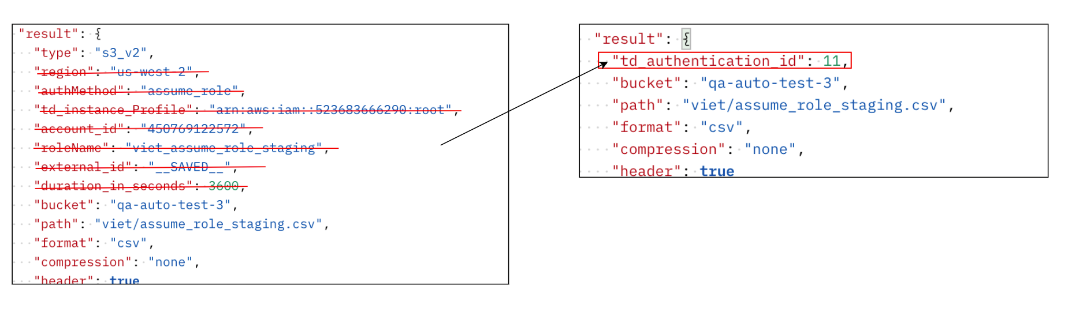
path: quang/s3v2_wf_jan16_1655.csv既存のJobおよびWorkflow設定の場合、設定から既存のConnector Authenticationの宣言を削除し、Authentication IDを指定するtd_authentication_idに置き換えるだけです。この例では、TD ConsoleのAuthentication URLの末尾から取得したAuthenticationは11です。