This feature is in BETA version. For more information, contact your Customer Success Representative.
The Snapchat Conversions API (CAPI) connector enables server-side tracking and measuring conversion events across web, mobile, and offline channels. By integrating directly with Snapchat's Events Manager, this connector helps businesses measure campaign performance and optimize ad delivery more effectively across Snapchat's 300M+ daily active users.
Key capabilities:
- Web Events: Server-side tracking to complement pixel data for enhanced measurement accuracy
- Mobile App Events: Direct integration of in-app conversion events
- Offline Events: Support for non-digital conversions like in-store purchases
- Data Validation: Automated event validation and formatting to Snapchat's CAPI specifications
This server-side integration provides more reliable conversion tracking and improved advertising performance measurement compared to client-side solutions alone.
- Basic knowledge of Treasure Data, including the TD Toolbelt.
- Basic knowledge of Snapchat Business.
- Snapchat Access Token or Snapchat Business account
Event Time Restrictions
- Events older than 7 days (based on
event_time) will be skipped during processing - Event time validations use UTC timezone for epoch conversions and 7-day window calculations
- Events older than 7 days (based on
Invalid Event Source ID Error Message Discrepancies between oAuth Authentication and Conversion API token authentication
- Different authentication methods produce varying error responses for invalid
event_source_id:- When using Conversion API Token Authentication, the error message will be:
{ "status": "INVALID", "reason": "Unauthorized resources" }
- When using Conversion API Token Authentication, the error message will be:
- Different authentication methods produce varying error responses for invalid
When using OAuth Authentication, the error message will be:
{ "status": "INVALID", "test_event": true, "reason": "At least one of the events is invalid.", "event_logs": [ { "event": 1, "status": "INVALID", "errors": { "codes": [ "523" ], "error_msgs": [ "The provided asset id must be valid UUID format." ] } }}When using OAuth authentication, the error response message does not explicitly indicate an invalid Event Source ID, instead referring to an invalid “asset id.” Therefore, for more reliable error handling when you’re unsure about the Event Source ID, it's recommended to use Conversion API Token authentication when running the job.
Anonymous ID Field (
anon_id): Despite being documented as a standard field in the “User Data Parameter” section of the API documentation (Link),anon_idcannot be included in theuser_dataobjectAttempting to use
anon_idinuser_dataresults in the following error:{ "status": "INVALID", "reason": "Request parsing failed. Ensure the request body is correctly formatted." }So, as a workaround, we have to map
anon_idto the custom data object instead of theuser_dataobject to avoid the API error.
Before running your query, you must create and configure the data connection on the TD Console. As part of the data connection, you provide authentication to access the integration. Complete the following steps.
Open TD Console.
Navigate to Integrations Hub > Catalog.
Search for and select Snapchat Conversions API. Hover over the icon and selectCreate Authentication.
Ensure that the Credentials tab is selected, and then enter credential information for the integration. Choose one of the following
**OAuth Authentication Workflow:**Select the link "Click here" to start the OAuth authentication flow. After completing the authentication, a new OAuth connection will be created and available in the dropdown.
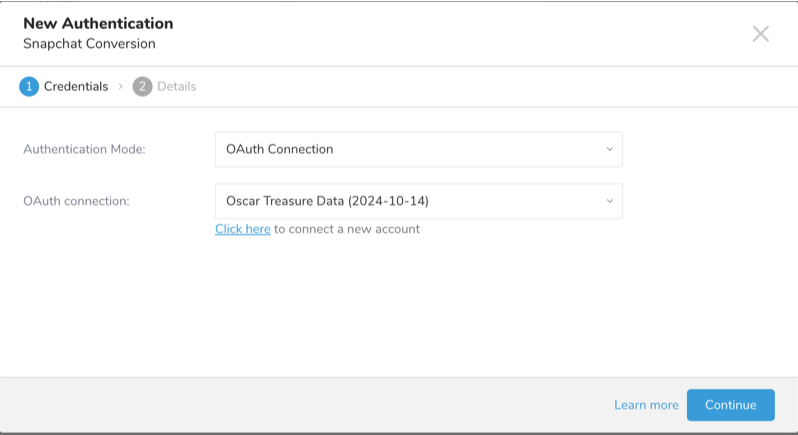
Select Continue to create a new connection.
b. Conversion API Token Workflow: Obtain the access token from the Snapchat Business Manager and input it in the Conversion API Token field.
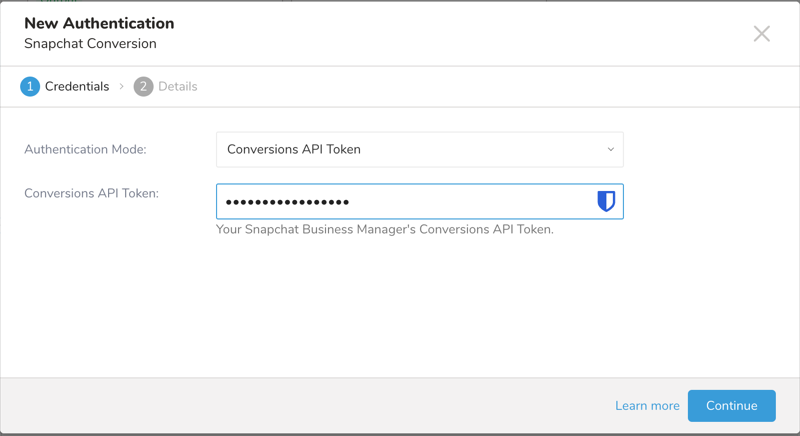
Parameter Description Authentication Mode Authentication method. Supported values: - oAuth Connection: OAuth Authentication - Conversions API Token: Long live access token generated in the Snapchat Business Manager. Conversions API Token You can obtain the Conversions API Token from the Snapchat Business Manager. This parameter is only available for Conversion API Token authentication methods.
Select Continue.
Enter a name for your authentication, and select Done.
The TD Console supports multiple ways to export data. Please follow these steps to export data from the Data Workbench.
- Navigate to Data Workbench > Queries.
- Select New Query, and define your query.
- Select Export Results to configure the data exporting.
- Select an existing Snapchat CAPI authentication or create a new one described previously
- Select Done.
| Field | Description |
|---|---|
| Event Source Type | Select the type of Snapchat event data source you are using. Supported event source types include: - Web Events - Mobile App Events - Offline Events |
| Event Source ID | Select the specific event source to upload event data to by inputting either pixel_id for Web Events/Offline Events and snap_app_id for Mobile App Events. |
| Send test events | Enable this to send test events instead of real traffic. |
| Skip invalid records? | If checked, the job will skip the invalid record and continue to handle the next record. Otherwise, the job will stop. |
To upload event data to Snapchat CAPI, you need to build a data export query that includes a combination of standard fields and custom fields that adhere to Snapchat CAPI guidelines. For standard fields, ensure the column names match those listed in the "Field/Column-Level Specifications" section. The connector automatically normalizes the column names to match Snapchat CAPI's required format, so you do not need to worry about case sensitivity. For example, for the default field "event_name," the column name in your export query can be written in any case, such as "EVENT_NAME," "event_name," or "Event_Id." The connector will standardize the column name to "event_name" to meet Snapchat CAPI's requirements.
To successfully upload/modify user profile data to Snapchat CAPI, you must construct an export query that adheres to specific data specifications. These specifications are divided into two levels:
- Export Query Specifications (or Dataset-level data specs): This section describes the requirements and rules that apply to your entire query result dataset, such as the presence of required fields and data validation rules that span multiple fields.
- Field/Column-Level Specifications: This section details the requirements and rules for individual fields/columns in your dataset, such as data types and formats for each field.
| Specification | Description |
|---|---|
| Conditionally Required Fields for User Data | At least one of the following identifier fields must be present in your export query:
|
| Conditionally Required Fields for PURCHASE Events | When your export query contains PURCHASE events, the following fields are required:
|
| Standard Field Names | Column names for standard fields can be written in any case (e.g., "EVENT_NAME", "event_name", "Event_Name"). The connector automatically standardizes them to match Snapchat CAPI requirements. |
| Null Value Handling | Columns with NULL values are ignored during export. |
| Duplicated Columns | Duplicate column names within the export query are not allowed. |
| Custom Fields | Any fields not listed in the standard fields will be automatically mapped to the custom_data object and preserved as-is. No normalization/formatting will be done. |
| Date-Time Formatting | For the event_time field, the following formats are accepted:
|
Array Field Formatting | For fields that accept arrays (e.g.,
Flattened Column Pattern: Example: To create an array field
These will be automatically combined into: |
JSON Object Array Construction | The
Arrays of objects can be constructed using flattened column names in the pattern: Example: To create the First object:
Second object:
This will be automatically constructed as: [
{
"id": "ABC123",
"quantity": 2,
"item_price": 29.99,
"delivery_category": "standard"
},
{
"id": "XYZ789",
"quantity": 1,
"item_price": 49.99,
"delivery_category": "express"
}
] |
| Date Field Formats | The checkin_date date field for the Custom Data object accepts the following formats:
|
| Required Fields for App Events | When sending app events, the following fields are required in your export query:
|
| extinfo Array Requirements | The extinfo field must:
|
Hashed Field Handling | For fields requiring SHA256 hashing in the
Note: The connector handles all normalization/hashing automatically - you can provide either raw or SHA256 hashed data |
There is Special Field Handling
Country Field
- For
user_dataobject: Use column name “country” (case-insensitive) - For
custom_dataobject: Use column name “custom_country” (case-insensitive)
Punctuation Marks Removal
Specific fields require the removal of punctuation marks. When this applies, the following characters will be removed:
- Basic punctuation:
. , ! ? ; : - — " ' ( ) [ ] { } / _ - Special characters:
& * + = @ # $ % ^ ~ |
Handling Date-Time
The integration can handle values cast as timestamps or in ISO-8601 date-time string format for date-time custom field columns. When using ISO-8601 date-time strings, ensure the value includes the letter “Z” at the end to allow the connector to detect and convert the date-time value into a Unix time value as required by Snapchat CAPI’s API contract.
Examples for Handling Date-Time Custom Field Columns
1. Casting as Timestamp
Create a column of type string in the source data table:
ALTER TABLE source_data_table ADD COLUMN date_time_field VARCHAR;Insert date-time value strings into that column:
INSERT INTO source_data_table (id, date_time_field)VALUES(1, '2024-08-28'),(2, '2024-08-28 15:30:00'),(3, '2024-08-28T15:30:00');Cast the column value as timestamp:
SELECT id, CAST(date_time_field AS timestamp) AS date_time_field FROM source_data_table;
2. Using ISO-8601 Date-Time String
Create a column of type string in the source data table:
ALTER TABLE source_data_table ADD COLUMN date_time_field VARCHAR;Insert date-time value strings into that column, ensuring they are formatted as ISO-8601 with a “T” separator and “Z” at the end:
INSERT INTO source_data_table (id, date_time_field)VALUES(1, '2024-08-28T00:00:00Z'),(2, '2024-05-28T15:30:00.123Z'),(3, '2024-02-28T15:30:00Z');Use the column directly in the query:
SELECT id, date_time_field FROM source_data_table;
| Field | Description | Required | Data Type | Additional Specifications |
|---|---|---|---|---|
| event_name | The type of event being tracked | Yes | String | Must be one of the following values:
|
| event_time | Timestamp of the event occurrence | Yes | Integer/String/Timestamp |
|
event_source_url | URL where the event occurred | Yes (for web events) | String | Must include protocol (http/https) Example: https://example.com/page |
| event_id | Unique identifier for the event | No | String | Chosen by the advertiser to represent a unique event |
| action_source | Source of the event | Yes* | String | *Automatically set based on configuration screen selection:
|
| data_processing_options | Privacy processing options | No | Array of strings | Accepted values: ["LMU"], ["DELETE"] |
| advertiser_tracking_enabled | Tracking permission indicator | No | Boolean |
|
The following fields are used to identify users and their attributes. At least one identifier field is required from: email (em), phone (ph), sc_click_id, client_ip_address, client_user_agent, or mobile advertiser id (madid).
| Field | Description | Required | Data Type | Formatting Requirements | Example |
|---|---|---|---|---|---|
| em | Email address | Conditional* | String/Array | - Spaces are trimmed - Converted to lowercase - Must be valid email format - Will be automatically hashed | Input: Person@Example.com Normalized: person@example.com |
| ph | Phone number | Conditional* | String/Array | - Spaces removed - Leading ‘00’ and ‘0’ removed - Non-numeric chars, ‘+’, ‘-’ excluded - Must include country code - Will be automatically hashed | Input: +44 844 412 4653 Normalized: 448444124653 |
| sc_click_id | Snapchat click ID from URL | Conditional* | String | - Must be in UUID format - Found in landing page URL’s ScCid parameter | 123e4567-e89b-12d3-a456-426614174000 |
| client_ip_address | Device IP address | Conditional* | String | - Supports IPv4 and IPv6 - Must be device IP, not server IP | 203.0.113.195 |
| client_user_agent | Device user agent | Conditional* | String | No special formatting required | Chrome/87.0.4180.143 |
| madid | Mobile advertiser ID | Conditional* | String | Automatically converted to lowercase | Input: 123ABC Normalized: 123abc |
*At least one of these identifier fields is required.
| Field | Description | Data Type | Data handling |
|---|---|---|---|
| fn | First name | String/Array | - Converted to lowercase - Punctuation removed - Special characters UTF-8 encoded - Will be automatically hashed |
| ln | Last name | String/Array | - Converted to lowercase - Punctuation removed - Special characters UTF-8 encoded - Will be automatically hashed |
| ge | Gender | String/Array | - Converted to lowercase - Accepted values: ‘f’ for female, ‘m’ for male - Will be automatically hashed |
| ct | City | String/Array | - Converted to lowercase - Punctuation and spaces removed - Special characters UTF-8 encoded - Will be automatically hashed |
| st | State | String/Array | - US: Use 2-character ANSI code - Converted to lowercase - No punctuation, special chars, or spaces - Will be automatically hashed |
| zp | Zip/postal code | String/Array | - Converted to lowercase - Spaces and ‘-’ removed - US: Use 5 digits - Will be automatically hashed |
| country | Country | String/Array | - Converted to 2-letter ISO 3166-1 alpha-2 code - Converted to lowercase - Will be automatically hashed |
| Field | Description | Required | Notes |
|---|---|---|---|
| external_id | Unique identifier (e.g., loyalty card ID) | No | Will be automatically hashed |
| subscription_id | Subscription identifier | No | |
| lead_id | Snapchat Lead Ad identifier | No | |
| anon_id | App install identifier | No | For app events only, this field will be mapped to custom_data object to avoid Snapchat API error |
| download_id | App download identifier | No | |
| sc_cookie1 | First-party cookie from Pixel SDK | No | Must be UUID format |
| idfv | IDFV value | No | Plain text value |
- Conditional Requirements: You must include at least one of the conditional identifier fields (em, ph, sc_click_id, client_ip_address, client_user_agent, or madid).
- Automatic Processing: The connector automatically handles:
- Field normalization (lowercase conversion, space removal, etc.)
- Hashing of sensitive fields
- UTF-8 encoding where required
- Multiple Values: Fields marked as String/Array can accept either a single value or multiple values
| Field | Description | Required | Data Type | Additional Specifications |
|---|---|---|---|---|
| content_category | Item or category classification | No | String/Array | - Can be a single value or array Example: "shoes" or ["coats", "shoes", "umbrellas"] |
| content_ids | Product/category identifiers | No | Array | - Can be a single ID or comma-separated list Example: "sku001" or ["sku001", "sku002", "sku003"] |
| content_name | Page/product name | No | String | Example: "Running Shoes" |
| content_type | Type of content identifier | No | String | - Accepted values: product, product_group |
| contents | Detailed item purchase information | No | Array of Objects | - Each object may include: • id (string) • quantity (integer) • item_price (float) • delivery_category (string) Example: [{"id": "123", "quantity": 2, "item_price": 29.99, "delivery_category": "standard"}] |
| currency | Transaction currency | Yes for PURCHASE | String | - Must be standard ISO 4217 code (e.g., USD, AED, AUD) |
| num_items | Total item count | No | String | Example: "3" |
| order_id | Order identifier | No | String | Example: "ORD12345" |
| predicted_ltv | Predicted lifetime value | No | Float | Example: 150.75 |
| value | Event monetary value | Yes for PURCHASE | Float | Example: 99.99 |
| search_string | Search query text | No | String | Example: "running shoes" |
| Field | Description | Required | Data Type | Example |
|---|---|---|---|---|
| checkin_date | Hotel check-in date | No | String | Format: YYYY-MM-DD Example: "2024-09-13" |
| travel_start | Travel start date | No | String | Example: "2024-09-13" |
| travel_end | Travel end date | No | String | Example: "2024-09-20" |
| suggested_destinations | Recommended destinations | No | String/Array | Example: ["destination1", "destination2"] |
| destination_airport | IATA code of destination | No | String | Example: "JFK" |
| origin_airport | IATA code of origin | No | String | Example: "LAX" |
| Field | Description | Required | Data Type | Example |
|---|---|---|---|---|
| country | Destination country | No | String | Example: "US" |
| city | Destination city | No | String | Example: "New York" |
| region | State/district/region | No | String | Example: "NY" |
| neighborhood | Specific neighborhood | No | String | Example: "Brooklyn" |
| postal_code | Postal/zip code | No | String | Example: "10001" |
| Field | Description | Required | Data Type | Example |
|---|---|---|---|---|
| departing_departure_date | Outbound departure | No | String | Example: "2024-09-13T08:00" |
| departing_arrival_date | Outbound arrival | No | String | Example: "2024-09-13T12:00" |
| returning_departure_date | Return departure | No | String | Example: "2024-09-20T08:00" |
| returning_arrival_date | Return arrival | No | String | Example: "2024-09-20T12:00" |
| Field | Description | Required | Data Type | Example |
|---|---|---|---|---|
| num_adults | Number of adults | No | Integer | Example: 2 |
| num_children | Number of children | No | Integer | Example: 1 |
| num_infants | Number of infants | No | Integer | Example: 0 |
| hotel_score | Hotel rating score | No | String | Example: "4.5" |
| preferred_neighborhoods | Preferred areas | No | String/Array | Example: ["neighbor1", "neighbor2"] |
| preferred_star_ratings | Hotel star rating range | No | String/Array | Example: ["star1", "star2"] |
| suggested_hotels | Recommended hotels | No | String/Array | Example: ["hotel1", "hotel2"] |
| destination_ids | Catalog destination IDs | No | String/Array | Example: ["dest1", "dest2"] |
| Field | Description | Required | Data Type | Additional Specifications |
|---|---|---|---|---|
| advertiser_tracking_enabled | User tracking opt-in status | Yes | Boolean | - 1 for OPT_IN - 0 for OPT_OUT - For iOS 14.5+: Set to ATT Authorization Status |
| app_id | Application identifier | Yes | String | - iOS: Numeric format (e.g., 447188370) - Android: Package name format (e.g., com.snapchat.android) |
| extinfo | Device and app information | Yes | Array | Must contain exactly 16 elements in a specific order (see detailed specs below) |
The extinfo array must contain exactly 16 elements in the following order, use the exact column name as specified in the "Column Name" for the connector to build the accurate array:
| Index | Column Name | Description | Data Type | Requirements | Example |
|---|---|---|---|---|---|
| 0 | device_os | OS identifier | String | Must be “i2” (iOS) or “a2” (Android) | "i2" |
| 1 | package_name | App package name | String | "com.snapchat.sdk" | |
| 2 | short_version | App short version | String/Integer | "1.0" | |
| 3 | long_version | App long version | String | "1.0" | |
| 4 | os_version | Device OS version | String | "10.3.1" | |
| 5 | device_model | Device model | String | "iphone14" | |
| 6 | locale | Device locale | String | "En_US" | |
| 7 | timezone_abbr | Timezone abbreviation | String | "EDT" | |
| 8 | carrier | Mobile carrier | String | "AT&T" | |
| 9 | screen_width | Screen width | Integer | Must be Int64 | 320 |
| 10 | screen_height | Screen height | Integer | Must be Int64 | 568 |
| 11 | screen_density | Screen density | String | "2" | |
| 12 | cpu_cores | Number of CPU cores | Integer | Must be Int64 | 2 |
| 13 | storage_size | Total storage (GB) | Integer | Must be Int64 | 15 |
| 14 | free_storage_size | Available storage (GB) | Integer | Must be Int64 | 8 |
| 15 | timezone_location | Device timezone | String | "USA/New York" |
Example complete extinfo array:
["i2", "com.snapchat.sdk", "1.0", "1.0", "10.3.1", "iphone14", "En_US", "EDT", "AT&T", "320", "568", "2", "2", "15", "8", "USA/New York"]- All three fields (
advertiser_tracking_enabled,app_id, andextinfo) are required for app events - The
extinfoarray must maintain the exact order specified above - Integer values in
extinfomust be provided as Int64 type - First element of
extinfodetermines the platform (iOS/Android)
You can use Scheduled Jobs with Result Export to periodically write the output result to a target destination that you specify.
Treasure Data's scheduler feature supports periodic query execution to achieve high availability.
When two specifications provide conflicting schedule specifications, the specification requesting to execute more often is followed while the other schedule specification is ignored.
For example, if the cron schedule is '0 0 1 * 1', then the 'day of month' specification and 'day of week' are discordant because the former specification requires it to run every first day of each month at midnight (00:00), while the latter specification requires it to run every Monday at midnight (00:00). The latter specification is followed.
Navigate to Data Workbench > Queries
Create a new query or select an existing query.
Next to Schedule, select None.
In the drop-down, select one of the following schedule options:
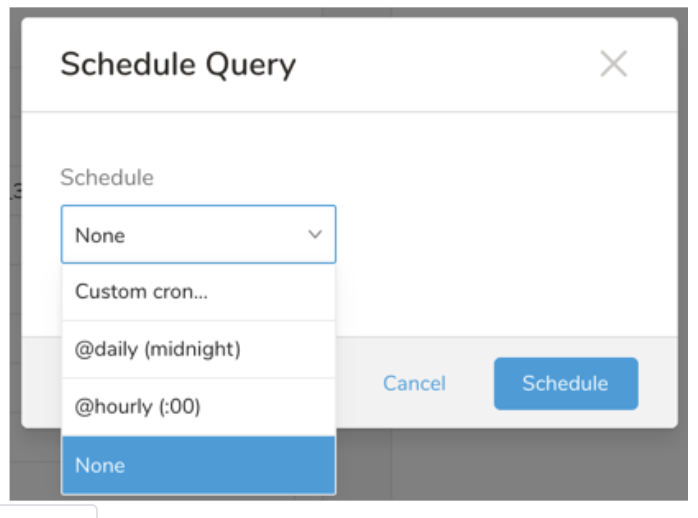
Drop-down Value Description Custom cron... Review Custom cron... details. @daily (midnight) Run once a day at midnight (00:00 am) in the specified time zone. @hourly (:00) Run every hour at 00 minutes. None No schedule.
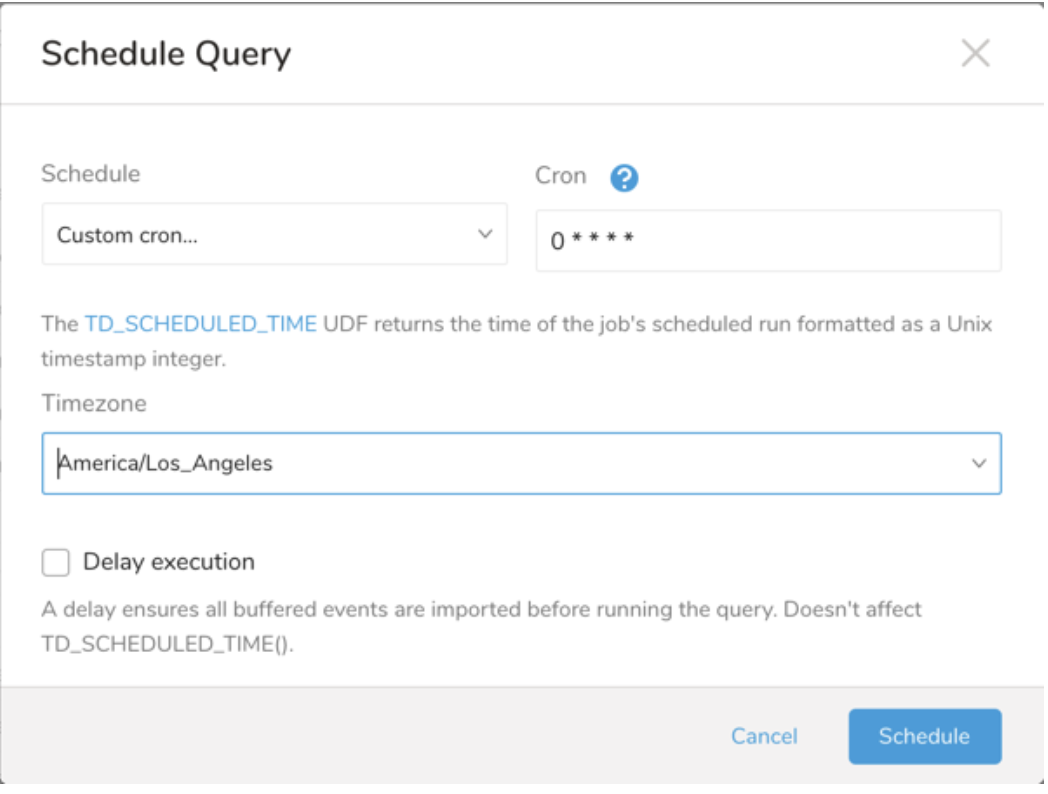
| Cron Value | Description |
|---|---|
0 * * * * | Run once an hour. |
0 0 * * * | Run once a day at midnight. |
0 0 1 * * | Run once a month at midnight on the morning of the first day of the month. |
| "" | Create a job that has no scheduled run time. |
 *    *    *    *    *
 -    -    -    -    -
 |    |    |    |    |
 |    |    |    |    +----- day of week (0 - 6) (Sunday=0)
 |    |    |    +---------- month (1 - 12)
 |    |    +--------------- day of month (1 - 31)
 |    +-------------------- hour (0 - 23)
 +------------------------- min (0 - 59)
The following named entries can be used:
- Day of Week: sun, mon, tue, wed, thu, fri, sat.
- Month: jan, feb, mar, apr, may, jun, jul, aug, sep, oct, nov, dec.
A single space is required between each field. The values for each field can be composed of:
| Field Value | Example | Example Description |
|---|---|---|
| A single value, within the limits displayed above for each field. | ||
A wildcard '*' to indicate no restriction based on the field. | '0 0 1 * *' | Configures the schedule to run at midnight (00:00) on the first day of each month. |
A range '2-5', indicating the range of accepted values for the field. | '0 0 1-10 * *' | Configures the schedule to run at midnight (00:00) on the first 10 days of each month. |
A list of comma-separated values '2,3,4,5', indicating the list of accepted values for the field. | 0 0 1,11,21 * *' | Configures the schedule to run at midnight (00:00) every 1st, 11th, and 21st day of each month. |
A periodicity indicator '*/5' to express how often based on the field's valid range of values a schedule is allowed to run. | '30 */2 1 * *' | Configures the schedule to run on the 1st of every month, every 2 hours starting at 00:30. '0 0 */5 * *' configures the schedule to run at midnight (00:00) every 5 days starting on the 5th of each month. |
A comma-separated list of any of the above except the '*' wildcard is also supported '2,*/5,8-10'. | '0 0 5,*/10,25 * *' | Configures the schedule to run at midnight (00:00) every 5th, 10th, 20th, and 25th day of each month. |
- (Optional) You can delay the start time of a query by enabling the Delay execution.
Save the query with a name and run, or just run the query. Upon successful completion of the query, the query result is automatically exported to the specified destination.
Scheduled jobs that continuously fail due to configuration errors may be disabled on the system side after several notifications.
(Optional) You can delay the start time of a query by enabling the Delay execution.
You can also send segment data to the target platform by creating an activation in the Audience Studio.
- Navigate to Audience Studio.
- Select a parent segment.
- Open the target segment, right-mouse click, and then select Create Activation.
- In the Details panel, enter an Activation name and configure the activation according to the previous section on Configuration Parameters.
- Customize the activation output in the Output Mapping panel.
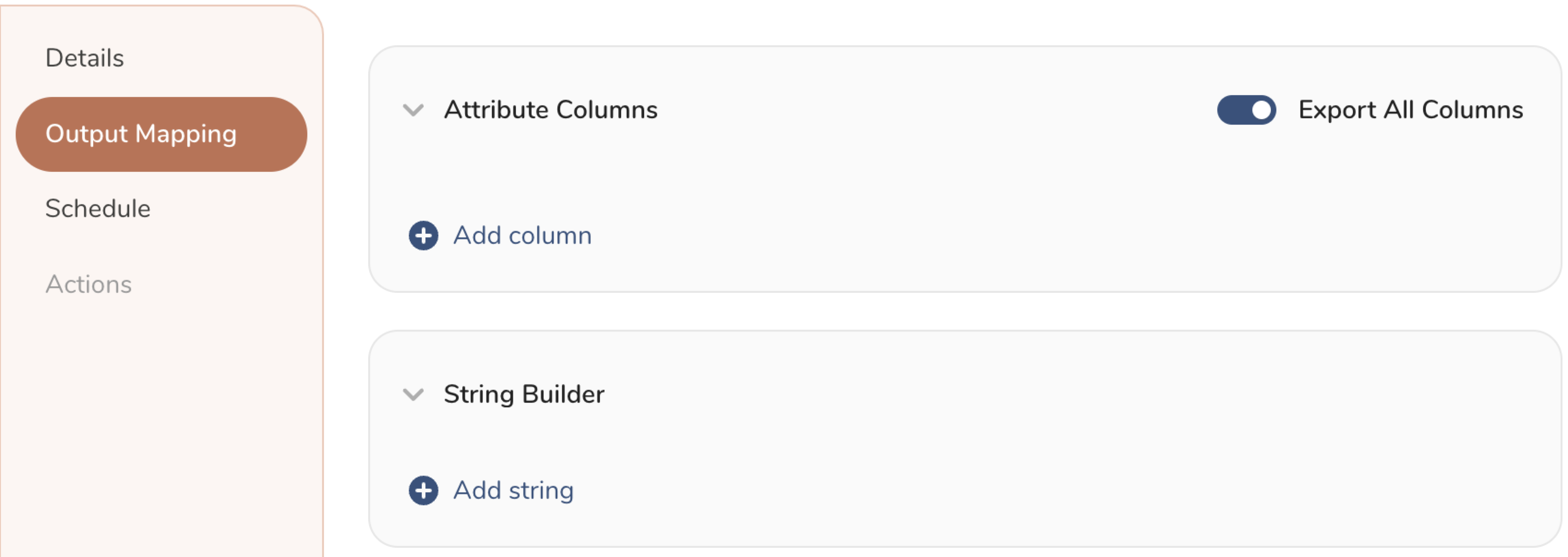
- Attribute Columns
- Select Export All Columns to export all columns without making any changes.
- Select + Add Columns to add specific columns for the export. The Output Column Name pre-populates with the same Source column name. You can update the Output Column Name. Continue to select + Add Columnsto add new columns for your activation output.
- String Builder
- + Add string to create strings for export. Select from the following values:
- String: Choose any value; use text to create a custom value.
- Timestamp: The date and time of the export.
- Segment Id: The segment ID number.
- Segment Name: The segment name.
- Audience Id: The parent segment number.
- + Add string to create strings for export. Select from the following values:
- Set a Schedule.
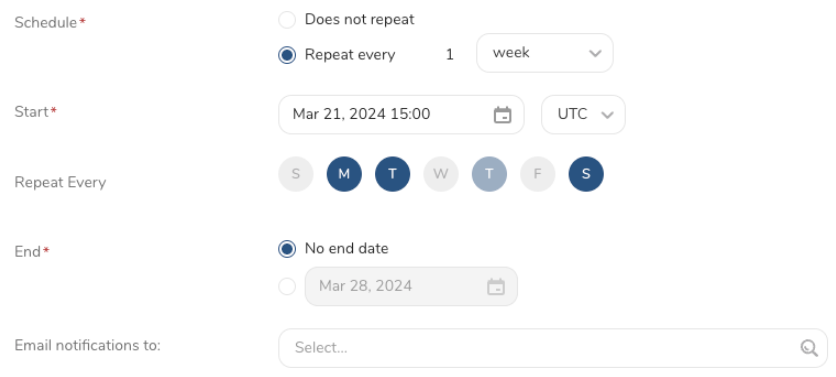
- Select the values to define your schedule and optionally include email notifications.
- Select Create.
If you need to create an activation for a batch journey, review Creating a Batch Journey Activation.
You can also use CLI (Toolbelt) to export results to Snapchat Conversion CAPI.
You need to specify the information for export to your Snapchat server using the *--result option of*the td query command. For more information about the *td query*command, refer to this article.
The format of the option is JSON, and the general structure is as follows.
{
  "type": "snapchat_conversion",
  "auth_method": "oauth",
  "oauth_credentials_id": "xxxxxxxxxxx",
  "event_source_type": "web",
  "event_source_id": "xxxxxxxxxxx",
  "send_test_events": false,
  "skip_invalid_records": true
}
{
  "type": "snapchat_conversion",
  "auth_method": "api_token",
  "api_token": "xxxxxxxxxxx",
  "event_source_type": "web",
  "event_source_id": "xxxxxxxxxxx",
  "send_test_events": false,
  "skip_invalid_records": true
}| Name | Description | Value | Default Value | Required |
|---|---|---|---|---|
| type | connector type | snapchat_conversion | N/A | Yes |
| auth_method | Authentication method | Supported values: - oauth - api_token | oauth | Yes |
| api_token | Conversion Api Token | N/A | N/A | yes ( if the authentication method is Conversion Api Token) |
| oauth_credentials_id | Credential id that was created by authentication method OAuth on the console | N/A | N/A | yes ( if the authentication method is oAuth) |
| event_source_type | event source type | Supported event sources: - WEB - MOBILE_APP - OFFLINE | WEB | Yes |
| event_source_id | The pixel id or application id on snapchat dashboard. | N/A | N/A | Yes |
| send_test_events | Send data to Validation API | true/false | false | No |
| skip_invalid_records | The flag to continue or stop the job when handling the invalid record. | true/false | true | No |
OAuth authentication
$ td query --result '{"type":"snapchat_conversion","auth_method":"oauth","oauth_credentials_id":"xxx","event_source_type":"WEB","event_source_id":"xxx", "send_test_events":false,"skip_invalid_records":true}' -d sample_datasets "select ........ from ........" -T prestoAPI Token authentication
$ td query --result '{"type":"snapchat_conversion","auth_method":"api_token","api_token":"xxx","event_source_type":"WEB","event_source_id":"xxx", "send_test_events":false,"skip_invalid_records":true}' -d sample_datasets "select ........ from ........" -T presto- The Result Export can be scheduled to periodically upload data to a target destination.
- All import and export integrations can be added to a TD Workflow. The td data operator can export a query result to a specified integration. For more information, see Reference for Treasure Data Operators.