When a parent segment is enabled for real-time journeys and real-time trigger activations, Treasure Data automatically creates the following objects:
- Database :
cdp_audience_<_parent_segment_id_>_rt - Table :
activations
These objects gather information to create an activation log. You can use the activation log to track information about your activations, such as:
- Failures
- Successes
- Journeys and their associated activations
- Profiles being activated
- The number of profiles activated
This topic includes:
Treasure Data suggests that you use the Trino engine for your query. Additionally, Trino has a Time Range functionality that can help you filter the query result.
- Open TD Console.
- Navigate to Data Workbench.
- Select Queries.
- Select New Query.
- Enter your query.
- Select Run.
- Select Query Result.
Query Using TD_TIME_RANGE With Timestamps
SELECT response, status, delivered, event_id, profile_id, activation_type, activation_id, activation_name, journey_name, timestamp from activations where TD_TIME_RANGE(time, 1716256019, 1716278847 ) SELECT response, status, delivered, event_id, profile_id, activation_type, activation_id, activation_name, journey_name, timestamp from activations where TD_INTERVAL(time, '-3d/now') SELECT * from activations where TD_TIME_RANGE(time, '-12h') 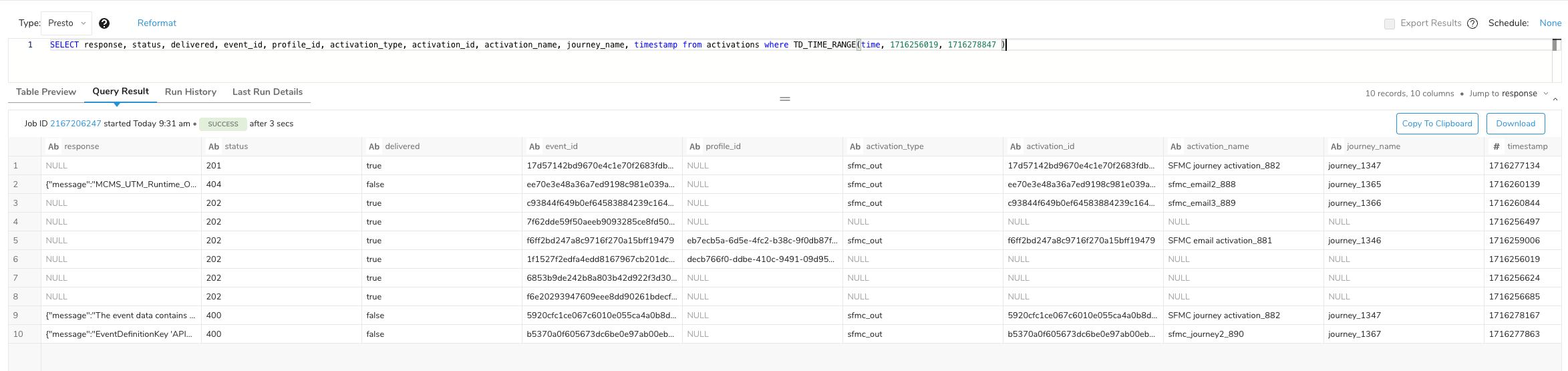
The following columns might be populated based on the query request and the values available:
- error
- response
- status
- delivered
- event_id
- profile_id
- activation_type
- activation_id
- activation_name
- journey_name
- timestamp
Fields are populated based on the event returned. For example, the profile_id is populated if the event contains td_client_id; otherwise , it will be null. Additionally, if there are no activation triggers for any of the following profile values:
- activation_type
- activation_id
- activation_name
- journey_name
- timestamp
the values will be null.