Using the Personalization API, developers can send the Treasure Data personalization service a customer identifier as well as updated customer information. A successful call to the personalization API performs the following actions:
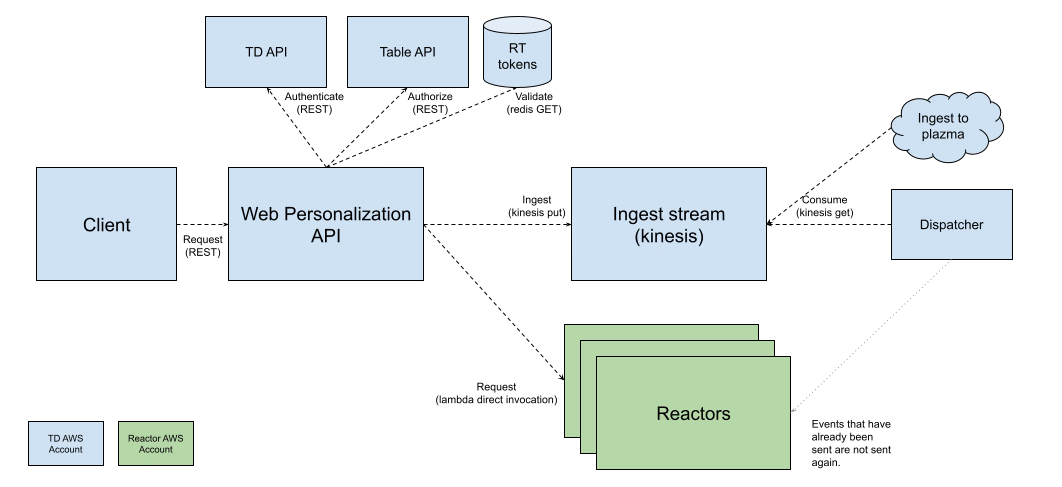
Events configured in the POST body are ingested into Plazma. The Personalization API behaves similarly to the Ingest API. The additional behavior is that real-time tokens are validated and used to route to reactors (the back-end engines for real-time processing). Here is a diagram of the process flow for the API.
All matching personalization payloads are returned in the response payload. If the customer meets the entry criteria for a personalization, the system returns the text of offers as well as any additional customer information that may be pertinent to the offer.
- The API requires the real-time personalization service to be enabled on your account.
- The API supports a maximum of 50 tokens per personalization service.
- Ensure that tokens have been created in Data Workbench for authenticating the API call and that the real-time event configurations are completed in Data Workbench. (See Creating Real-time Personalization Services with Data Workbench.)
- Ensure that at least one personalization has been configured in Audience Studio. (See Creating a Real-time Personalization with Audience Studio.)
The API must be authorized with
- a TD Write API key or Master API key for the account
- a personalization token
- the correct content type:
application/vnd.treasuredata.v1+json
For example, when making the API call from cURL, you would need these headers:
--header 'Authorization: TD1 {account_id}/{apikey}'
--header 'WP13n-Token: {account_id}/{instance_id}/{token}'
--header 'Content-Type: application/vnd.treasuredata.v1+json'The Web Personalization API has one ingestion endpoint per region:
{regionBaseURL}/{database}/{table}
Specify your endpoint using the baseURL for your region.
| Region | Base URL for Endpoint |
|---|---|
| USA (us01) | us01.p13n.in.treasuredata.com |
| Europe (eu01) | eu01.p13n.in.treasuredata.com |
| Japan (ap01 or "co.jp") | ap01.p13n.in.treasuredata.com |
The API uses the following path parameters:
- database — the database that was used to create and configure the personalization
- table — the table that contains the customer information.
For example, when making the API call from cURL, it could look like this:
POST https://us01.p13n.in.treasuredata.com/{database}/{table}
The request body is a JSON object that contains at least one identifier for the customer. It can also contain event data and additional attributes to be updated in the real-time system.
{
    "td_client_id": "42a508e2-d9b1-4baa-9eb2-6c3fb8bd5e16",
    "td_url": "https://example.com/retail/shop/women",
    "td_path": "/retail/shop/women",
    "product_name": "women's-tank-top",
    "product_category": "women",
    "product_list": ["women's-running-shoes", "kids'-hoodie", "women's-tank-top"],
    "category_list": ["women", "kids"]
}| Field | Type | Description |
|---|---|---|
td_client_id | string | The Treasure Data client ID associated with the customer (typically a UUID). |
td_url | string | The full URL of the page where the event occurred. |
td_path | string | The path portion of the URL (used for event filtering and personalization rules). |
| Additional attributes | any | Any additional event data or customer attributes (e.g., product_name, product_category, arrays like product_list) to be ingested and used in personalization logic. |
At least one identifier (such as td_client_id or email) must be provided to identify the customer. The personalization service evaluates the event data against your configured personalization rules and returns matching offers in the response.
The API returns a JSON response containing the following fields:
- Success : If the HTTP status code indicates success, offers are returned in the response payload
- Failure : If the HTTP status code indicates failure, an error code and message are returned in the response payload
| Response | Description | Example |
|---|---|---|
| 200 OK | with payload | 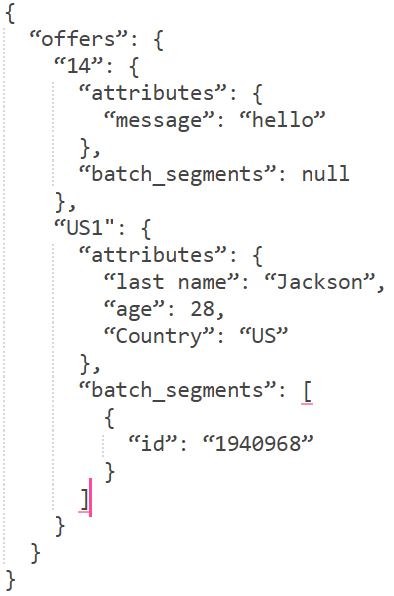 |
| 200 OK | without payload | 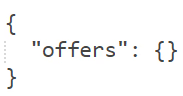 |
| Response | Example |
|---|---|
| 400 |  |
| 415 | 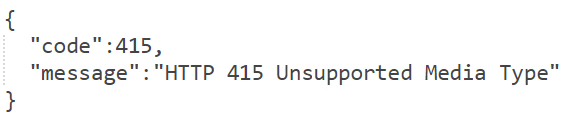 |
| 429 |  |
| Error Code | Message |
|---|---|
| 2003 | Kinesis error due to limit being exceeded (status 429) |
| 2013 | Lambda total concurrent execution exceeds the reserved concurrency (status 429) |
| 3000 | RT token was not provided (WP13n-Token header). |
| 3001 | RT token is not in configuration. |
| 3002 | RT token account conflicts with Authed user account. |
| 3003 | RT token is in an invalid format. |
| 3004 | Invalid event object. |
| 3005 | Request origin not in IP whitelist. |
export BASE_URL="us01.p13n.in.treasuredata.com"
export DATABASE="your_database"
export TABLE="pageviews"
export API_KEY="1234/abcdefghijklmnopqrstuvwxyz"
export ACCOUNT_ID="12345"
export INSTANCE_ID="67890"
export TOKEN="abcdef123456"

curl -X POST "https://${BASE_URL}/${DATABASE}/${TABLE}" \
--header 'Content-Type: application/vnd.treasuredata.v1+json' \
--header "Authorization: TD1 ${API_KEY}" \
--header "WP13n-Token: ${ACCOUNT_ID}/${INSTANCE_ID}/${TOKEN}" \
--data '{
    "td_client_id": "42a508e2-d9b1-4baa-9eb2-6c3fb8bd5e16",
    "td_url": "https://example.com/retail",
    "td_path": "/retail"
}'{
"offers": {
"offer_for_high_loyalty": {
"attributes": {
"status": "high"
},
"batch_segments": [{
"id": "1588214"
}]
}
}
}