The integration for Teradata enables the export of data from Treasure Data to your Teradata Server.
- Basic knowledge of Treasure Data
- Basic knowledge of Teradata SQL
- A Teradata instance running
- Go to Integrations Hub > Catalog.
- Search and select Teradata.
- A dialog will open.
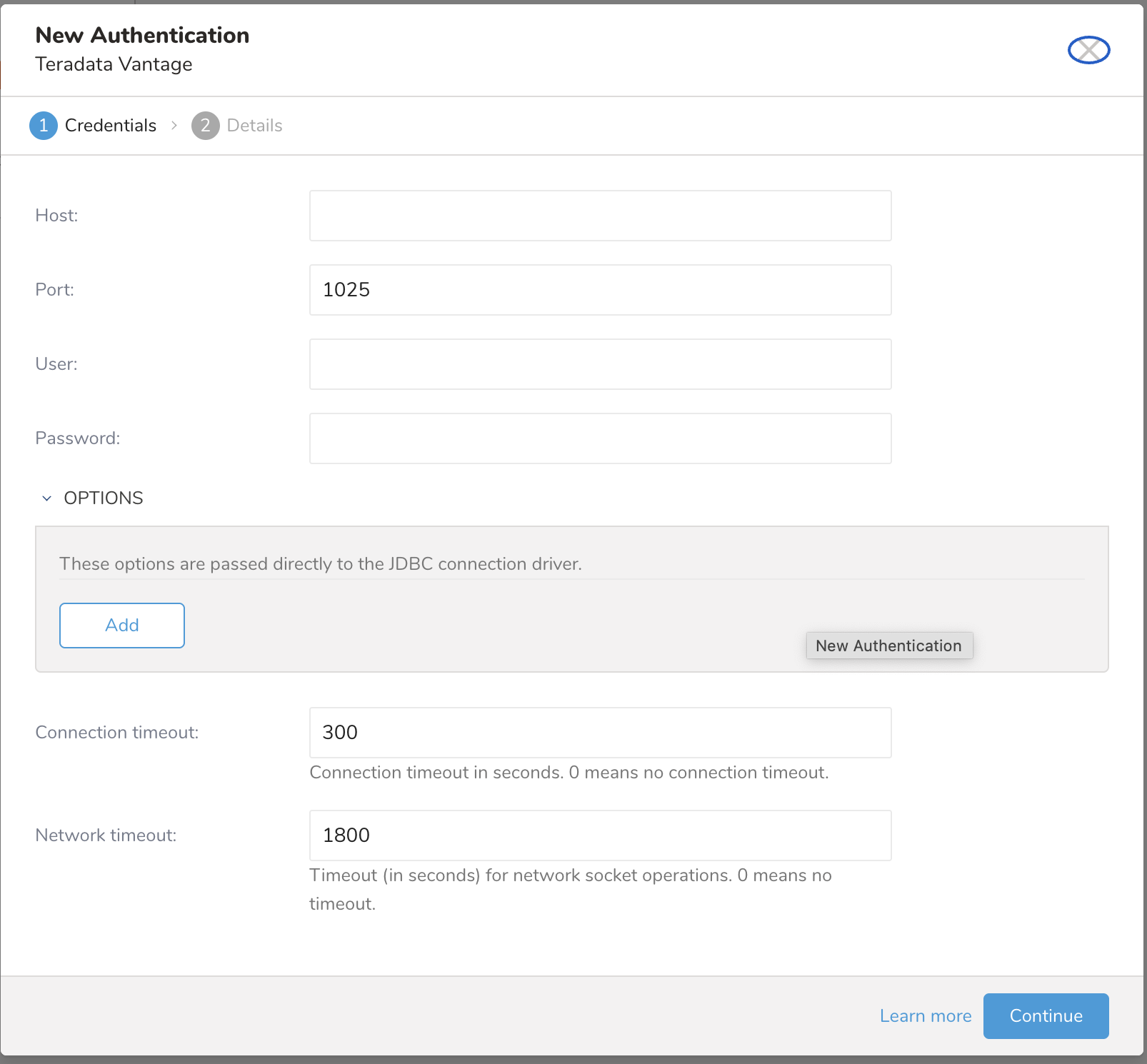
- Provide your configuration.
| Parameters | Description |
|---|---|
| Host | The host information of the teradata database, eg. an IP address. |
| Port | The connection port on the instance, Teradata default is 1025. |
| Username | Username to connect to the teradata database. |
| Password | Password to connect to the teradata database. |
| JDBC Connection options | Any special JDBC connections required by Teradata database. Please don't add these JDBC options because they will be ignored:
|
| connection timeout | Timeout (in seconds) for socket connection (default is 300). |
| Network timeout | Timeout (in seconds) for network socket operations (default is 1800). 0 means no timeout. |
- Type a name for your connection and select Done.
In this step, you create or reuse a query and configure the data connection in the query.
| TD/Teradata | string | double | long | boolean | timestamp | json |
|---|---|---|---|---|---|---|
| BYTEINT | yes | yes | yes | yes | no | no |
| SMALLINT | yes | yes | yes | yes | no | no |
| INTEGER | yes | yes | yes | yes | no | no |
| BIGINT | yes | yes | yes | yes | yes (EpochMilli) | no |
| FLOAT | yes | yes | yes | yes | no | no |
| DECIMAL | yes | yes | yes | yes | no | no |
| VARCHAR | yes | yes | yes | yes | yes | yes |
| CHAR | yes | yes | yes | yes | yes | yes |
| CLOB | yes | yes | yes | yes | yes | yes |
| DATE | yes (expected to be in format yyyy-MM-dd) | no | yes (expected to be EpochMilli) | no | yes | no |
| TIME* yes (expected to be in format HH:mm:[ss]) | no | yes (expected to be EpochMilli) | no | yes | no | |
| TIMESTAMP | yes (expected to be in format yyyy-MM-ddTHH:mm:ssZ) | no | yes (expected to be EpochMilli) | no | yes | no |
When types are incompatible, NULL values will be set. Other Teradata data types are unsupported.
Here is default mapping from the TD types to Teradata types in case the target table does not exist:
| TD results | Teradata |
|---|---|
| json | VARCHAR (1000) |
| string | VARCHAR (500) |
| double | FLOAT |
| long | BIGINT |
| timestamp | TIMESTAMP |
| boolean | BYTEINT |
You might want to set the different type as the default. Data Type Mapping is used to explicitly set a specific type (for example, VARCHAR) to a specific column.
If you use Data Mapping, the following is true:
Only applies when creating a new target table. The syntax for data type mapping parameter is: col_name_1:VARCHAR; col_name2:BIGINT. The column name must match the export result field name.
Go to the TD Console. Go to Data Workbench > Queries. Access the query that you plan to use to export data.
Select Export Results, located at the top of your query editor.
The Choose Integration dialog opens. You have two options when selecting a connection to use to export the results:
Use an existing connection Type the connection name in the search box to filter and select your connection.
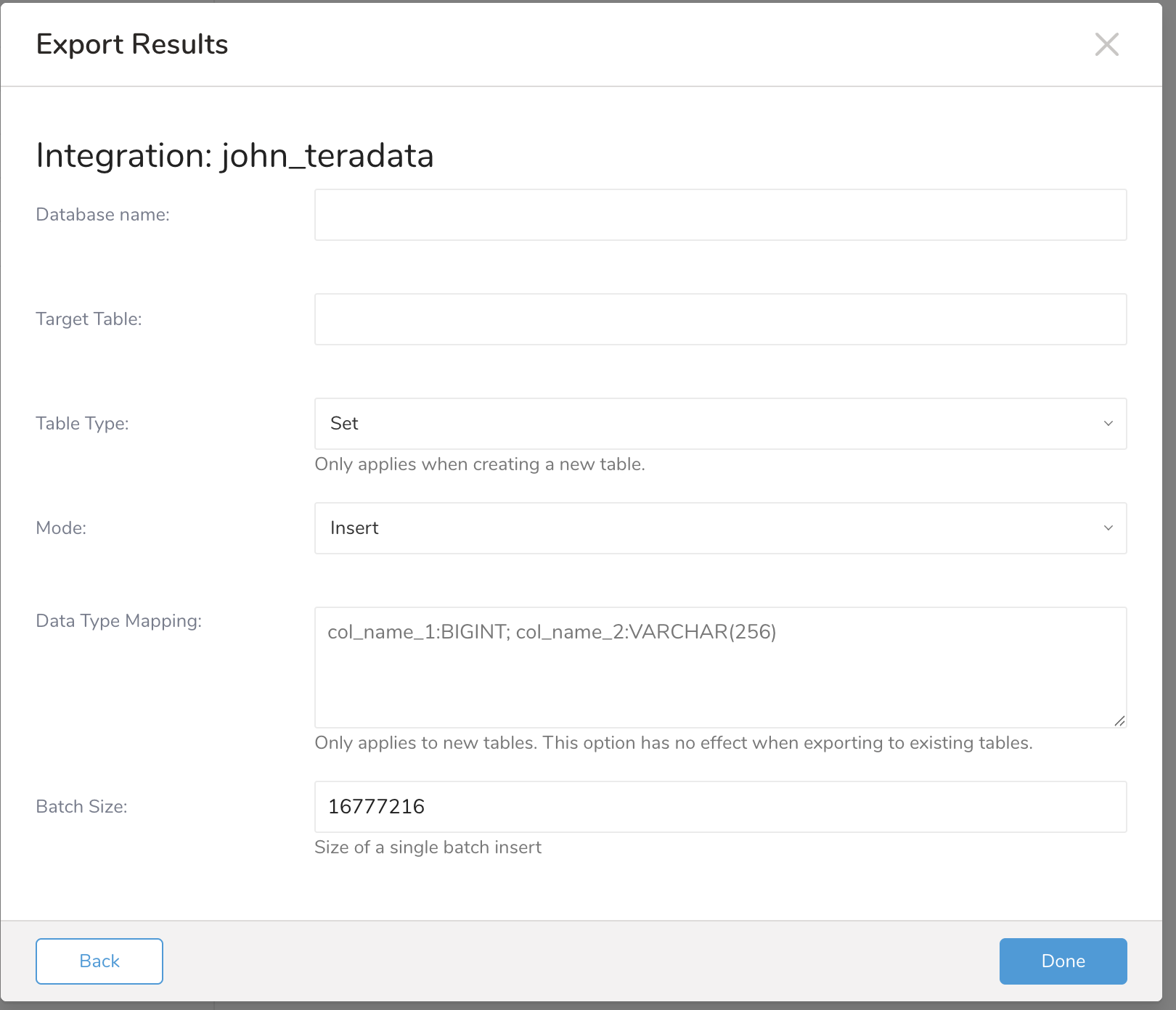
The dialog opens: Insert Mode
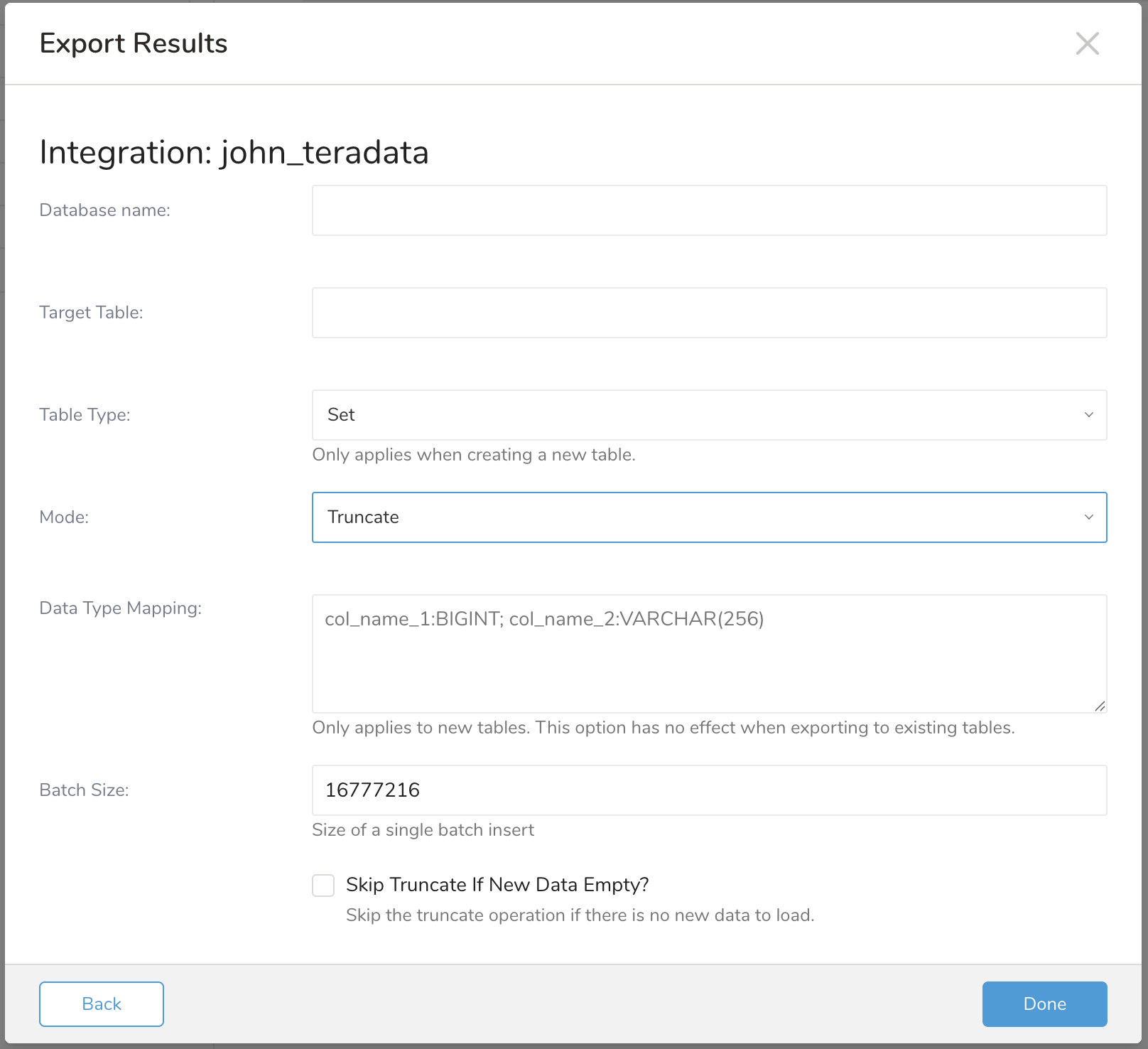
Truncate Mode
Merge Mode
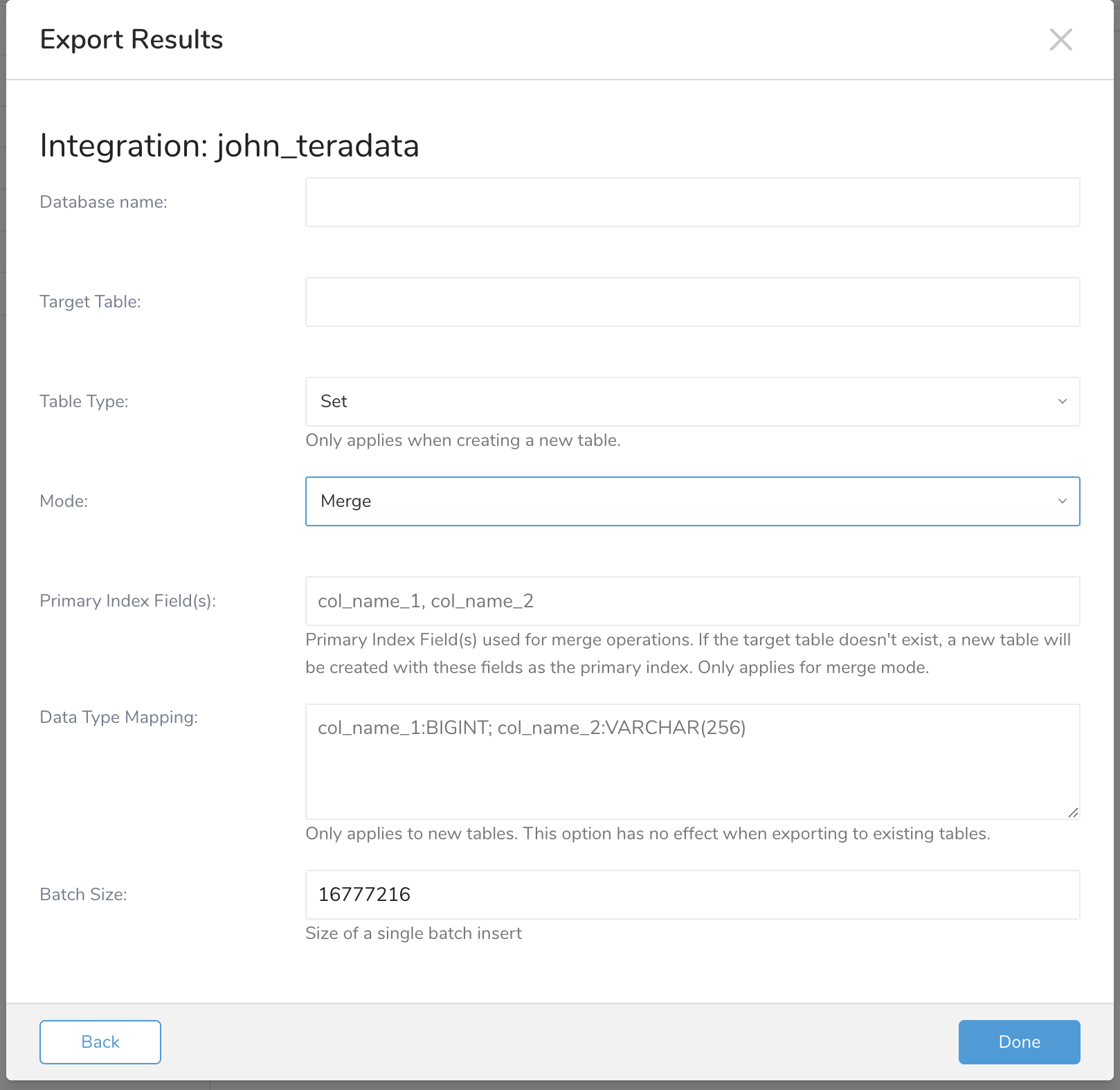
Create a new Teradata Connection. Select New Integration, and select Teradata from the Type dropdown. You see the following:
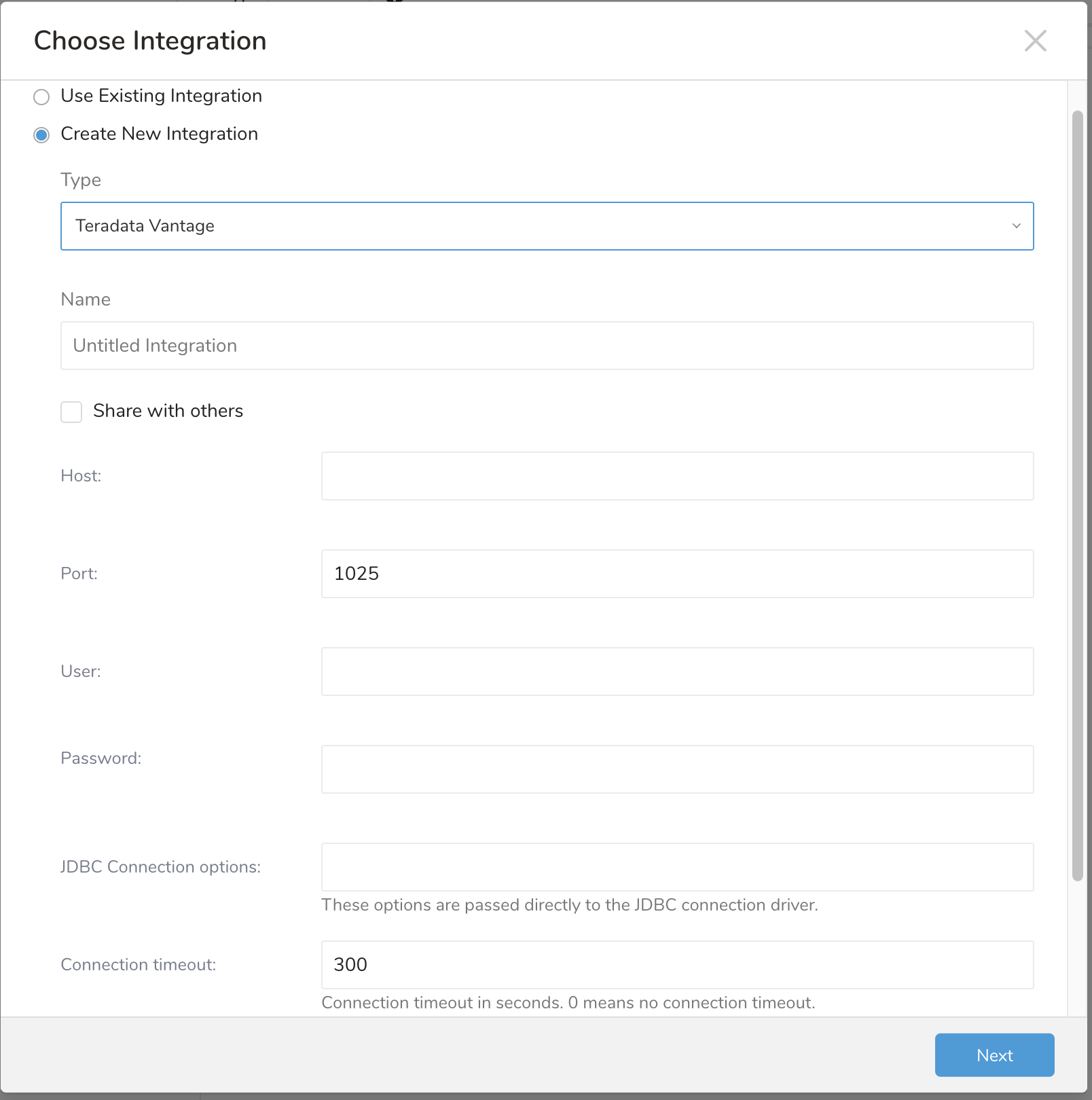
Fill in Teradata information for your new connection. Then click Next.
| Parameter | Description |
|---|---|
| Database name (required) | Database name |
| Target Table (required) | Target table name |
| Table Type (required) | Table Type. Only applies when creating a new table |
| Mode (required) | Operation mode |
| Primary Index Field(s) (required if mode is merge) | Primary Index Field(s) of target table |
| Data Type Mapping (Optional) | Map a target table field to specify data type. Only applies when create new table |
| Batch Size (Optional) | Size of a single batch insert |
| Skip Truncate If New Data Empty? (Optional) | Skip the truncate operation if there is no new data to load |
- You can create an activation in the Audience Studio to export segment data to this integration.
- You can use Scheduled Job with Result Export to periodically upload data to a target destination.
Within Treasure Workflow, you can specify the use of a data connector to export data.
Learn more at Using Workflows to Export Data with the TD Toolbelt.
For mode insert
_export:
   td:
      database: teradata

+teradata_export_task:
   td>: export.sql
   database: ${td.database}
   result_connection: new_created_teradata
   result_settings:
      type: teradata
      database: xxx
      table: xxxx
      table_type: set
      mode: insert
      column_options: col_1:VARCHAR(50), col_2:BIGINT
      batch_size: 16777216
For mode truncate
_export:
   td:
      database: teradata

+teradata_export_task:
   td>: export.sql
   database: ${td.database}
   result_connection: new_created_teradata
   result_settings:
      type: teradata
      database: xxx
      table: xxxx
      table_type: set
      mode: truncate
      column_options: col_1:VARCHAR(50), col_2:BIGINT
      batch_size: 16777216
      skip_truncate_if_empty: true
For mode merge
_export:
   td:
      database: teradata

+teradata_export_task:
   td>: export.sql
   database: ${td.database}
   result_connection: new_created_teradata
   result_settings:
      type: teradata
      database: xxx
      table: xxxx
      table_type: set
      mode: merge
      column_options: col_1:VARCHAR(50), col_2:BIGINT
      batch_size: 16777216
merge_keys: col_1,col_2You can also use CLI (Toolbelt) to export results to Teradata.
You need to specify the information for export to your Account using the --result option of the td query command. For more information about the td query command, refer to this article.
The format of the option is JSON, and the general structure is as follows.
For mode insert
{
   "type": "teradata",
   "host": "xxxx",
   "port": 1025,
   "user": "xxx",
   "password": "xxx",
   "options": "{\"xxxx\": \"xxxx\"}",
   "connect_timeout": 30,
   "socket_timeout": 60,
   "database": "xxx",
   "table": "xxxx",
   "table_type": "set",
   "mode": "insert",
   "column_options": "col_1:VARCHAR(50), col_2:BIGINT",
   "batch_size": 16777216
}
For mode truncate
{
   "type": "teradata",
   "host": "xxxx",
   "port": 1025,
   "user": "xxx",
   "password": "xxx",
   "options": "{\"xxxx\": \"xxxx\"}",
   "connect_timeout": 30,
   "socket_timeout": 60,
   "database": "xxx",
   "table": "xxxx",
   "table_type": "set",
   "mode": "truncate",
   "column_options": "col_1:VARCHAR(50), col_2:BIGINT",
   "batch_size": 16777216,
   "skip_truncate_if_empty": true
}
For mode merge
{
   "type": "teradata",
   "host": "xxxx",
   "port": 1025,
   "user": "xxx",
   "password": "xxx",
   "options": "{\"xxxx\": \"xxxx\"}",
   "connect_timeout": 30,
   "socket_timeout": 60,
   "database": "xxx",
   "table": "xxxx",
   "table_type": "set",
   "mode": "merge",
   "column_options": "col_1:VARCHAR(50), col_2:BIGINT",
   "batch_size": 16777216,
   "merge_keys": "col_1,col_2"
}| Name | Description | Type | Value | Default Value | Required |
|---|---|---|---|---|---|
| type | connector type | string | teradata | N/A | Yes |
| host | Teradata server host | string | N/A | N/A | Yes |
| port | Teradata server port | number | N/A | 1025 | Yes |
| options | Teradata JDBC option | string (in hash object format) | N/A | N/A | No |
| connect_timeout | Teradata logon timeout | number | N/A | 300 | No |
| socket_timeout | Network socket operations timeout | number | N/A | 1800 | No |
| database | Teradata database | string | N/A | N/A | Yes |
| table_type | Table Type | string | Support values: set, multiset | set | Yes |
| table | Table Name | string | N/A | N/A | Yes |
| mode | Mode | string | Support values: insert, truncate, merge | insert | Yes |
| column_options | Map a table field to specify data type | string | N/A | N/A | No |
| batch_size | Size of a single batch insert | number | N/A | 16777216 | No |
| merge_keys | Primary Index Field(s) of target table | string | N/A | N/A | Yes if mode merge |
| skip_truncate_if_empty | Skip the truncate operation if there is no new data to load | boolean | true/false | false | No |