Treasure Dataでは、Netsuiteからデータをインポートすることができます。
Netsuiteからデータをインポートするサンプルワークフローについては、Treasure Boxesをご覧ください。
- Treasure Dataの基礎知識
- NetSuiteアカウント
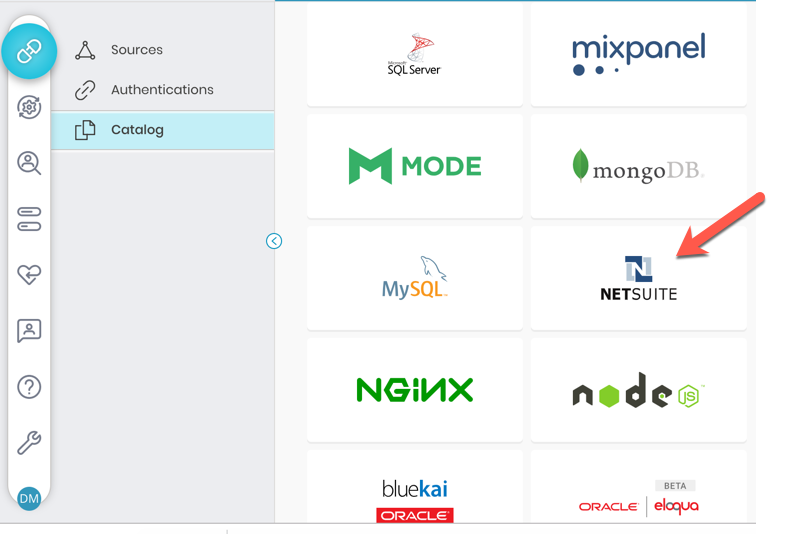
Integrations Hub > Catalogに移動し、検索します。NetSuiteを選択します。
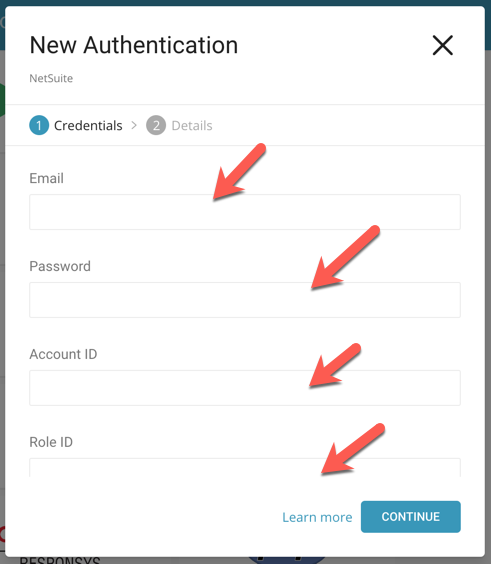
NetSuiteのログイン情報を入力します。Continueをクリックします。
接続名を入力します。
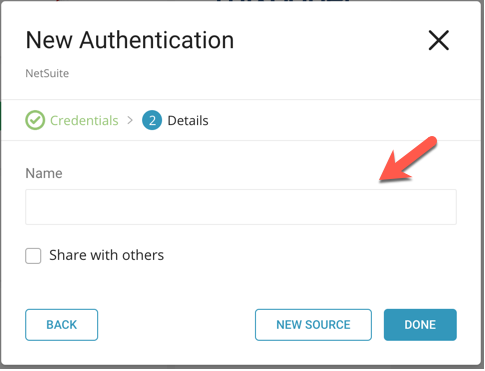
Doneをクリックします。
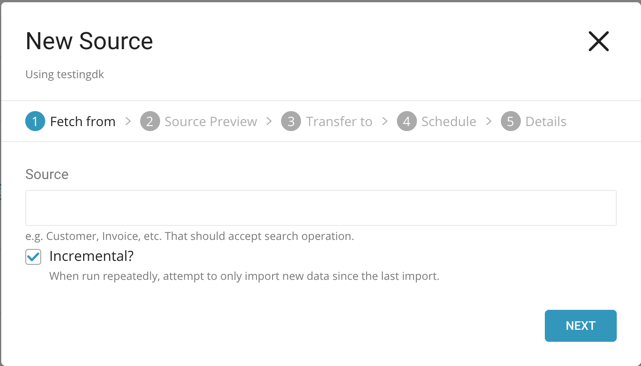
接続を作成すると、Authenticationsページに自動的に移動します。作成した接続を探し、New Sourceをクリックします。ソースの場所を指定します。
次に、データのプレビューが表示されます。エラーやレート制限時のスキップなど、データに変更を加える場合はAdvanced Settingsをクリックし、それ以外の場合はNextをクリックします。
データを転送するデータベースとテーブルを選択します。
Scheduleタブでは、1回限りの転送を指定するか、自動的に繰り返される転送をスケジュールすることができます。Once nowを選択した場合は、Start Transferをクリックします。**Repeat…**を選択した場合は、スケジュールオプションを指定してから、Schedule Transferをクリックします。
転送が実行されると、Data Workbench > Databasesで転送結果を確認できます。
これでデータの分析を開始する準備が整いました。
最新のTD Toolbeltをインストールします。
$ td --version
0.11.10まず、以下の例のように、メールアドレス、パスワード、アカウント、ロールを指定してseed.ymlを準備します。"replace"モードを使用します:
in:
  type: netsuite
  target: Customer
  email: YOUR_EMAIL_ADDRESS
  password: YOUR_PASSWORD
  account: YOUR_ACCOUNT_ID
  role: YOUR_ROLE_ID
  incremental: INCREMENTAL_OPTION #(optional, default: true)
  from_datetime: DATE TO LOAD DATA #(optional, Date value i.e 2017-07-24 15:43:11 +0700 to spefify the date that data)
  sandbox: false # set "sandbox: true" if you want to get sandbox account data
out:
  mode: replace
アカウントとロール(オプション)は、ナビゲーションバーのSetup –> Integration –> Web Service Preferenceで確認できます。
targetは、NetSuiteからダンプしたいオブジェクトのタイプを指定します。タイプはNetSuite公式ドキュメントに記載されていますが、一部のタイプはサポートされていません。Treasure Dataでテスト済みのターゲットタイプ: Customer、Invoice、CustomerPayment、CustomerRefund。
incrementalを指定すると、タスクは前回のインポート以降の新しいデータのみをインポートしようとします。
使用可能なoutモードの詳細については、付録を参照してください。
connector:guessを使用します。このコマンドは自動的にターゲットファイルを読み取り、ファイル形式をインテリジェントに推測します。
td connector:guess seed.yml -o load.ymlload.ymlを開くと、ファイル形式、エンコーディング、カラム名、タイプなど、推測されたファイル形式の定義が表示されます。
in:
  type: netsuite
  target: Customer
  email: YOUR_EMAIL_ADDRESS
  password: YOUR_PASSWORD
  account: YOUR_ACCOUNT_ID
  role: YOUR_ROLE_ID
  incremental: true
  sandbox: false
  columns:
  - {name: access_role_external_id, type: string}
  - {name: access_role_internal_id, type: long}
  - {name: access_role_name, type: string}
  - {name: access_role_type, type: string}
  - {name: comments, type: string}
  - {name: company_name, type: string}
  - {name: credit_hold_override, type: string}
  - {name: currency_external_id, type: string}
  - {name: currency_internal_id, type: long}
  - {name: currency_name, type: string}
  - {name: currency_type, type: string}
  - {name: custom_fields, type: json}
  - {name: date_created, type: timestamp, format: "%Y-%m-%d %H:%M:%S %z"}
  - {name: days_overdue, type: long}
  - {name: default_address, type: string}
  - {name: email, type: string}
  - {name: email_preference, type: string}
  - {name: email_transactions, type: boolean}
  - {name: entity_id, type: string}
  - {name: entity_status_external_id, type: string}
  - {name: entity_status_internal_id, type: long}
  - {name: entity_status_name, type: string}
  - {name: entity_status_type, type: string}
  - {name: fax, type: string}
  - {name: fax_transactions, type: boolean}
  - {name: give_access, type: boolean}
  - {name: is_budget_approved, type: boolean}
  - {name: is_inactive, type: boolean}
  - {name: is_person, type: boolean}
  - {name: language, type: string}
  - {name: last_modified_date, type: timestamp, format: "%Y-%m-%d %H:%M:%S %z"}
  - {name: phone, type: string}
  - {name: print_transactions, type: boolean}
  - {name: sales_rep_external_id, type: string}
  - {name: sales_rep_internal_id, type: long}
  - {name: sales_rep_name, type: string}
  - {name: sales_rep_type, type: string}
  - {name: stage, type: string}
  - {name: subsidiary_external_id, type: string}
  - {name: subsidiary_internal_id, type: long}
  - {name: subsidiary_name, type: string}
  - {name: subsidiary_type, type: string}
  - {name: taxable, type: boolean}
  - {name: terms_external_id, type: string}
  - {name: terms_internal_id, type: long}
  - {name: terms_name, type: string}
  - {name: terms_type, type: string}
  - {name: unbilled_orders, type: string}
  - {name: url, type: string}
filters: []
out: {more: replace}
exec: {}
previewコマンドを使用して、システムがファイルをどのように解析するかをプレビューできます。
$ td connector:preview load.ymlシステムがカラム名やタイプを予期しない形で検出した場合は、load.ymlを直接修正して再度プレビューしてください。
現在、Data Connectorは"boolean"、"long"、"double"、"string"、"timestamp"、"json"タイプの解析をサポートしています。
最後に、ロードジョブを送信します。データサイズによっては数時間かかる場合があります。ユーザーは、データが保存されるデータベースとテーブルを指定する必要があります。
td connector:issue load.yml \
--database td_sample_db \
--table td_sample_table上記のコマンドは、すでに*database(td_sample_db)とtable(td_sample_table)*を作成していることを前提としています。Treasure Dataにデータベースまたはテーブルが存在しない場合、このコマンドは成功しないため、データベースとテーブルを手動で作成するか、td connector:issueコマンドで--auto-create-tableオプションを使用してデータベースとテーブルを自動作成してください:
td connector:issue load.yml \
--database td_sample_db \
--table td_sample_table \
--time-column created_at --auto-create-table
"--time-column"オプションを使用して、Time Format列を"Partitioning Key"に割り当てることができます。
定期的なNetSuiteインポートのために、定期的なData Connector実行をスケジュールできます。高可用性を実現するため、スケジューラの配布と運用には細心の注意を払っています。この機能を使用することで、ローカルデータセンターでcronデーモンを使用する必要がなくなります。
incremental:をtrueに設定し、以下の例のようにfrom_dateを指定することで、データを増分的にロードできます:
in:
  type: netsuite
  target: Customer
  email: YOUR_EMAIL_ADDRESS
  password: YOUR_PASSWORD
  account: YOUR_ACCOUNT_ID
  role: YOUR_ROLE_ID
  incremental: INCREMENTAL_OPTION #(optional, default: true)
  from_datetime: DATE TO LOAD DATA #(optional, Date value i.e 2017-07-24 15:43:11 +0700 to spefify the date that data)
  sandbox: false # set "sandbox: true" if you want to get sandbox account data
out:
  mode: replace
from_datetimeを省略すると、利用可能なすべてのレコード(データ)が取得されます。timestamp、timestamptz(タイムゾーン付きtimestamp)のみがサポートされています。
td connector:createコマンドを使用して新しいスケジュールを作成できます。スケジュールの名前、cron形式のスケジュール、データが保存されるデータベースとテーブル、Data Connector設定ファイルが必要です。
td connector:create \
    daily_netsuite_import \
    "10 0 * * *" \
    td_sample_db \
    td_sample_table \
load.ymlcronパラメータは、@hourly、@daily、@monthlyの3つの特別なオプションも受け入れます。デフォルトでは、スケジュールはUTCタイムゾーンで設定されます。-tまたは--timezoneオプションを使用して、タイムゾーンでスケジュールを設定できます。--timezoneオプションは、'Asia/Tokyo'、'America/Los_Angeles'などの拡張タイムゾーン形式のみをサポートしています。PST、CSTなどのタイムゾーン略語は*サポートされておらず*、予期しないスケジュールになる可能性があります。
以下のリストは、使用可能なすべてのオプションの詳細を示しています:
target: Target object e.g. Customer, Invoice, etc. That should accept search operation. (string, required)
email: Email address. (string, required)
password: Password. (string, required)
account: Account ID. (string, required)
role: Role ID. (string, default: nil)
sandbox: Use sandbox environment if true. (bool, default: false)
from_datetime: Fetch data after this time. (string, default: nil)