# Using the TD Javascript Consent UI Add on
This add-on provides an example of how you can use TD JavaScript SDK Consent Extension APIs with your UI to build fully customizable consent management. It enables you to create a cookie banner and a web form for managing consent preferences, as shown in the following examples.
* [Banner](#banner)
* [Form](#form)
* [Supported Browsers](#supported-browsers)
* [Installing the Add-On](#installing-the-add-on)
* [Polyfill](#polyfill)
* [npm](#npm)
* [Configuring the UI](#configuring-the-ui)
* [showBanner()](#showbanner)
* [openConsentManager](#openconsentmanager)
* [Full example](#full-example)
### Banner
A small overlay displays at the top of your website to let users know that the website is using cookies (and other similar technologies) to collect data for improving user experiences. Users can choose to adjust their preferences as they want.

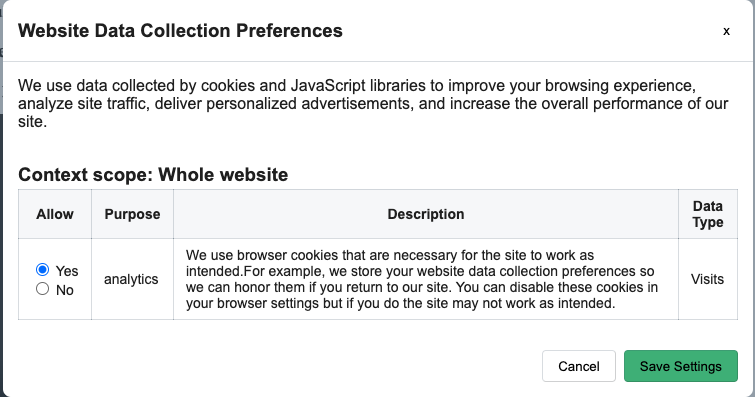
### Form
A web form for managing consent preferences
### Supported Browsers
| IE/Edge | Chrome | Firefox | Safari |
| --- | --- | --- | --- |
| IE11Edge 15 and higher | 60 and higher | 60 and higher | 9 and higher |
# Installing the Add-On
This add-on depends on [Treasure Data JavaScript SDK](https://github.com/treasure-data/td-js-sdk) to work properly, you need to load Treasure Data JavaScript SDK into your website first. For more information, see [how to install td-js-sdk](https://github.com/treasure-data/td-js-sdk#installing).
Add the following JavaScript snippet to your website. We recommend putting it at the end of the `body` tag.
```html
```
When the script finishes loading, an object `TDConsentManager` is available in the browser’s global context. You can use that object to set up your configurations accordingly.
### Polyfill
The add-on uses Web Component to build the UIs and includes the following script snippet in your `` tag.
```html
>
```
Some features might not be available in legacy browsers such as Internet Explorer 11. This loader dynamically loads the minimum polyfill bundle, using feature detection.
For more information, see [Web Component loader](https://unpkg.com/@webcomponents/webcomponentsjs/webcomponents-loader.js).
### npm
This NPM package works in **browser only.**
```bash
npm install --save td-consent-ui
```
Yarn
```bash
yarn add td-consent-ui
```
```javascript
import TDConsentManager from 'td-consent-ui'
// or
const TDConsentManager = require('td-consent-ui')
```
## Configuring the UI
When the scripts are ready, you can start configuring the UIs.
```javascript
TDConsentManager.setConfig({
sdk: td, // Treasure Data JavaScript SDK instance
container: 'selector',
bannerContent: 'banner content',
bannerSubContent: 'banner sub content',
dialogTitle: 'dialog title',
dialogDescription: 'description',
cancelButtonText: 'Cancel',
saveButtonText: 'Save'
})
```
| **Parameter** | **Type** | **Description** |
| --- | --- | --- |
| **sdk** | Object (required) | Treasure Data JavaScript SDK instance |
| **container** | String/Object (optional) | Element selector or DOM object.Default `document.body` |
| **bannerContent** | String (required) | The banner's content |
| **bannerSubContent** | String (required) | Text of the link to the web form |
| **dialogTitle** | String (optional) | Form's title |
| **dialogDescription** | String (optional) | Form's description |
| **cancelButtonText** : | String (optional) | Cancelling button's text.Default `Cancel` |
| **saveButtonText** | String (optional) | Saving button's text.Default `Save Settings` |
After finishing the setup, you can use `showBanner` to show the banner or you can use `openConsentManager` to show the web form and let users adjust their preferences
### showBanner()
Show a small overlay on top of the website to let users know that you are collecting their data to improve performance and user experience.
```javascript
TDConsentManager.showBanner()
```
### openConsentManager
Show a web form for managing consent preferences. You can show the web form with your additional consent preferences.
```javascript
TDConsentManager.openConsentManager(options)
```
Optionally, you can use the following parameters to customize your consent preferences.
| **Parameter** | **Type** | **Description** |
| --- | --- | --- |
| **options.customConsents** | Object (optional) | Object - Additional consents |
```javascript
TDConsentManager.openConsentManager({
customConsents: {
'marketing': { // <--- purpose
description: 'description of consent',
datatype: 'Attibutes',
status: 'given | refused',
expiry_date: 'YYYY-MM-DD',
context_id: 'context_id'
},
'storing': { // <--- purpose
description: 'description',
datatype: 'datatype',
status: 'given | refused',
expiry_date: 'YYYY-MM-DD',
context_id: 'context_id'
},
'recommendations': { // <--- purpose
description: 'description',
datatype: 'datatype',
status: 'given | refused',
expiry_date: 'YYYY-MM-DD',
context_id: 'context_id'
}
}
})
```
## Full example
```javascript
// ************
// script.js
// ************
!(function () {
function successCallback (preferences) {
var analytics = preferences['analytics'] || {}
if (analytics.status === 'given') {
td.setSignedMode()
td.unblockEvents()
} else if (analytics.status === 'refused') {
td.setAnonymousMode()
td.blockEvents()
}
td.trackPageview()
}
var td = new Treasure({
database: 'database_name',
writeKey: '1/xxxxxxxxxx',
host: 'in.treasuredata.com',
consentManager: {
successConsentCallback: successCallback,
expiredConsentsCallback: function (consents) {
console.log(consents)
},
failureConsentCallback: function (error) {
console.log(error)
}
}
})
td.ready(function () {
// setup the UIs
TDConsentManager.setConfig({
sdk: td,
bannerContent: 'We use cookies (and other similar technologies) to collect data to improve your experience on our site.',
bannerSubContent: 'You can change your preferences at any time'
})
// check if the preferences exists
// otherwise don't do the setup again.
if (!td.getPreferences()) {
var contextId = td.addContext({
brand: 'All',
domain_name: '',
collection_type: 'Whole website',
collection_point_id: 'whole_website'
})
td.addConsents({
analytics: {
description: 'Consent description',
status: td.consentManager.states.GIVEN,
datatype: 'Visits',
context_id: contextId,
expiry_date: '2050-01-01'
}
})
// You might want to save contexts and consents
// td.saveContexts()
// td.saveConsents()
TDConsentManager.showBanner()
}
})
var editPreference = document.querySelector('.edit-preferences')
editPreference.addEventListener('click', function (event) {
event.preventDefault()
TDConsentManager.openConsentManager()
})
})()
```
```html
Website Title
...
>
```