# Configuring TD Agent for High Availability
You can configure a high availability Treasure Agent (td-agent) to operate in your high-traffic websites.
* [Prerequisites](#prerequisites)
* [Message Delivery Semantics](#message-delivery-semantics)
* [Network Topology](#network-topology)
* [Log Forwarder Configuration](#log-forwarder-configuration)
* [Log Aggregator Configuration](#log-aggregator-configuration)
* [Failure Case Scenarios](#failure-case-scenarios)
* [Forwarder Failure](#forwarder-failure)
* [Aggregator Failure](#aggregator-failure)
* [What's Next?](#whats-next)
# Prerequisites
* Basic knowledge of Treasure Data.
* Basic knowledge of td-agent.
**Need mission critical** configuration of td-agent? Leverage our [Scalability Consultation Service](/support/consultation).
# Message Delivery Semantics
td-agent is designed primarily for event-log delivery systems.
In such systems, several delivery guarantees are possible:
* *At most once* : Messages are immediately transferred. If the transfer succeeds, the message is never sent out again. However, many failure scenarios can cause lost messages (meaning, no more write capacity)
* *At least once* : Each message is delivered at least once. In failure cases, messages might be delivered twice.
* *Exactly once* : Each message is delivered once and only once.
If the system “can’t lose a single event”, and must also transfer “ *exactly once* ”, then the system must stop processing events when it runs out of write capacity. The proper approach is to use synchronous logging and return errors when the event cannot be accepted.
That’s why *td-agent guarantees ‘At most once’ transfer*. To collect massive amounts of data without impacting application performance, a data logger must transfer data asynchronously. Performance improves at the cost of potential delivery failure.
However, most failure scenarios are preventable.
# Network Topology
To configure td-agent for high availability, we assume that your network consists of ‘ *log forwarders* ’ and ‘ *log aggregators* ’.
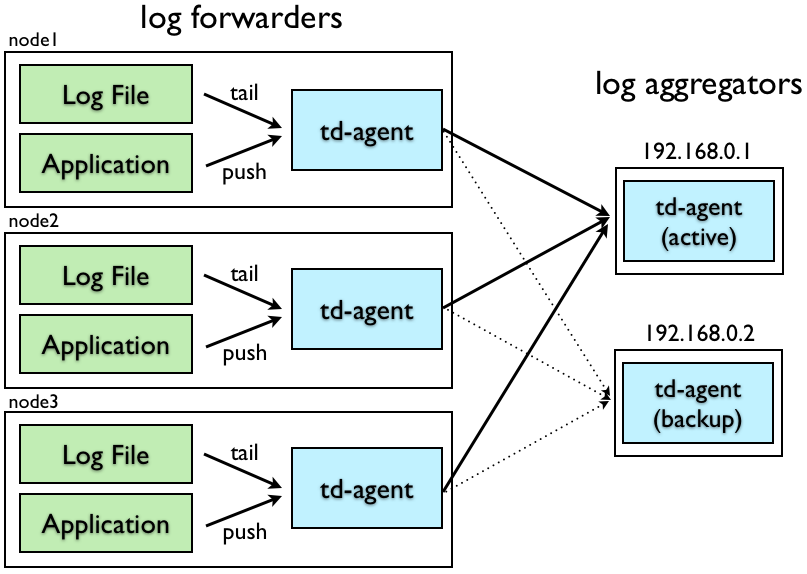
‘ *log forwarders* ’ are typically installed on every node to receive local events. When an event is received, they forward it to the ‘log aggregators’ through the network.
‘ *log aggregators* ’ are daemons that continuously receive events from the log forwarders. They buffer the events and periodically upload the data into the cloud.
td-agent can act as either a log forwarder or a log aggregator, depending on its configuration. The following information describes the setups. We assume that the active log aggregator has an IP address ‘192.168.0.1’ and that the backup has an IP address ‘192.168.0.2’.
# Log Forwarder Configuration
Add the following lines to the /etc/td-agent/td-agent.conf file for your log forwarders. The following example shows how you can configure your log forwarders to transfer logs to log aggregators.
```conf
# TCP input
type forward
port 24224
# HTTP input
type http
port 8888
# Log Forwarding
type forward
host 192.168.0.1
port 24224
# use secondary host
host 192.168.0.2
port 24224
standby
# use tcp for heartbeat
heartbeat_type tcp
# use longer flush_interval to reduce CPU usage.
# note that this is a trade-off against latency.
flush_interval 10s
# use multi-threading to send buffered data in parallel
num_threads 8
# expire DNS cache (required for cloud environment such as EC2)
expire_dns_cache 600
# use file buffer to buffer events on disks.
buffer_type file
buffer_path /var/log/td-agent/buffer/forward
# in case buffer becomes full, have local backup
type file
path /var/log/td-agent/buffer/secondary
compress gzip
```
When the active aggregator (192.168.0.1) dies, the logs are sent to the backup aggregator (192.168.0.2). If both servers die, the logs are buffered on-disk at the corresponding forwarder nodes.
# Log Aggregator Configuration
Add the following lines to the /etc/td-agent/td-agent.conf file for your log aggregators. The input source for the log transfer is TCP.
```conf
# TCP input
type forward
port 24224
# Treasure Data output
type tdlog
endpoint api.treasuredata.com
apikey YOUR_API_KEY_HERE
auto_create_table
buffer_type file
buffer_path /var/log/td-agent/buffer/td
use_ssl true
num_threads 8
# in case buffer becomes full, have local backup
type file
path /var/log/td-agent/buffer/secondary
compress gzip
```
The incoming logs are buffered, then periodically uploaded into the cloud. If the upload fails, the logs are stored on the local disk until the retransmission succeeds.
If you want to write logs to a file, in addition to Treasure Data, use the ‘copy’ output. The following code is an example configuration for writing logs to TD, file, and MongoDB simultaneously.
```conf
type copy
type tdlog
endpoint api.treasuredata.com
apikey YOUR_API_KEY_HERE
auto_create_table
buffer_type file
buffer_path /var/log/td-agent/buffer/td
use_ssl true
type file
path /var/log/td-agent/myapp.%Y-%m-%d-%H.log
localtime
type mongo_replset
database db
collection logs
nodes host0:27017,host1:27018,host2:27019
```
# Failure Case Scenarios
## Forwarder Failure
When a log forwarder receives events from applications, the events are first written into a disk buffer (specified by buffer_path). After every flush_interval, the buffered data is forwarded to aggregators.
This process is inherently robust against data loss. If a log forwarder’s td-agent process dies, the buffered data is properly transferred to its aggregator after it restarts. If the network between forwarders and aggregators breaks, the data transfer is automatically retried. That being said, possible message loss scenarios do exist:
* The process dies immediately after receiving the events, but before writing them into the buffer.
* The forwarder’s disk is broken, and the file buffer is lost.
## Aggregator Failure
When log aggregators receive events from log forwarders, the events are first written into a disk buffer (specified by buffer_path). After every flush_interval, the buffered data is uploaded into the cloud.
This process is inherently robust against data loss. If a log aggregator’s td-agent process dies, the data from the log forwarder is properly retransferred after it restarts. If the network between aggregators and the cloud breaks, the data transfer is automatically retried.
Possible message loss scenarios are as follows:
* The process dies immediately after receiving the events, but before writing them into the buffer.
* The aggregator’s disk is broken, and the file buffer is lost.
# What’s Next?
For further information on managing data with td-agent, refer to the documents following documents:
* [Monitoring td-agent](/products/customer-data-platform/integration-hub/streaming/td-agent/monitoring-td-agent)
* [Fluentd Documentation](https://docs.fluentd.org) (td-agent is open-sourced as `Fluentd`)
* [td-agent Change Log](/products/customer-data-platform/integration-hub/streaming/td-agent/td-agent-logs-sent-to-treasure-data)