Skip to content
Last updated

Use TD Javascript SDK to Fetch Profile Segment Ids

You can apply the segment IDs in your tools to push highly personalized communications to profiles or control what is shown to profiles in the specified segments. Typically, this requires that you work with our support or services team.

You add Treasure Data SDK script into your client by including the following:

  • API Request

    • audienceToken: List of Profiles API Tokens

    • keys: List of key columns

  • API Response

    • values: Object of values, attributes, key, and audienceId

Your tool (such as Optimizely or Google Chrome Developer Tools) accesses the client to retrieve the segment IDs.

  1. Copy the tokens that you created and add them to your JS SDK script as follows.
<!-- Treasure Data -->
<script type="text/javascript"> !function(t,e){if(void 0===e[t]){e[t]=function(){e[t].clients.push(this),this._init=[Array.prototype.slice.call(arguments)]},e[t].clients=[];for(var r=function(t){return function(){return this["_"+t]=this["_"+t]||[],this["_"+t].push(Array.prototype.slice.call(arguments)),this}},s=["addRecord","blockEvents","fetchServerCookie","fetchGlobalID","fetchUserSegments","resetUUID","ready","setSignedMode","setAnonymousMode","set","trackEvent","trackPageview","trackClicks","unblockEvents"],n=0;n<s.length;n++){var c=s[n];e[t].prototype[c]=r(c)}var o=document.createElement("script");o.type="text/javascript",o.async=!0,o.src=("https:"===document.location.protocol?"https:":"http:")+"//cdn.treasuredata.com/sdk/3.1/td.min.js";var a=document.getElementsByTagName("script")[0];a.parentNode.insertBefore(o,a)}}("Treasure",this);
</script>
<script>
  var td = new Treasure({...})

  var successCallback = function (values) {
    /* values format => [... {
      key: {
        [key]:value
      },
      values: ["1234"],
      attributes: {
        age: 30
      },

    } ... ]*/
    // celebrate();
  };

  var errorCallback = function (error) {
    // cry();
  };

  td.fetchUserSegments({
    audienceToken: ['YOUR_PROFILES_API_TOKEN_1', 'YOUR_PROFILES_API_TOKEN_2'],
    keys: {
      someKey: 'someValue',
      someOtherKey: 'someOtherValue',
    }
  }, successCallback, errorCallback)
</script>

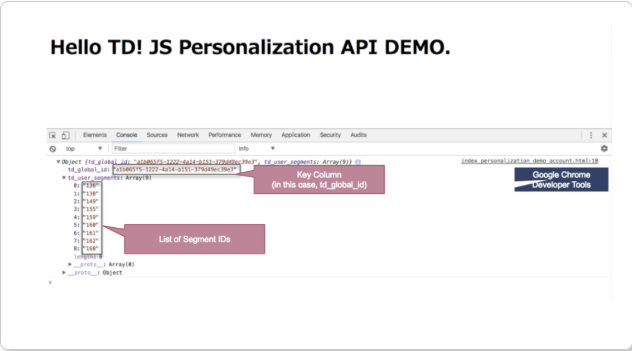
Example Profile Output

Here’s the example output with Google Chrome Developer Tools.