# TD Javascript Consent UI Add onの使用
このadd-onは、UIでTD JavaScript SDK Consent Extension APIを使用して、完全にカスタマイズ可能なconsent managementを構築する方法の例を提供します。以下の例に示すように、cookie bannerとconsent preferenceを管理するためのweb formを作成できます。
* [Banner](#banner)
* [Form](#form)
* [サポートされているBrowser](#supported-browsers)
* [Add-Onのインストール](#installing-the-add-on)
* [Polyfill](#polyfill)
* [npm](#npm)
* [UIの設定](#configuring-the-ui)
* [showBanner()](#showbanner)
* [openConsentManager](#openconsentmanager)
* [完全な例](#full-example)
### Banner
ウェブサイトの上部に小さなoverlayが表示され、ウェブサイトがユーザー体験を向上させるためにデータを収集するためにcookie(および他の類似技術)を使用していることをユーザーに知らせます。ユーザーは希望に応じてpreferenceを調整できます。

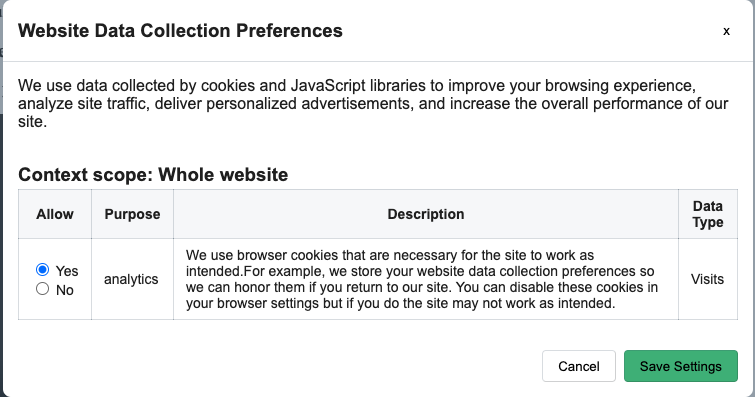
### Form
consent preferenceを管理するためのweb form
### サポートされているBrowser
| IE/Edge | Chrome | Firefox | Safari |
| --- | --- | --- | --- |
| IE11Edge 15以降 | 60以降 | 60以降 | 9以降 |
# Add-Onのインストール
このadd-onは、正しく動作するために[Treasure Data JavaScript SDK](https://github.com/treasure-data/td-js-sdk)に依存しています。最初にTreasure Data JavaScript SDKをウェブサイトにロードする必要があります。詳細については、[td-js-sdkのインストール方法](https://github.com/treasure-data/td-js-sdk#installing)を参照してください。
以下のJavaScriptスニペットをウェブサイトに追加します。`body`タグの最後に配置することをお勧めします。
```html
```
scriptのロードが完了すると、browserのglobal contextで`TDConsentManager`オブジェクトが使用可能になります。そのオブジェクトを使用して、設定を適切にセットアップできます。
### Polyfill
add-onはWeb Componentを使用してUIを構築し、``タグに以下のscriptスニペットを含めます。
```html
>
```
Internet Explorer 11などのlegacy browserでは、一部の機能が使用できない場合があります。このloaderは、機能検出を使用して最小限のpolyfill bundleを動的にロードします。
詳細については、[Web Component loader](https://unpkg.com/@webcomponents/webcomponentsjs/webcomponents-loader.js)を参照してください。
### npm
このNPM packageは**browserのみ**で動作します。
```bash
npm install --save td-consent-ui
```
Yarn
```bash
yarn add td-consent-ui
```
```javascript
import TDConsentManager from 'td-consent-ui'
// or
const TDConsentManager = require('td-consent-ui')
```
## UIの設定
scriptの準備ができたら、UIの設定を開始できます。
```javascript
TDConsentManager.setConfig({
sdk: td, // Treasure Data JavaScript SDK instance
container: 'selector',
bannerContent: 'banner content',
bannerSubContent: 'banner sub content',
dialogTitle: 'dialog title',
dialogDescription: 'description',
cancelButtonText: 'Cancel',
saveButtonText: 'Save'
})
```
| **パラメータ** | **タイプ** | **説明** |
| --- | --- | --- |
| **sdk** | Object(required) | Treasure Data JavaScript SDKインスタンス |
| **container** | String/Object(optional) | Element selectorまたはDOMオブジェクト。デフォルト`document.body` |
| **bannerContent** | String(required) | bannerのcontent |
| **bannerSubContent** | String(required) | web formへのlinkのtext |
| **dialogTitle** | String(optional) | Formのタイトル |
| **dialogDescription** | String(optional) | Formの説明 |
| **cancelButtonText** : | String(optional) | Cancellingボタンのtext。デフォルト`Cancel` |
| **saveButtonText** | String(optional) | Savingボタンのtext。デフォルト`Save Settings` |
セットアップが完了したら、`showBanner`を使用してbannerを表示するか、`openConsentManager`を使用してweb formを表示して、ユーザーがpreferenceを調整できるようにできます
### showBanner()
ウェブサイトの上部に小さなoverlayを表示して、パフォーマンスとユーザー体験を向上させるためにデータを収集していることをユーザーに知らせます。
```javascript
TDConsentManager.showBanner()
```
### openConsentManager
consent preferenceを管理するためのweb formを表示します。追加のconsent preferenceと共にweb formを表示できます。
```javascript
TDConsentManager.openConsentManager(options)
```
オプションで、以下のパラメータを使用してconsent preferenceをカスタマイズできます。
| **パラメータ** | **タイプ** | **説明** |
| --- | --- | --- |
| **options.customConsents** | Object(optional) | Object - 追加のconsent |
```javascript
TDConsentManager.openConsentManager({
customConsents: {
'marketing': { // <--- purpose
description: 'description of consent',
datatype: 'Attibutes',
status: 'given | refused',
expiry_date: 'YYYY-MM-DD',
context_id: 'context_id'
},
'storing': { // <--- purpose
description: 'description',
datatype: 'datatype',
status: 'given | refused',
expiry_date: 'YYYY-MM-DD',
context_id: 'context_id'
},
'recommendations': { // <--- purpose
description: 'description',
datatype: 'datatype',
status: 'given | refused',
expiry_date: 'YYYY-MM-DD',
context_id: 'context_id'
}
}
})
```
## 完全な例
```javascript
// ************
// script.js
// ************
!(function () {
function successCallback (preferences) {
var analytics = preferences['analytics'] || {}
if (analytics.status === 'given') {
td.setSignedMode()
td.unblockEvents()
} else if (analytics.status === 'refused') {
td.setAnonymousMode()
td.blockEvents()
}
td.trackPageview()
}
var td = new Treasure({
database: 'database_name',
writeKey: '1/xxxxxxxxxx',
host: 'in.treasuredata.com',
consentManager: {
successConsentCallback: successCallback,
expiredConsentsCallback: function (consents) {
console.log(consents)
},
failureConsentCallback: function (error) {
console.log(error)
}
}
})
td.ready(function () {
// setup the UIs
TDConsentManager.setConfig({
sdk: td,
bannerContent: 'We use cookies (and other similar technologies) to collect data to improve your experience on our site.',
bannerSubContent: 'You can change your preferences at any time'
})
// check if the preferences exists
// otherwise don't do the setup again.
if (!td.getPreferences()) {
var contextId = td.addContext({
brand: 'All',
domain_name: '',
collection_type: 'Whole website',
collection_point_id: 'whole_website'
})
td.addConsents({
analytics: {
description: 'Consent description',
status: td.consentManager.states.GIVEN,
datatype: 'Visits',
context_id: contextId,
expiry_date: '2050-01-01'
}
})
// You might want to save contexts and consents
// td.saveContexts()
// td.saveConsents()
TDConsentManager.showBanner()
}
})
var editPreference = document.querySelector('.edit-preferences')
editPreference.addEventListener('click', function (event) {
event.preventDefault()
TDConsentManager.openConsentManager()
})
})()
```
```html
Website Title
...
>
```