# Rails Apps Import Integration
Treasure Data provides [td-agent](https://docs.treasuredata.com/smart/project-product-documentation/about-treasure-data-s-server-side-agent) to collect server-side logs and events and to seamlessly import the data from Ruby on Rails applications.
## Prerequisites
- Basic knowledge of Ruby, Rails, Gems, and Bundler.
- Basic knowledge of Treasure Data.
- Ruby 2.0 or higher (for local testing).
## Installing td-agent
Install `td-agent`on your application servers. td-agent sits within your application servers, focusing on uploading application logs to the cloud.
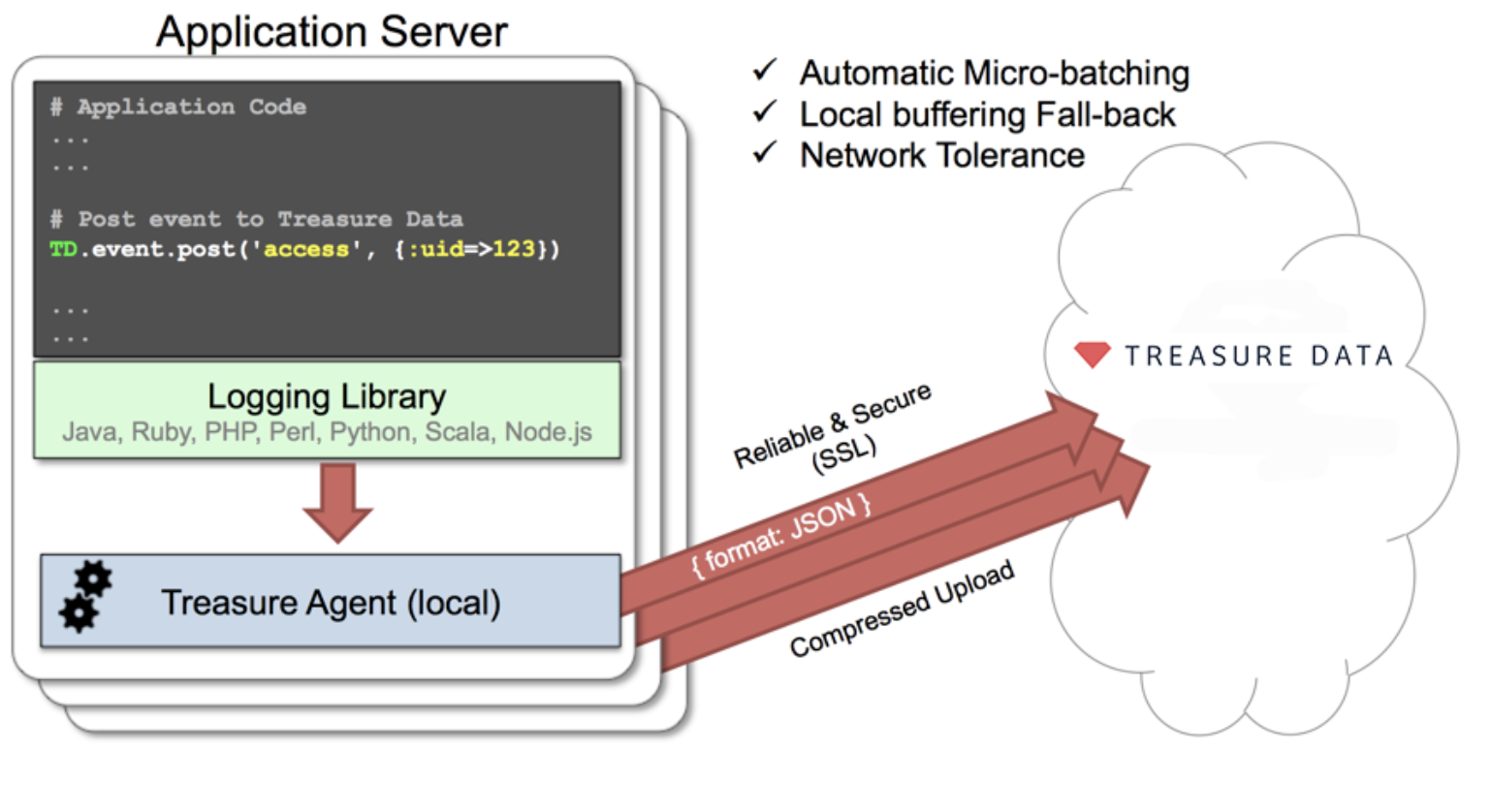
The [td-logger-ruby](http://github.com/treasure-data/td-logger-ruby) library enables Ruby on Rails applications to post records to their local td-agent. td-agent, in turn, receives the records, buffers them, and uploads the data to the cloud every 5 minutes. Because the daemon runs on a local node, the logging latency is negligible.
## td-agent Install Options
To install `td-agent`, run one of the following commands based on your environment. The agent program is installed automatically by using the package management software for each platform like rpm/deb/dmg.
### RHEL/CentOS 5,6,7
```
$ curl -L https://toolbelt.treasuredata.com/sh/install-redhat-td-agent3.sh | sh
```
### Ubuntu and Debian
```
# 16.04 Xenial (64bit only)
$ curl -L https://toolbelt.treasuredata.com/sh/install-ubuntu-xenial-td-agent3.sh | sh
# 14.04 Trusty
$ curl -L https://toolbelt.treasuredata.com/sh/install-ubuntu-trusty-td-agent3.sh | sh
# 12.04 Precise
$ curl -L https://toolbelt.treasuredata.com/sh/install-ubuntu-precise-td-agent3.sh | sh
# Debian Stretch (64-bit only) $ curl -L https://toolbelt.treasuredata.com/sh/install-debian-stretch-td-agent3.sh | sh
# Debian Jessie (64-bit only)
$ curl -L https://toolbelt.treasuredata.com/sh/install-debian-jessie-td-agent3.sh | sh
# Debian Squeeze (64-bit only)
$ curl -L https://toolbelt.treasuredata.com/sh/install-debian-squeeze-td-agent2.sh | sh
```
### Amazon Linux
You can choose Amazon Linux 1 or Amazon Linux 2. Refer to [Installing td-agent on Amazon Linux](https://docs.treasuredata.com/smart/project-product-documentation/installing-td-agent-on-aws-linux).
### MacOS X 10.11+
```
$ open 'https://td-agent-package-browser.herokuapp.com/3/macosx/td-agent-3.1.1-0.dmg'
```
MacOS X 10.11.1 (El Capitan) introduces some security changes. After the td-agent is installed, edit the **/Library/LaunchDaemons/td-agent.plist** file to change **/usr/sbin/td-agent** to **/opt/td-agent/usr/sbin/td-agent**.
### Windows Server 2012+
The Windows installation requires the steps detailed in:
- [Installing Treasure Agent using .msi Installer (Windows)](https://docs.fluentd.org/installation/install-by-msi)
### Opscode Chef Repository
You can [read more about the repository](https://github.com/treasure-data/chef-td-agent?tab=readme-ov-file#description).
```
$ echo 'cookbook "td-agent"' >> Berksfile
$ berks install
```
[AWS Elastic Beanstalk](https://github.com/treasure-data/elastic-beanstalk-td-agent) is also supported. Windows is NOT supported.
## Modifying /etc/td-agent/td-agent.conf
Specify your API key by setting the `apikey` option in your `/etc/td-agent/td-agent.conf` file.
```conf
# Input from Logging Libraries
type forward
port 24224
# Treasure Data Output
type tdlog
endpoint api.treasuredata.com
apikey YOUR_API_KEY
auto_create_table
buffer_type file
buffer_path /var/log/td-agent/buffer/td
use_ssl true
```
`YOUR_API_KEY` should be your actual apikey string. You can retrieve your API key from your profiles in TD Console. Using a [write-only API key](/products/my-settings/getting-your-api-keys) is recommended.
Restart your agent after adding the following lines:
```
# Linux
$ sudo /etc/init.d/td-agent restart
# MacOS X
$ sudo launchctl unload /Library/LaunchDaemons/td-agent.plist
$ sudo launchctl load /Library/LaunchDaemons/td-agent.plist
```
td-agent accepts data via port 24224, buffers the data (*var/log/td-agent/buffer/td*), and automatically uploads the data into the cloud.
## Using td-logger-ruby
Add the ‘td’ gem to your Gemfile.
```
gem 'td', "~> 0.10.6"
```
Modify the *config/treasure_data.yml* file as follows:
```
production:
agent: "localhost:24224"
tag: td.production_database_name
debug_mode: false
development:
agent: "localhost:24224"
tag: td.development_database_name
debug_mode: false
test:
```
Insert the appropriate logging code into your application.
```
# Example1: login event
TD.event.post('login', {:uid=>123})
# Example2: follow event
TD.event.post('follow', {:uid=>123, :from=>'TD', :to=>'Heroku'})
# Example3: pay event
TD.event.post('pay',
{:uid=>123, :item_name=>'Stone of Jordan',
:category=>'ring', :price=>100, :count=>1})
```
## Confirming Data Import
Execute the program.
```
$ ruby test.rb
```
Sending a SIGUSR1 signal flushes td-agent’s buffer. The upload starts immediately.
```
# Linux
$ kill -USR1 `cat /var/run/td-agent/td-agent.pid`
# MacOS X
$ sudo kill -USR1 `sudo launchctl list | grep td-agent | cut -f 1`
```
### From TD Console
To confirm that your data has been uploaded successfully, check your data set.
### From CLI
Or, use the *td tables* command if you have a CLI.
```
$ td tables
+------------+------------+------+-----------+
| Database | Table | Type | Count |
+------------+------------+------+-----------+
| test_db | login | log | 1 |
| test_db | follow | log | 1 |
| test_db | pay | log | 1 |
+------------+------------+------+-----------+
```
# Production Deployments
## Use Rack-Based Server Deployments
We recommend that you use *unicorn*, *thin*, *mongrel*, etc. Other setups have not been fully validated.
## High Availability Configurations of td-agent
For high-traffic websites (more than 5 application nodes), use a high availability configuration of td-agent to improve data transfer reliability and query performance.
- [High-Availability Configurations of td-agent](https://docs.treasuredata.com/smart/project-product-documentation/configuring-td-agent-for-high-availability)
## Monitoring td-agent
Monitoring td-agent itself is also important. For general monitoring methods for td-agent, see [Monitoring td-agent](https://docs.treasuredata.com/smart/project-product-documentation/monitoring-td-agent).
td-agent is fully open-sourced under the [Fluentd project](http://fluentd.org/).