# Python Apps Import Integration
td-agent was discontinued in December 2023 and has been replaced by **fluent-package**. The fluent-package is the official successor maintained by the [Cloud Native Computing Foundation](https://www.cncf.io/projects/).
Treasure Data provides [Fluentd](/products/customer-data-platform/integration-hub/streaming/td-agent/about-treasure-data-s-server-side-agent) to collect server-side logs and events and to seamlessly import the data from Python applications.
## Prerequisites
- Basic knowledge of Python.
- Basic knowledge of Treasure Data.
- Python 3.9 or higher (for local testing).
## Installing Fluentd
Install Fluentd (fluent-package) on your application servers. Fluentd sits within your application servers, focusing on uploading application logs to the cloud.
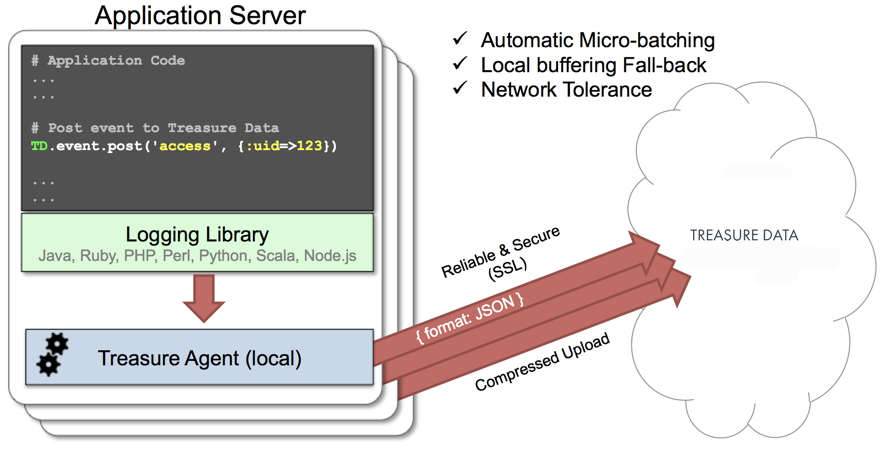
The [fluent-logger-python](http://github.com/fluent/fluent-logger-python) library enables Python applications to post records to their local Fluentd. Fluentd, in turn, uploads the data to the cloud every 5 minutes. Because the daemon runs on a local node, the logging latency is negligible.
## Fluentd (fluent-package) Install Options
td-agent was discontinued in December 2023 and has been replaced by **fluent-package**. The fluent-package is the official successor maintained by the [Cloud Native Computing Foundation](https://www.cncf.io/projects/). For migration guidance from td-agent, see [Fluentd Installation Guide](https://docs.fluentd.org/installation/install-fluent-package).
To install `fluent-package`, run one of the following commands based on your environment.
### RHEL/CentOS/Rocky Linux
```bash
# fluent-package 6 LTS (recommended)
curl -fsSL https://fluentd.cdn.cncf.io/sh/install-redhat-fluent-package6-lts.sh | sh
```
### Ubuntu
```bash
# Ubuntu 24.04 Noble - fluent-package 6 LTS
curl -fsSL https://fluentd.cdn.cncf.io/sh/install-ubuntu-noble-fluent-package6-lts.sh | sh
# Ubuntu 22.04 Jammy - fluent-package 6 LTS
curl -fsSL https://fluentd.cdn.cncf.io/sh/install-ubuntu-jammy-fluent-package6-lts.sh | sh
```
### Debian
```bash
# Debian Bookworm - fluent-package 6 LTS
curl -fsSL https://fluentd.cdn.cncf.io/sh/install-debian-bookworm-fluent-package6-lts.sh | sh
```
### Amazon Linux
```bash
# Amazon Linux 2023 - fluent-package 6 LTS
curl -fsSL https://fluentd.cdn.cncf.io/sh/install-amazon2023-fluent-package6-lts.sh | sh
```
### Windows
Download the MSI installer from:
- [fluent-package 6 LTS for Windows](https://fluentd.cdn.cncf.io/lts/6/windows/index.html)
After installation:
1. Edit the configuration file at `C:/opt/fluent/etc/fluent/fluentd.conf`
2. Start the service using `net start fluentdwinsvc` or via Services administrative tool
### macOS
fluent-package for macOS is planned to be available via Homebrew. For current installation options, see [Fluentd Installation Guide](https://docs.fluentd.org/installation).
## Starting the Service
After installation, start and verify the Fluentd service.
### Linux
```bash
sudo systemctl start fluentd.service
sudo systemctl status fluentd.service
```
The configuration file is located at `/etc/fluent/fluentd.conf`.
### Windows
```cmd
net start fluentdwinsvc
```
The configuration file is located at `C:\opt\fluent\etc\fluent\fluentd.conf`.
### macOS (gem installation)
```bash
fluentd -c /path/to/fluentd.conf
```
For more details, see the [Fluentd Documentation](https://docs.fluentd.org/).
## Modifying fluentd.conf
Specify your API key by setting the `apikey` option in your `/etc/fluent/fluentd.conf` file (for fluent-package). You can view your API key from the TD Console.
```conf
# Treasure Data Input and Output
@type forward
port 24224
@type tdlog
endpoint api.treasuredata.com
apikey YOUR_API_KEY
auto_create_table
use_ssl true
@type file
path /var/log/fluent/buffer/td
```
`YOUR_API_KEY` should be your actual apikey string. You can retrieve your API key from your profiles in TD Console. Using a [write-only API key](/products/my-settings/getting-your-api-keys) is recommended.
Restart the Fluentd service after the following lines are added.
```bash
# Linux
sudo systemctl restart fluentd.service
# macOS (gem installation)
# Restart the Fluentd process manually
```
Fluentd now accepts data via port 24224, buffers the data (`/var/log/fluent/buffer/td`), and automatically uploads the data into the cloud.
## Using fluent-logger-python
Install the fluent-logger library via pip.
```
$ pip install fluent-logger
```
Initialize and post the records as follows.
```
# Initialize
from fluent import sender
from fluent import event
sender.setup('td.test_db', host='localhost', port=24224)
event.Event('follow', {
'from': 'userA',
'to': 'userB'
})
```
## Confirm the Import
Execute the program.
```bash
$ python test.py
```
Sending a SIGUSR1 signal flushes Fluentd's buffer. Upload starts immediately.
```bash
# Linux
$ kill -USR1 $(cat /var/run/fluent/fluentd.pid)
# macOS (gem installation)
# Send SIGUSR1 to the Fluentd process
```
To confirm that your data has been uploaded successfully, issue the *td tables* command.
```
$ td tables
+------------+------------+------+-----------+
| Database | Table | Type | Count |
+------------+------------+------+-----------+
| test_db | follow | log | 1 |
+------------+------------+------+-----------+
```
## Production Deployments
### Use gunicorn, tornado or modwsgi
We recommend that you use [gunicorn](http://gunicorn.org/), [tornado](http://www.tornadoweb.org/) or [modwsgi](http://code.google.com/p/modwsgi/). Other setups have not been fully validated.
### High Availability Configurations of Fluentd
For high-traffic websites (more than 5 application nodes), use a high availability configuration of Fluentd to improve data transfer reliability and query performance.
- [High-Availability Configurations of Fluentd](/products/customer-data-platform/integration-hub/streaming/td-agent/configuring-td-agent-for-high-availability)
### Monitoring Fluentd
Monitoring Fluentd itself is also important. For general monitoring methods for Fluentd, see:
- [Monitoring Fluentd](/products/customer-data-platform/integration-hub/streaming/td-agent/monitoring-td-agent)
Fluentd is fully open-sourced under the [Fluentd project](http://fluentd.org/).