# Php Apps Import Integration
Treasure Data provides [td-agent](https://docs.treasuredata.com/smart/project-product-documentation/about-treasure-data-s-server-side-agent), to collect server-side logs and events, and to seamlessly import the data from PHP applications, through Treasure Agent.
# Prerequisites
- Basic knowledge of PHP.
- Basic knowledge of Treasure Data, including the [TD Toolbelt](https://toolbelt.treasuredata.com/).
- PHP 5.3 or higher (for local testing).
The fluent-logger-php library does not work in Heroku ([here's why](https://docs.treasuredata.com/smart/project-integrations/heroku-add-on-notes)).
# Installing td-agent
Install `td-agent`on your application servers. td-agent sits within your application servers, focusing on uploading application logs to the cloud.
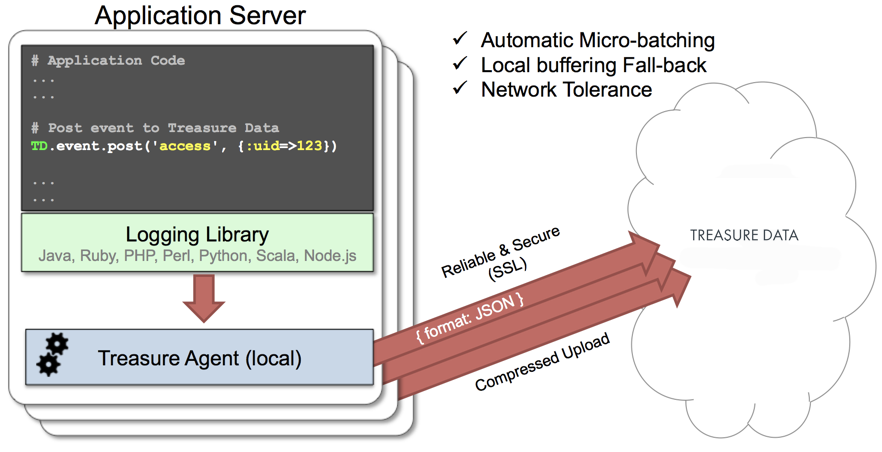
The [fluent-logger-php](http://github.com/fluent/fluent-logger-php) library enables PHP applications to post records to their local td-agent. td-agent, in turn, uploads the data to the cloud every 5 minutes. Because the daemon runs on a local node, the logging latency is negligible.
## td-agent Install Options
To install `td-agent`, run one of the following commands based on your environment. The agent program is installed automatically when you use the package management software for each platform like rpm/deb/dmg.
### RHEL/CentOS 5,6,7
```
$ curl -L https://toolbelt.treasuredata.com/sh/install-redhat-td-agent3.sh | sh
```
### Ubuntu and Debian
```
# 18.04 Bionic
$ curl -L https://toolbelt.treasuredata.com/sh/install-ubuntu-bionic-td-agent3.sh | sh
# 16.04 Xenial (64bit only)
$ curl -L https://toolbelt.treasuredata.com/sh/install-ubuntu-xenial-td-agent3.sh | sh
```
### Amazon Linux
You can choose Amazon Linux 1 or Amazon Linux 2. Refer to [Installing td-agent on AWS Linux](https://docs.treasuredata.com/smart/project-product-documentation/installing-td-agent-on-aws-linux).
### MacOS X 10.11+
```
$ open 'https://td-agent-package-browser.herokuapp.com/3/macosx/td-agent-3.1.1-0.dmg'
```
MacOS X 10.11.1 (El Capitan) introduces some security changes. After the td-agent is installed, edit the **/Library/LaunchDaemons/td-agent.plist** file to change **/usr/sbin/td-agent** to **/opt/td-agent/usr/sbin/td-agent**.
### Windows Server 2012+
The Windows installation requires the steps detailed in:
- [Installing Treasure Agent using .msi Installer (Windows)](https://docs.fluentd.org/installation/install-by-msi)
### Opscode Chef Repository
```
$ echo 'cookbook "td-agent"' >> Berksfile
$ berks install
```
[AWS Elastic Beanstalk](https://github.com/treasure-data/elastic-beanstalk-td-agent) is also supported. Windows is currently NOT supported.
## Modifying /etc/td-agent/td-agent.conf
Next, specify your API key by setting the `apikey` option. You can view your API key from your profile in the TD Console.
```conf
# Unix Domain Socket Input
type unix
path /var/run/td-agent/td-agent.sock
# Treasure Data Output
type tdlog
endpoint api.treasuredata.com
apikey YOUR_API_KEY
auto_create_table
buffer_type file
buffer_path /var/log/td-agent/buffer/td
use_ssl true
```
`YOUR_API_KEY` should be your actual apikey string. You can retrieve your API key from your profiles in TD Console. Using a [write-only API key](/products/my-settings/getting-your-api-keys) is recommended.
Restart your agent when the following lines are in place.
```
# Linux
$ sudo /etc/init.d/td-agent restart
# MacOS X
$ sudo launchctl unload /Library/LaunchDaemons/td-agent.plist
$ sudo launchctl load /Library/LaunchDaemons/td-agent.plist
```
td-agent now accepts data via port 24224, buffers the data (*var/log/td-agent/buffer/td*), and automatically uploads the data into the cloud.
## Using fluent-logger-php
To use fluent-logger-php, use [Composer](https://getcomposer.org/) as a package manager. First, create `composer.json` in your directory with the following content.
```
{
"require": {
"fluent/logger": "v1.0.0"
}
}
```
Then, install `Composer` and install necessary libraries.
```
$ curl -sS https://getcomposer.org/installer | php
$ php composer.phar install
```
Next, initialize and post the records as follows.
```
post("td.test_db.test_table", array("hello"=>"world"));
$logger->post("td.test_db.follow", array("from"=>"userA", "to"=>"userB"));
```
## Confirming Data Import
Execute the preceding program.
```
$ php test.php
```
Sending a SIGUSR1 signal flushes td-agent’s buffer. The upload starts immediately.
```
# Linux
$ kill -USR1 `cat /var/run/td-agent/td-agent.pid`
# MacOS X
$ sudo kill -USR1 `sudo launchctl list | grep td-agent | cut -f 1`
```
To confirm that your data has been uploaded successfully, issue the *td tables* command as follows:
```
$ td tables
+------------+------------+------+-----------+
| Database | Table | Type | Count |
+------------+------------+------+-----------+
| test_db | test_table | log | 1 |
| test_db | follow | log | 1 |
+------------+------------+------+-----------+
```
The first argument of post() determines the database name and table name. If you specify `td.test\_db.test\_table`, the data is imported into the table *test_table* within the database *test_db*. They are automatically created at upload time.
# Tips on Production Deployment
## Use Apache and mod_php
We recommend that you use Apache and mod_php. Other setups have not been fully validated.
## Use Apache prefork MPM
Use Apache prefork MPM. Other MPMs such as worker MPM should not be used. You can confirm your current settings with the *apachectl -V* command.
```
$ apachectl -V | grep MPM:
Server MPM: Prefork
```
## Set MaxRequestsPerChild
We recommend that you periodically restart your PHP processes by setting *MaxRequestsPerChild* in your Apache conf.
```conf
StartServers 32
MinSpareServers 32
MaxSpareServers 32
MaxClients 32
MaxRequestsPerChild 4096
```
Do not set MaxRequestsPerChild to zero.
# Production Deployments
## High-Availability Configurations of td-agent
For high-traffic websites (more than 5 application nodes), use a high availability configuration of td-agent to improve data transfer reliability and query performance.
- [High-Availability Configurations of td-agent](https://docs.treasuredata.com/smart/project-product-documentation/configuring-td-agent-for-high-availability)
## Monitoring td-agent
Monitoring td-agent itself is also important. Refer to this document for general monitoring methods for td-agent:
- [Monitoring td-agent](https://docs.treasuredata.com/smart/project-product-documentation/monitoring-td-agent)
td-agent is fully open-sourced under the [Fluentd project](http://fluentd.org/).
# FAQs
## “Resource temporarily unavailable” warning message appears in my PHP application
This problem occurs when you have either a relatively high volume, or an old Linux kernel version. You must tune up the Linux kernel a little bit.
### Increase Max # of File Descriptors
First, increase the max number of file descriptors per process. When you type `ulimit -n` command and the result shows `1024`, complete the follow instructions to increase to 65535:
- [Increase Max # of File Descriptors](https://docs.fluentd.org/installation/before-install)
### Optimize Kernel Parameters
Add the following parameters to your `/etc/sysctl.conf` file. Either type `sysctl -w` or reboot your node to have the changes take effect. You need a root permission.
```
net.core.somaxconn = 1024
net.ipv4.tcp_tw_reuse = 1
net.ipv4.ip_local_port_range = 10240 65535
```
# Next Steps
We offer a schema mechanism that is more flexible than that of traditional RDBMSs. For queries, we leverage the Hive and Presto Query Languages.
- [Schema Management](https://docs.treasuredata.com/smart/project-product-documentation/schema-management)
- [Presto Query Language](https://api-docs.treasuredata.com/en/tools/presto/quickstart/#choosing-an-analytics-engine)
- [Hive Query Language](https://api-docs.treasuredata.com/en/tools/hive/quickstart/)
- [Programmatic Access with REST API and its Bindings](https://api-docs.treasuredata.com/en/api/td-api/td-client/)