# Logstash Import Integration
[Logstash](https://www.elastic.co/products/logstash) is an open source software for log management and widely used as a part of the ELK stack.
Many plugins exist for Logstash to collect, filter, and store data from many sources, and into many destinations. You can ingest data from Logstash into Treasure Data by creating a Treasure Data plugin.
## Install and Configure the Treasure Data Logstash Plugin
You can install the Treasure Data plugin for Logstash. The following example assumes that you already have Logstash installed and configured.
```bash
$ cd /path/of/logstash
$ bin/plugin install logstash-output-treasure_data
Validating logstash-output-treasure_data
Installing logstash-output-treasure_data
Installation successful
```
Configure Logstash with Treasure Data services. You must provide the name of a database and table into which your Logdash data is imported. You can retrieve your API key from your profile in TD Console. Use your write-only key.
```conf
input {
# ...
}
output {
treasure_data {
apikey => "xxxxxxxxxxxxxxxxxxxxxxxxxxxxxxx"
database => "dbname"
table => "tablename"
endpoint => "api-import.treasuredata.com"
}
}
```
Launch Logstash with the configuration file.
```bash
$ bin/logstash -f your.conf
```
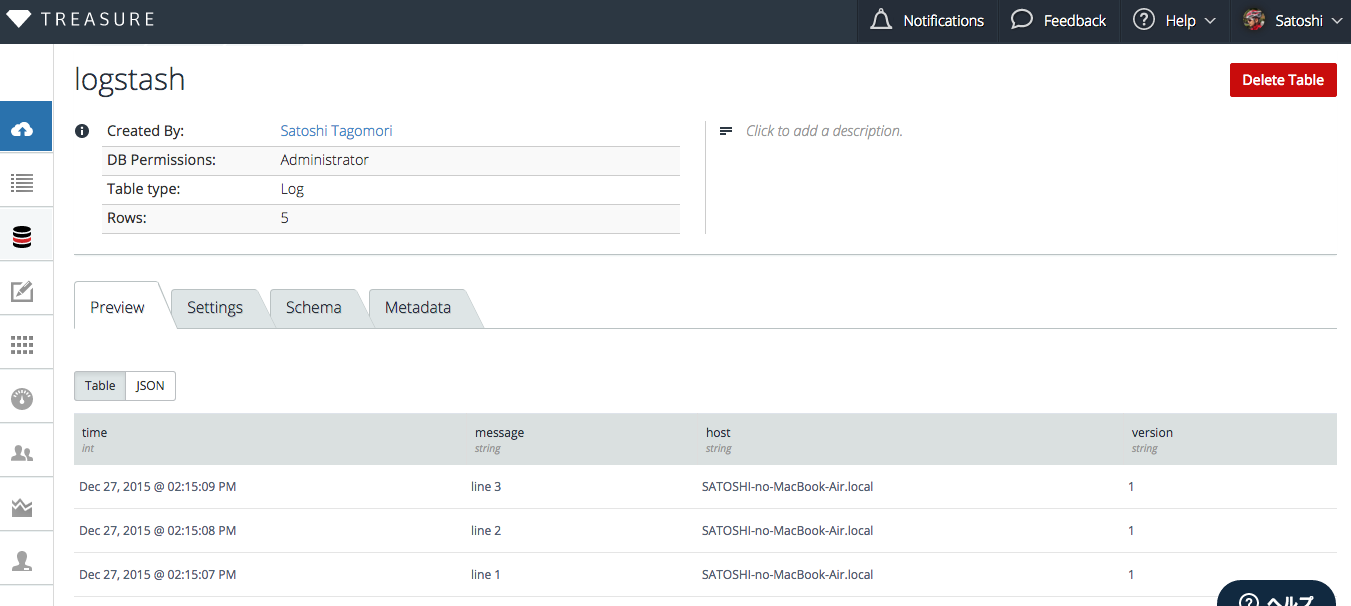
You can see rows of your data in TD Console. Log message texts are stored in message column, and some additional columns will exist (for example: time, host and version).
## Parameters
Logs are stored in a table. Create 2 or more sections in your configuration file if you want to insert data into 2 or more tables.
In your Logstash configuration, you can specify the following options:
- apikey (required)
- database (required)
- table (required)
- auto_create_table [true]: creates a table if table doesn’t exists
- endpoint [[api.treasuredata.com](http://api.treasuredata.com)]
- use_ssl [true]
- http_proxy [none]
- connect_timeout [60s]
- read_timeout [600s]
- send_timeout [600s]
The plugin work with default values for almost all cases, but some of the parameters might help you in unstable network environments.
This plugin buffers data in memory buffer in 5 minutes at most. Buffered data is lost if the Logstash process crashes. To avoid losing your data during import, we recommend to use td-agent with your Logstash plugin.
## The Logstash Plugin in Combination with td-agent
The Logstash plugin is limited in the areas of buffering, stored table specifications, and performance.
You can use Treasure Agent ([td-agent](https://docs.treasuredata.com/smart/project-product-documentation/about-treasure-data-s-server-side-agent)) for more flexible and high performance transferring of data. You use logstash-output-fluentd to do it.
```
[host a]
-> (logstash-output-fluentd) -+
[host b] |
-> (logstash-output-fluentd) -+- [Treasure Agent] -> [Treasure Data]
[host c] |
-> (logstash-output-fluentd) -+
```
Logstash can be configured to send the logs to a td-agent node, and that td-agent stores all the data into Treasure Data.
```conf
# Configuration for Logastash
input {
# ...
}
output {
fluentd {
host => "your.host.name.example.com"
port => 24224 # default
tag => "td.database.tablename"
}
}
# Configuration for Fluentd
@type forward
port 24224
type tdlog
endpoint api-import.treasuredata.com
apikey YOUR_API_KEY
auto_create_table
buffer_type file
buffer_path /var/log/td-agent/buffer/td
use_ssl true
num_threads 8
```
The Fluentd tdlog plugin can store data into many database-table combinations by parsing td.dbname.tablename. You can configure any database and table pairs in Logstash configuration files.
## More Information
- [github.com/tagomoris/logstash-output-treasure_data](https://github.com/tagomoris/logstash-output-treasure_data)
- [github.com/tagomoris/logstash-output-fluentd](https://github.com/tagomoris/logstash-output-fluentd)